Participant
May 24, 2022
Question

Script Error opening a pdf file in Acrobat Reader Pro

  • May 24, 2022
  • 3 replies
  • 3013 views

Good day all,

I am having a problem opening a PDF with Acrobat Reader PRO.

When I select a file to read I get the follow scrip error
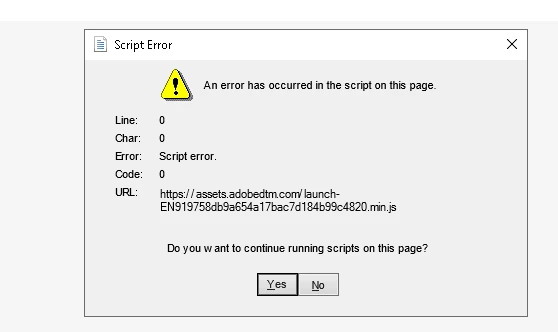
Any suggestions?

 

This topic has been closed for replies.

3 replies

Participant
September 23, 2022

Hi Gary im getting the same issue did you manage to resolve it, very annoying 😞


Legend
September 24, 2022

Darren please list the exact steps you use to open this file. Also share a sample file (with no personal or private info). 

Legend
May 24, 2022

There is no product Acrobat Reader Pro. There is Acrobat Pro. And there is Acrobat Reader. Two different products.

Also, this message looks as if it comes from a browser., not from Adobe apps Please describe your exact steps to open the file.

Participant
May 24, 2022

You are correct.  I tried to make my own hybrid application.  LOL

This error hapens wirh Adobe Acrobat Pro

Amal.
Community Manager
Community Manager
May 25, 2022

Hi there


We are sorry to hear that. Please share the steps you are doing to open the PDF file. A small video recording of the same would be very helpful. Also please share the sample PDF file so that we can check it at our end.


Regards

Amal

Amal.
Community Manager
Community Manager
May 24, 2022

Hi there


Hope you are doing well and sorry to hear that.


Is this an issue with a particular PDF file or with all the PDF that you try to open?  Please try with a different PDF file and check.  If it's a file-specific issue, please share the file with us for testing?


Also make sure you have the recent version of the application installed. Go to Help > Check for updates and reboot the computer once.


Regards

Amal

Participant
May 24, 2022

This happens with all PDF files