


Participant
October 12, 2022
Answered

SCRIPT ERROR SIGN-IN

  • October 12, 2022
  • 3 replies
  • 2801 views

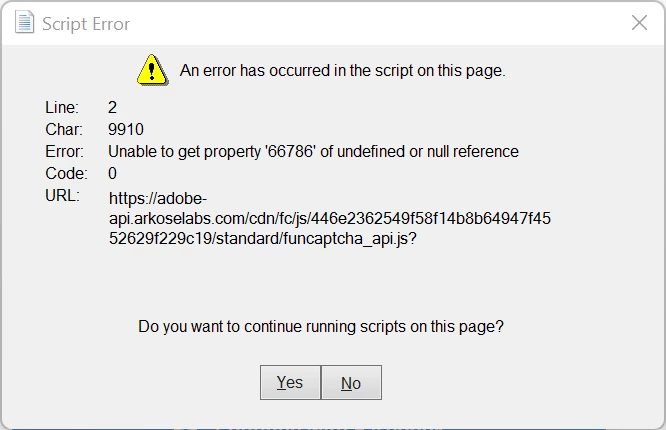
Every time I launch the app I get the following error (see attached image below). Once the error occurs, I'm unable to exit or close the error. I have to launch task manager every time to force quit. I also uninstalled and reinstalled the app several times, but it did not fix the error/issue. Please help!
This topic has been closed for replies.
Correct answer ankit_sharma17144863

Hi @Sahar26551701t557 ,

The issue has been fixed.  Can you please try now and let us know if you are still facing the issue.


Thanks,

Ankit

3 replies

Adobe Employee
October 14, 2022

Hi @Sahar26551701t557 ,

Please follow below steps to resolve the error:

- Create dword 'iAcroLoginType' = 5 (decimal) at below registry location:

'Computer\HKEY_LOCAL_MACHINE\SOFTWARE\Policies\Adobe\Adobe Acrobat\DC\FeatureLockDown'

Please let us know if this resolves the issue.


Thanks,

Ankit

Participant
October 13, 2022

I am having the same issue. Every time I open the app, it asks me to log in. I enter my email but when it asks for my password, this message pops up. No matter what I do (click yes, click no, click exit) the message will not go away. I have to open my task manager to close the app. 


Side note - my account only allows for 2 computers/laptops to be signed in simultaneously. I had deactivated 1 of my 2 devices to activate a 3rd device. The device that I did not deactivate is the one I am having trouble with. 

ankit_sharma17144863Correct answer
Adobe Employee
October 14, 2022

Hi @Sahar26551701t557 ,

The issue has been fixed.  Can you please try now and let us know if you are still facing the issue.


Thanks,

Ankit

Participant
October 14, 2022

Works for me now! Thank you so much!

Meenakshi Negi
Community Manager
Community Manager
October 12, 2022

Hi Sahar26551701t557,


Thank you for reaching out.


Would you mind sharing more details about this issue?

- Did you start receiving this error recently?

- Share the steps that pop-ups the error message.

- Share the current Acrobat and OS versions on the machine.


Thanks,

Meenakshi