Participant
January 20, 2018
Answered

Security (Enhanced) Page Not Responding

  • January 20, 2018
  • 1 reply
  • 1518 views

How do I access my security settings? The page is not responding.

This topic has been closed for replies.
Correct answer Adorobat

Of course.

CC2500


Would it be possible if you can share the screenshot of the options available to you on the downloads page? You may follow the steps given in this link on how to attach a screenshot here in the forums: https://forums.adobe.com/docs/DOC-7043#jive_content_id_How_do_I_attach_a_screenshot

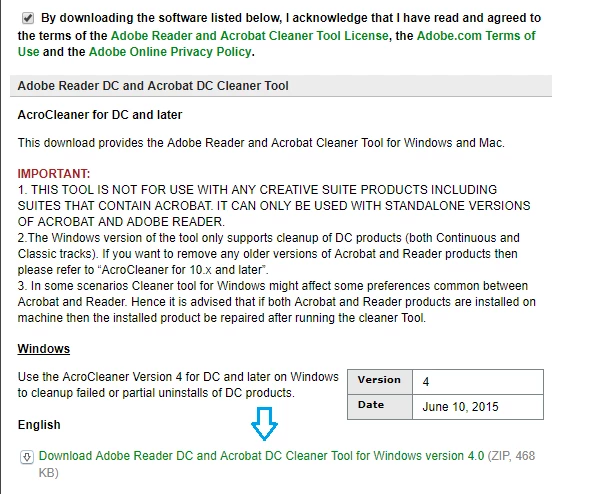
Below is a screenshot of the cleaner tool available for Windows OS:
Thanks,

Shivam

1 reply

Adorobat
Community Manager
Community Manager
February 8, 2018

Hi Carolc,

Sorry for the delay in response.

Are you still experiencing this issue? If yes, please try repairing Reader by clicking "repair installation" under Help menu, reboot the machine after repair and try again. If repair option doesn't work from Help menu, navigate to Programs and Features (for Windows machines) > locate Acrobat Reader DC > right-click > change > repair installation.

Also, let us know the application installed on the machine- Adobe Reader/ Adobe Acrobat?

Which operating system running on the machine?

You may also try the suggestion provided in the thread given below:

Can't access preferences in Adobe Acrobat DC

Thanks,

Shivam

Participant
February 13, 2018

Thanks for the reply, but it didn't help at all. I'm running windows 7 with

the latest Reader DC. No other Acrobat programs are installed. No pdf files

are open. I followed your repair suggestion and rebooted, but I still

cannot access the enhanced security preference. The screen locks and says

it's not responding. Is there some file that needs to be uninstalled that

wasn't when I switched to Reader DC from the old Acrobat program? Where do

I look for it?

Thanks,

CC2500

Adorobat
Community Manager
AdorobatCommunity ManagerCorrect answer
Community Manager
February 14, 2018

Of course.

CC2500


Would it be possible if you can share the screenshot of the options available to you on the downloads page? You may follow the steps given in this link on how to attach a screenshot here in the forums: https://forums.adobe.com/docs/DOC-7043#jive_content_id_How_do_I_attach_a_screenshot

Below is a screenshot of the cleaner tool available for Windows OS:

Thanks,

Shivam