
February 4, 2019
Question

Send PDF as email-attachment: Name of attached file

  • February 4, 2019
  • 1 reply
  • 1573 views

Hello

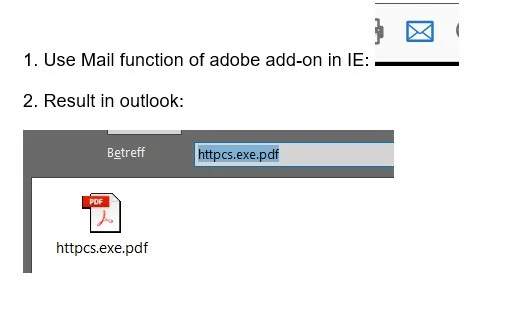
we open an invoice original (which is a pdf-file). The PDF is opened in internet explorer add-on for adobe reader (Version 17.8.30051.224877). Within the add-on, we use the function to attach the PDF as an attachment to an outlook email. Unfortunately, the PDF-attachment of the outlook-mail is created with a very strange file name which contains the string "exe": "httpcs.exe.pdf ".

"Exe" leads sometimes to trouble with firewalls or anti-virus programs.

Is there somehow the possibility to influence the name of the PDF-file which is attached to the outlook-mail so that we get rid of the "exe"-string?
Thanks and best regards

Kai

    This topic has been closed for replies.

    1 reply

    Community Expert
    February 4, 2019

    Why open in IE Explorer?

    The Acrobat Reader application is free and viewing PDFs in the native reader is advised. 3rd party apps like IE addons for PDFs do not use all modules for PDF that are available.


    Skip IE Explorer and all 3rd Party Apps and open directly in the free Adobe Reader.

    Adobe Acrobat Reader DC Install for all versions

    • Click Send As Attachment.

    • In the Send As Attachment section, do one of the following:
      • Choose Default Email Application, and click Continue.
      • Choose Webmail. In the Select Option drop-down list, choose one of the following:
        • Add Gmail: Enter your email address, and click Continue. Enter the password, and grant permissions when prompted.
        • Add other: Enter your email address, password, and IMAP/SMTP mail server settings. Click Add.

    February 11, 2019

    Hello Eugene

    thanks for your answer. It is a central decission of our company to use the Adobe add-on in IE.

    So I guess there is no possibility to change the attachment naming ??

    Best regards

    Kai

    Community Expert
    February 11, 2019

    Your company has centrally made an incorrect decision.

    They should move to the free Adobe Reader method.

    As IE plugin is 3rd party - I cannot help - maybe check with the plugin manufacturer, or Microsoft themselves.