Participant
December 2, 2024
Answered

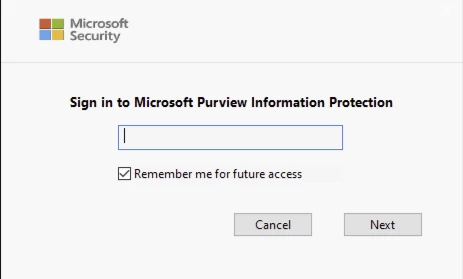
Signing into Microsoft Purview Information Protection does not save credentials

  • December 2, 2024
  • 1 reply
  • 2067 views

Has anyone had this issue and was able to resolve it? Everytime the user opens Acrobat it requires them to sign into Microsoft Purview. Selecting "Remember me for future access" does not stick. 


Correct answer AnandSri

Hello!


I hope you are doing well, and we apologize for the delayed response and the trouble.


Try the following steps, and let us know how it goes: 


Clear and Reconfigure MPIP Credentials in Acrobat

Sometimes Acrobat stores corrupted or incomplete credentials. To reset:

  • Open Acrobat
  • Go to Preferences > Security > Microsoft Purview Information Protection
  • Click “Clear remembered account information.”
  • Restart Acrobat and sign in again

This step ensures that Acrobat resets its internal token cache. See this community discussion for more information: https://adobe.ly/4l8VlIX


Disable Browser-Based Authentication (If Applicable)

If Acrobat is using browser-based authentication (which is common in enterprise environments), it may not persist credentials across sessions. Adobe recommends disabling this mode if persistent login is needed:

  • Follow the steps in this Adobe guide: https://adobe.ly/3TrRuuO
  • This involves registry edits (Windows) or plist changes (macOS) to force Acrobat to use native authentication


Ensure Registry or Plist Settings Are Correct

For Windows:

  • Open regedit
  • Navigate to: HKEY_CURRENT_USER\SOFTWARE\Adobe\Adobe Acrobat\DC\MicrosoftAIP
  • Ensure bShowDMB is set to 1


For macOS:

  • Use Terminal to run:
    sudo /usr/libexec/PlistBuddy -c "Add :DC:MicrosoftAIP:ShowDMB array" ~/Library/Preferences/com.adobe.acrobat.pro.plist
    sudo /usr/libexec/PlistBuddy -c "Add :DC:MicrosoftAIP:ShowDMB:item1 bool true" ~/Library/Preferences/com.adobe.acrobat.pro.plist
    sudo /usr/libexec/PlistBuddy -c "Add :DC:MicrosoftAIP:ShowDMB:item0 integer 0" ~/Library/Preferences/com.adobe.acrobat.pro.plist

These settings help Acrobat retain MPIP-related preferences and improve session persistence.


This issue may occur in environments using sensitivity labels with encryption, which require stricter token validation. If you're using Microsoft Sovereign Cloud or Double Key Encryption, additional setup steps may be required


I hope this helps.

Thanks,

Anand Sri.
1 reply

Participant
April 28, 2025

Hello, Were you able to resolve this?

AnandSri
AnandSriCorrect answer
Legend
June 18, 2025

Hello!


I hope you are doing well, and we apologize for the delayed response and the trouble.


Try the following steps, and let us know how it goes: 


Clear and Reconfigure MPIP Credentials in Acrobat

Sometimes Acrobat stores corrupted or incomplete credentials. To reset:

  • Open Acrobat
  • Go to Preferences > Security > Microsoft Purview Information Protection
  • Click “Clear remembered account information.”
  • Restart Acrobat and sign in again

This step ensures that Acrobat resets its internal token cache. See this community discussion for more information: https://adobe.ly/4l8VlIX


Disable Browser-Based Authentication (If Applicable)

If Acrobat is using browser-based authentication (which is common in enterprise environments), it may not persist credentials across sessions. Adobe recommends disabling this mode if persistent login is needed:

  • Follow the steps in this Adobe guide: https://adobe.ly/3TrRuuO
  • This involves registry edits (Windows) or plist changes (macOS) to force Acrobat to use native authentication


Ensure Registry or Plist Settings Are Correct

For Windows:

  • Open regedit
  • Navigate to: HKEY_CURRENT_USER\SOFTWARE\Adobe\Adobe Acrobat\DC\MicrosoftAIP
  • Ensure bShowDMB is set to 1


For macOS:

  • Use Terminal to run:
    sudo /usr/libexec/PlistBuddy -c "Add :DC:MicrosoftAIP:ShowDMB array" ~/Library/Preferences/com.adobe.acrobat.pro.plist
    sudo /usr/libexec/PlistBuddy -c "Add :DC:MicrosoftAIP:ShowDMB:item1 bool true" ~/Library/Preferences/com.adobe.acrobat.pro.plist
    sudo /usr/libexec/PlistBuddy -c "Add :DC:MicrosoftAIP:ShowDMB:item0 integer 0" ~/Library/Preferences/com.adobe.acrobat.pro.plist

These settings help Acrobat retain MPIP-related preferences and improve session persistence.


This issue may occur in environments using sensitivity labels with encryption, which require stricter token validation. If you're using Microsoft Sovereign Cloud or Double Key Encryption, additional setup steps may be required


I hope this helps.

Thanks,

Anand Sri.

AnandSri
Legend
November 11, 2025
I don't understand what this is

Hello @authentic_Sunrise9487, and @David38672639d05p


I hope you are doing well.


Could you please verify if this issue persists with the latest builds of Acrobat Reader, version 25.001.20844 for Windows and 25.001.20841 for Mac, released on November 3, 2025? 

Enable Keychain Access for Adobe Reader

Open System Settings > Privacy & Security > Full Disk Access.
Add Adobe Reader to the list.
Restart Reader and sign in again.
This ensures the Reader can store tokens securely in macOS Keychain.


Check Purview Extension Settings

In Reader, go to Preferences > Security (Enhanced).
Confirm Enable Protected Mode at startup is ON (required for MPIP).
Under Microsoft Purview, ensure that 'Allow persistent sign-in' is enabled.


Reset Adobe Identity Cache

Quit Reader.
Delete the identity cache folder:
~/Library/Application Support/Adobe/Acrobat/DC/Identity


Relaunch Reader and sign in again.


Verify MPIP Plugin Version

Ensure the Purview extension is the latest version.
If outdated, reinstall via Adobe Enterprise Installer or contact IT for the latest package.


I hope this helps, and let us know how it goes.

Thanks,

Anand Sri.
