Participant
December 2, 2024
Answered

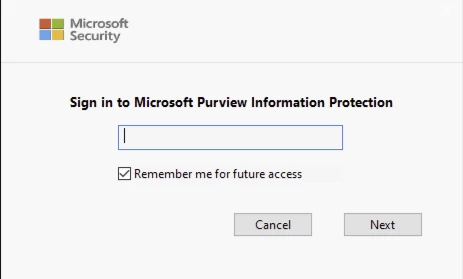
Signing into Microsoft Purview Information Protection does not save credentials

  • December 2, 2024
  • 1 reply
  • 2067 views

Has anyone had this issue and was able to resolve it? Everytime the user opens Acrobat it requires them to sign into Microsoft Purview. Selecting "Remember me for future access" does not stick. 


Correct answer AnandSri

Hello!


I hope you are doing well, and we apologize for the delayed response and the trouble.


Try the following steps, and let us know how it goes: 


Clear and Reconfigure MPIP Credentials in Acrobat

Sometimes Acrobat stores corrupted or incomplete credentials. To reset:

  • Open Acrobat
  • Go to Preferences > Security > Microsoft Purview Information Protection
  • Click “Clear remembered account information.”
  • Restart Acrobat and sign in again

This step ensures that Acrobat resets its internal token cache. See this community discussion for more information: https://adobe.ly/4l8VlIX


Disable Browser-Based Authentication (If Applicable)

If Acrobat is using browser-based authentication (which is common in enterprise environments), it may not persist credentials across sessions. Adobe recommends disabling this mode if persistent login is needed:

  • Follow the steps in this Adobe guide: https://adobe.ly/3TrRuuO
  • This involves registry edits (Windows) or plist changes (macOS) to force Acrobat to use native authentication


Ensure Registry or Plist Settings Are Correct

For Windows:

  • Open regedit
  • Navigate to: HKEY_CURRENT_USER\SOFTWARE\Adobe\Adobe Acrobat\DC\MicrosoftAIP
  • Ensure bShowDMB is set to 1


For macOS:

  • Use Terminal to run:
    sudo /usr/libexec/PlistBuddy -c "Add :DC:MicrosoftAIP:ShowDMB array" ~/Library/Preferences/com.adobe.acrobat.pro.plist
    sudo /usr/libexec/PlistBuddy -c "Add :DC:MicrosoftAIP:ShowDMB:item1 bool true" ~/Library/Preferences/com.adobe.acrobat.pro.plist
    sudo /usr/libexec/PlistBuddy -c "Add :DC:MicrosoftAIP:ShowDMB:item0 integer 0" ~/Library/Preferences/com.adobe.acrobat.pro.plist

These settings help Acrobat retain MPIP-related preferences and improve session persistence.


This issue may occur in environments using sensitivity labels with encryption, which require stricter token validation. If you're using Microsoft Sovereign Cloud or Double Key Encryption, additional setup steps may be required


I hope this helps.

Thanks,

Anand Sri.
1 reply

Participant
April 28, 2025

Hello, Were you able to resolve this?

AnandSri
AnandSriCorrect answer
Legend
June 18, 2025

Hello!


I hope you are doing well, and we apologize for the delayed response and the trouble.


Try the following steps, and let us know how it goes: 


Clear and Reconfigure MPIP Credentials in Acrobat

Sometimes Acrobat stores corrupted or incomplete credentials. To reset:

  • Open Acrobat
  • Go to Preferences > Security > Microsoft Purview Information Protection
  • Click “Clear remembered account information.”
  • Restart Acrobat and sign in again

This step ensures that Acrobat resets its internal token cache. See this community discussion for more information: https://adobe.ly/4l8VlIX


Disable Browser-Based Authentication (If Applicable)

If Acrobat is using browser-based authentication (which is common in enterprise environments), it may not persist credentials across sessions. Adobe recommends disabling this mode if persistent login is needed:

  • Follow the steps in this Adobe guide: https://adobe.ly/3TrRuuO
  • This involves registry edits (Windows) or plist changes (macOS) to force Acrobat to use native authentication


Ensure Registry or Plist Settings Are Correct

For Windows:

  • Open regedit
  • Navigate to: HKEY_CURRENT_USER\SOFTWARE\Adobe\Adobe Acrobat\DC\MicrosoftAIP
  • Ensure bShowDMB is set to 1


For macOS:

  • Use Terminal to run:
    sudo /usr/libexec/PlistBuddy -c "Add :DC:MicrosoftAIP:ShowDMB array" ~/Library/Preferences/com.adobe.acrobat.pro.plist
    sudo /usr/libexec/PlistBuddy -c "Add :DC:MicrosoftAIP:ShowDMB:item1 bool true" ~/Library/Preferences/com.adobe.acrobat.pro.plist
    sudo /usr/libexec/PlistBuddy -c "Add :DC:MicrosoftAIP:ShowDMB:item0 integer 0" ~/Library/Preferences/com.adobe.acrobat.pro.plist

These settings help Acrobat retain MPIP-related preferences and improve session persistence.


This issue may occur in environments using sensitivity labels with encryption, which require stricter token validation. If you're using Microsoft Sovereign Cloud or Double Key Encryption, additional setup steps may be required


I hope this helps.

Thanks,

Anand Sri.

AnandSri
Legend
November 18, 2025

Unfortunately, this did not work. I updated Reader for MacOS to the latest version and granted Full Disk access and am still getting prompted to login to the MS Purview Information Protection plugin everytime I open a PDF with a label. I was not able to clear the identity cache like you suggested as the full path you provided did not exist.  I had a path to ~/Library/Application Support/Adobe/Acrobat/DC but the "Identity" folder did not exist.


Hello @authentic_Sunrise9487


Thank you for sharing the details. Please install the latest build once: 25.001.20918 Planned update, Nov 13, 2025, and see if the issue continues. If the issue persists, please collect the logs from the affected machine and share them with us for further investigation. To collect the logs, download and run the Log Collector tool. Ensure that you select all log options and attempt to reproduce the issue. After that, close the Log Collector tool; it will generate the logs along with a log ID. Please share this log ID with us.


Regards,

Anand Sri.
