
Participant
October 13, 2022
Question

Since upgrading to Windows 11 22H2 Adobe has stopped working

  • October 13, 2022
  • 1 reply
  • 3910 views

So Adobe Reader has always worked fine on my system but sisnce upgrading to 22H2 it has stopped working, Doing a repair would sort it out so that I can open a document however once closing Adobe i couldnt open it until doing a repair, even a reboot wouldnt work. Finaly I did a full uninstall and reinstall and the resolved the issue for about a week, however the issue has some back. We are starting the testing of migrating our enviroment to Windows 11 and seeing the same behavior on all the upgrded system +- 15 now. The processes are in Task manager however Adobe doesnt start up. 
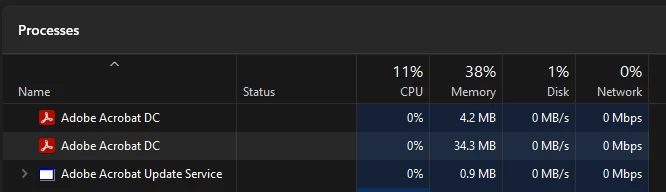
Running V 22.002.20212

Is anyone else experiancing this? 

If so how did you fix this? 


This topic has been closed for replies.

1 reply

Participant
October 27, 2022

I am running Acrobat Pro DC and am having the same issue. Any resolution would be very helpful

AkanchhaS8194121
Legend
October 28, 2022

Hi @Nicholas26573636muwo @chriss468969 


Thanks for reporting this to us. 

As seen in the image above, Acrobat shows the processes running in the background. However not launch on screen. 

We could try a couple of things to see if that helps. 

1- Once, close the background processes from the task manager>Reboot computer> and then Launch Acrobat.

2- Change the following security settings from Acrobat's preferences.

Navigate to Acrobat/Reader>Edit>Preferences>Security (Enhanced)>disable "Protected Mode at Startup", "Protected View" and "Enhanced Security">OK>close and reopen Acrobat/Reader

Note: these changes are only for testing purposes. Once tested, please change it back to the previous setting. 

3- If step-1 and 2 doesn't help, then 

Run this cleaner tool to remove the existing installer and application’s files traces:

https://www.adobe.com/devnet-docs/acrobatetk/tools/Labs/cleaner.html

Download the Acrobat installer from here:

https://helpx.adobe.com/acrobat/kb/acrobat-dc-downloads.html

Download the Acrobat Reader DC installer from here:

https://get.adobe.com/reader/enterprise/


Let us know the result.


Thanks,

Akanchha 

Participant
November 3, 2022

Good Day.

So upgrading to the .63 release seemed to sort out most issue except when opening a password protected document. 

Since yesterday the issue has returned in the it crashes in about 10s, just get a not responding. 

Even when just opening the app and not a document 

In Task manager it just sit here until you end Adobe


I am unable to upload the DMP file. 

thanks