
Participant
November 30, 2017
Question

Store and share files in the Document Cloud not getting Disabled.

  • November 30, 2017
  • 2 replies
  • 2867 views

I have tried disabling 'Store and share files in the Document Cloud' but is not getting disabled.

I have added a registry key :

[HKEY_LOCAL_MACHINE\SOFTWARE\Policies\Adobe\Acrobat Reader\DC\FeatureLockDown\cServices]

"bToggleAdobeDocumentServices"=dword:00000001

But it is still there
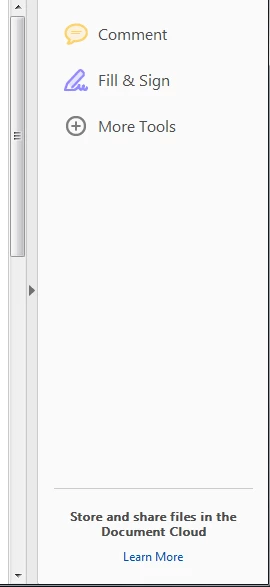
Please help me with the same.

This topic has been closed for replies.

2 replies

AnandSri
Community Manager
Community Manager
December 1, 2017

Thank  you Ankush for the details. I have sent you a private message, please check your email inbox.

- Anand Sri.

ContreBombarde64
Participant
December 7, 2017

Could you describe your solution for others here? I'm having the same problem.

Participant
December 7, 2017

Hello ryanhelmer,

I have implemented one more solution for this problem :

The solution is to edit the XML file present at path  "C:\Program Files (x86)\Adobe\Acrobat Reader DC\Reader\AcroApp\ENU\Viewer.aapp" to contain only :

<Application xmlns="http://ns.adobe.com/acrobat/app/2014" title="Viewer" id="Viewer" majorVersion="1" requiresDoc="true" minorVersion="0">

</Application> 

This will result in the Tools Pane being hidden by default, but  without the loss of functionality (and potential crashes).

Also rather than removing the tags from inside the file you can also make a new folder inside and paste the Viewer file there.

One more alternative is to comment the content of the file.

This will works the same.

Please try it at your end probably it will be helpful for you.

Regards,

Ankush Chandel

AnandSri
Community Manager
Community Manager
November 30, 2017

Hello ankushc55552433

As per the description above, you want to disable the Online Services/features in Adobe Reader, Is that correct?

Please refer and try the steps from the following KB doc Disable online services/features in Acrobat Reader DC?

Online features — Acrobat Customization Wizard DC for Windows

Hope this helps, and let us know how it goes.

Regards,

Anand Sri.

Participant
December 1, 2017

Thanks AnandSri,

I have tried this solution but this is not working.

I have mentioned the same in my question.