
Beachcolonist
Inspiring
January 16, 2021
Answered

Thanks Adobe, for installing putrid McAfee on my PC without my permission!

  • January 16, 2021
  • 5 replies
  • 15016 views

Acrobat Reader was running poorly (spinning wheel), so I decided to reinstall it from their site. No problem right because I am a loyal Cloud customer and we can trust Adobe! Wrong.


The devious installer put "McAfee Safe Connect" GARBAGE software on my Win10 PC, without my permission. It is a god awful experience trying to get rid of it and I have not done so yet.


McAfee are complete LIARS, their advertised uninstall via Windows usual methods is BS that just removes the reference to the name of the program from a list. Wtf Adobe are you not making enough $$ that you have to screw with long time Cloud subscribers??
Correct answer try67

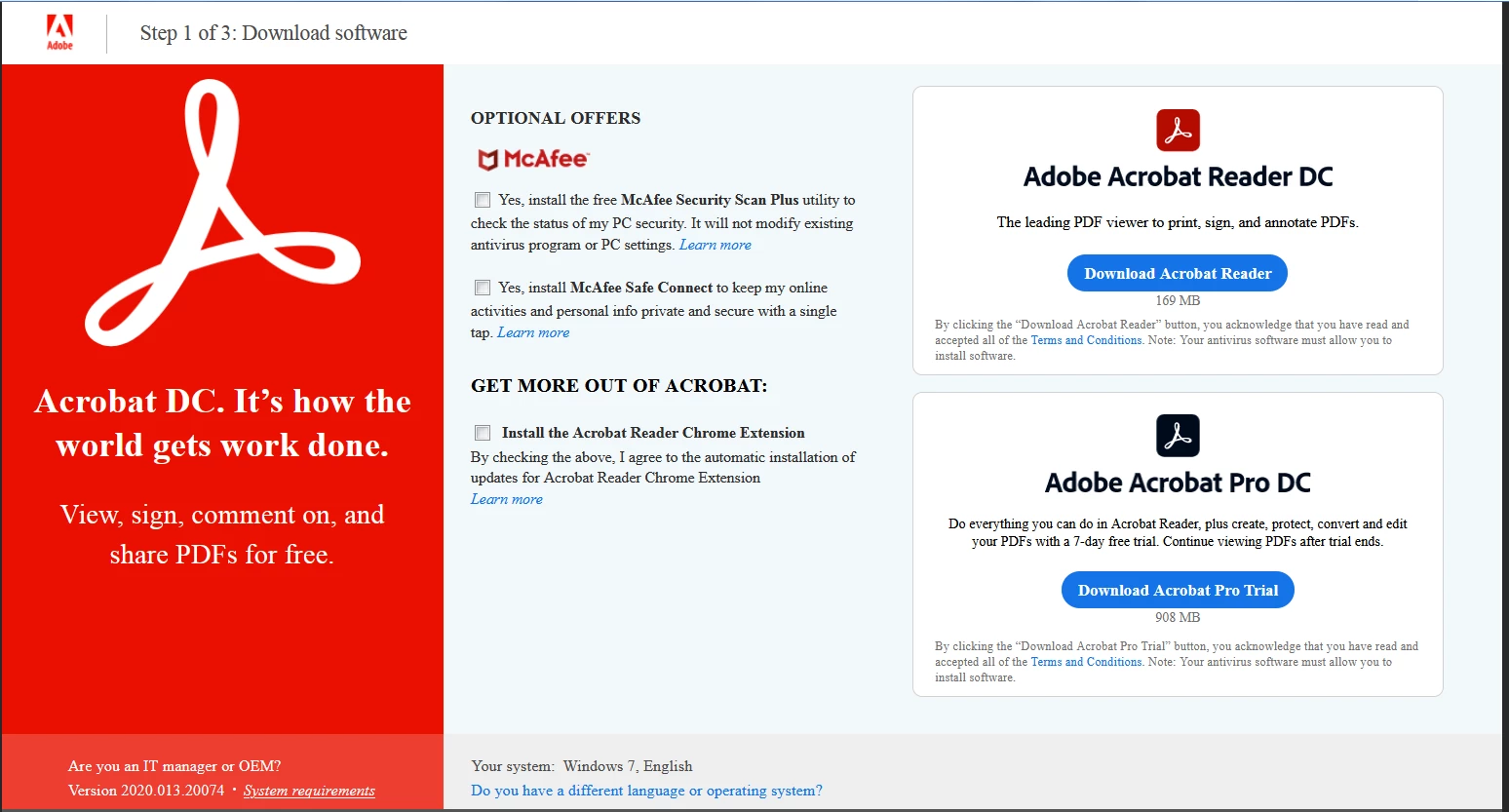
The McAffee installer is an optional download with Reader, and is not selected by default, so unless you ticked those boxes at some point it should not have been installed on your computer:


I agree it's not very good software, but that's neither here nor there, and Adobe has the right to recuperate its investment in the free Reader by partnering up with third-parties and bundling their software with theirs. This is a very common practice, and I personally prefer it over having ads in the application itself, for example.


5 replies

OneWileyDog
Participating Frequently
November 13, 2024

McAfee is simply a virus pretending to be anti-virus. It will not uninstall, so I may try deletogn all the files and cleaning my registry.

Meenakshi_Negi
Legend
November 27, 2024

Hi OneWileyDog,


Thank you for reaching out.


If McAfee was installed with Acrobat Reader, you must uninstall It. Then, McAfee will be removed automatically.   

You may install Acrobat Reader from the following page: https://adobe.ly/3ARf26R


Hope the information helps.


Thanks,

Meenakshi

Participant
September 11, 2024

You can use Revo Uninstaller (free) to remove McAfee, and just about anything else.  Be careful after scanning, and do not check anything not in bold.

Participant
September 26, 2022

Thanks Adobe for wasting my morning unistalling an unwanted program. Very deceptive and a terrible business practice. I can tell you without a doubt I do not want Mcafee on my PC and had no intention of installing it. I was simply running an Adobe update, that is it. Shameful.  

FeliTec
Participant
July 22, 2022

I have filed a formal complaint regarding to this case [here]

This is completely outrageous and unacceptable (make have actually touched US law: Computer Fraud and Abuse Act 18 U.S.C. § 1029 and 1030), please help to support the complaint crusade by upvoting & commenting my submition to their product team here: [Click here to direct], 30 upvotes will get us to the top of the list.

Carol F Metzger
Inspiring
July 23, 2022

I never solved it. Husband's PC. I have Acrobat with CC, so I don't need the free reader on my Mac.

try67
Community Expert
try67Community ExpertCorrect answer
Community Expert
January 16, 2021

The McAffee installer is an optional download with Reader, and is not selected by default, so unless you ticked those boxes at some point it should not have been installed on your computer:


I agree it's not very good software, but that's neither here nor there, and Adobe has the right to recuperate its investment in the free Reader by partnering up with third-parties and bundling their software with theirs. This is a very common practice, and I personally prefer it over having ads in the application itself, for example.


Participant
August 5, 2022

it is SELECTED as TRUE by default, go try it yourselves and see.

https://get.adobe.com/uk/reader/ 


(Abusive remarks removed by moderator)

Abambo
Community Expert
Community Expert
December 24, 2023
quote

I guess this is what you get when it's not clear on a forums platform to what message a reply was sent to... My apologies for the harsh response, but be aware that everyone posting here without the "Adobe Employee" tag is a fellow-user, just like you, volunteering their time in an effort to help others, and since we don't have any insights into Adobe's algorithms or business practices we can make mistakes. To err is human, after all.

By @try67


Yeah, they should definitly include the username of the person you are replying to when you click reply under their response. No worries. I have some thoughts on company's, espcially ones worth hundreds of billions of dollars, using "community support forums" filled with unpaid volunteers, but I will keep them to myself. 


Yeah, they should definitly include the username of the person you are replying to when you click reply under their response. No worries. I have some thoughts on company's, espcially ones worth hundreds of billions of dollars, using "community support forums" filled with unpaid volunteers, but I will keep them to myself. 

By @acme-scottp

@acme-scottp ,

you can do so by using the at character, and making your choice, or by quoting part of the message. 


It's not ideal, because you need to do something, instead of an automatic indicator, but it helps.


As for the community volunteers, it's what it is, and we all could stop volunteering. Users, normaly, have user experience with the product, that is more valuable to the community than anything else. Some, like @try67 , also offer for paid services, so that gives them invaluable experience, and why not, the one or other customer. It's a good system, at the end of the day, for all of us.

ABAMBO | Hard- and Software Engineer | Photographer