
benjaminc63878482
Participant
January 18, 2018
Answered

Trying to print inf PDF, instead asking me to Save first.

  • January 18, 2018
  • 3 replies
  • 30033 views

Hi, I have read on the forums almost the same issue but instead of printing the pdf from chrome or a browser, this is just by opening the PDF file from explorer.

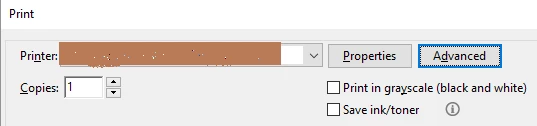
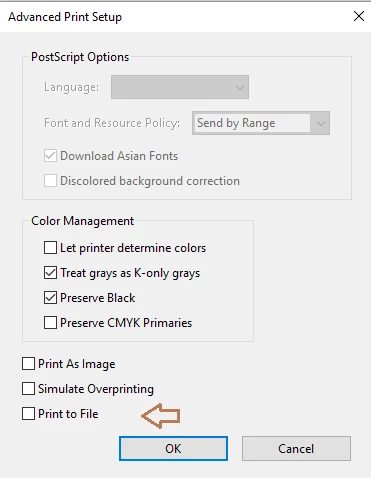
double-clicking the PDF file, Adobe Reader DC opens, Print and it prompts me to save as.  I am a Window 10 user. Even in the print dialog box, the print to file is nowhere to be found, I also click the Advanced section, to look for "PrintFile" n/a.

For now, I right click the PDF file, and choose Open With -> and I choose Microsoft Edge, then print it from there.
    This topic has been closed for replies.
    Correct answer Adorobat

    Hi Benjaminc,

    Try selecting your printer under "Printer" > click on "Advanced" and check if print to file option is visible.

    Feel free to update this discussion if you need any help.

    Shivam

    3 replies

    mohammadjasimuddin
    Participant
    October 23, 2024

    You guys are legends. I just helped fix my boss's computer/printer by following the instructions. Thumbs up, bro!

    April 30, 2020

    Hi,

    I don't know if it is a same situation or not, but could you help me on this?

    I am trying to print the file but my printer is not showing, I tried to print files on word and excel and it's working just to make sure that the printer is connected.


    Thank you


    Legend
    April 30, 2020

    Have you tried rebooting? I say this because sometimes a printer does disappear in particular apps, but comes back on a reboot.

    Adorobat
    AdorobatCorrect answer
    Participating Frequently
    January 18, 2018

    Hi Benjaminc,

    Try selecting your printer under "Printer" > click on "Advanced" and check if print to file option is visible.

    Feel free to update this discussion if you need any help.

    Shivam

    benjaminc63878482
    Participant
    January 18, 2018

    Yeah that worked! thank you.