
Participant
April 10, 2015
Answered

Unable to disable Welcome Screen in Acrobat 2015 or DC

  • April 10, 2015
  • 3 replies
  • 43851 views

Hi

I have downloaded Acrobat DC, extracted the MSI, and used the customization Wizard to remove the desktop shortcut, disable updates, and accept EULA.  I have configured Group policy to set the following registry keys (among others):

HKLM\Software\Policies\Adobe\Acrobat Reader\DC\FeatureLockDown\cWelcomeScreen

bShowWelcomeScreen

Reg_DWORD

0

as per:  http://www.adobe.com/devnet-docs/acrobatetk/tools/PrefRef/Windows/AVGeneral.html?zoom_highlight=welcome#idkeyname_1_4934http://www.adobe.com/devnet-docs/acrobatetk/tools/PrefRef/Windows/AVGeneral.html?zoom_highlight=welcome#idkeyname_1_4934

and the following Welcome screen keeps appearing:
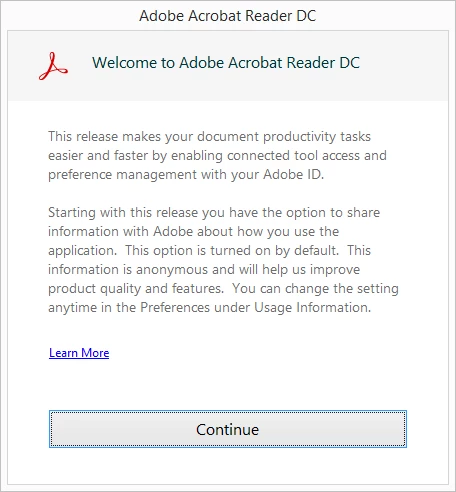
I have also downloaded Acrobat 2015, and used the same process, but used the registry:

HKLM\Software\Policies\Adobe\Acrobat Reader\2015\FeatureLockDown\cWelcomeScreen

bShowWelcomeScreen

Reg_DWORD

0

and it still appears.

is there a way to disable the welcome screen that appears?

This topic has been closed for replies.
Correct answer vdobhal

Hi,

If you would like to disable the above dialog, you can set the following key either through Group policy or through the direct editor in the Customization Wizard:

HKLM\Software\Policies\Adobe\Acrobat Reader\2015\FeatureLockDown\

bUsageMeasurement

Reg_DWORD

0

Thanks,

Vinod

3 replies

HansanaDissanayake
Participant
October 23, 2018

Hellow All..
Please any once have idea about registry for remove this screen. it's not remove form

bshowWelcomescreen = 0

welcomescreen
Participant
November 1, 2018

Hello,

Same problem occurs on our pc's after installing the newest Adobe Reader DC.

Every regkey or GPO provided by Adobe isn't able to hide this welcomescreen.

Is this a bug or do we need to apply a hotfix or another regkey to hide the particular screen?

Participant
July 13, 2016

Edit

Preferences

General

Uncheck: "Show me messages when I launch Adobe Acrobat DC

vdobhalCorrect answer
Adobe Employee
April 10, 2015

Hi,

If you would like to disable the above dialog, you can set the following key either through Group policy or through the direct editor in the Customization Wizard:

HKLM\Software\Policies\Adobe\Acrobat Reader\2015\FeatureLockDown\

bUsageMeasurement

Reg_DWORD

0

Thanks,

Vinod

anonitAuthor
Participant
April 11, 2015

Hi Vinod

That has worked great, thank you.

January 28, 2016

No, this one is different (it's almost a full overlay), and I don't recall seeing yours before. I tried setting bHideUnreadMsgAtLaunch back to 0 and still didn't see yours. Odd. Anyway, here's mine:


Little strange but I found out that if you create two subkeys (AcroApp and FTEDialog) under HKEY_CURRENT_USER\Software\Adobe\Acrobat Reader\DC that Access Files Anywhere screen is no longer shown in the first start.

Note: If you are using Adobe Customization Wizard to create package you also need to create some dummy values under those keys because that tool does not allow you to create empty keys.