Exit
  • Global community
    • Language:
      • Deutsch
      • English
      • Español
      • Français
      • Português
  • 日本語コミュニティ
  • 한국 커뮤니티
0

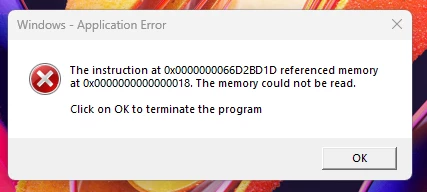
Windows Application Error memory could not be read
New Here ,
Nov 14, 2024 Nov 14, 2024

x10Bishop_0-1731655731801.png

 Why is this error showing up every single time i open a file?
Closing it or leaving it seems to have no effect on the file, but what is the fix for this every single time i open the file?

 

TOPICS
View PDF , Windows
292
Translate
Report
Community guidelines
Be kind and respectful, give credit to the original source of content, and search for duplicates before posting. Learn more
community guidelines
Adobe Employee ,
Feb 28, 2025 Feb 28, 2025
LATEST

Hello,


I hope you're doing well, and we apologize for the delayed response and the trouble.


Please ensure you have the latest version of Acrobat installed on the machine: 24.005.20421 Optional update, Feb 24, 2025. Check for any pending updates from the Menu > help > check for updates, install the updates, restart the app and the machine, and check. For more information, see this: https://adobe.ly/41yUtXf.


Please update the operating system as well with the latest version. Let us know how it goes.


Thanks,

Anand Sri.

Translate
Report
Community guidelines
Be kind and respectful, give credit to the original source of content, and search for duplicates before posting. Learn more
community guidelines