Copy link to clipboard
Copied
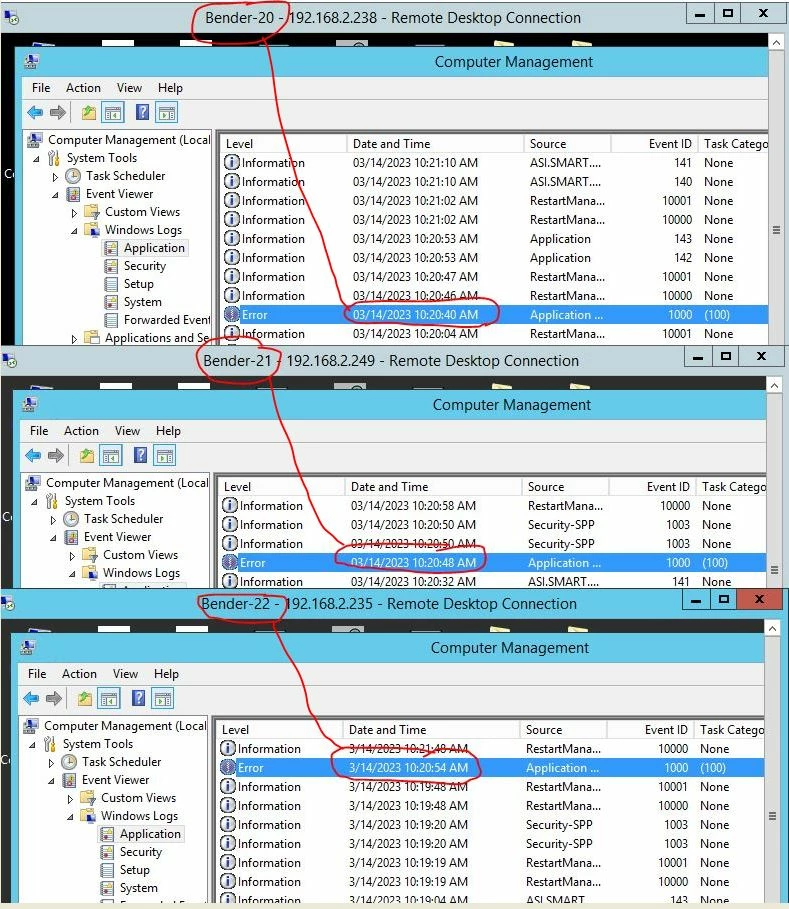
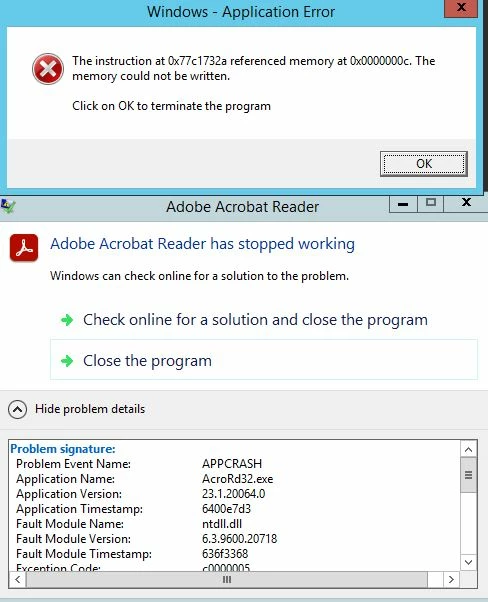
Please help! Not sure if others are running into this error, but it started happening about a week or 2 ago and we cannot stop it. All users on the servers randmly receive the pop-up, but it is only seems once per day. We can close the error and continue without issue. Repaired the install, completely removed and reinstalled Adobe Reader but we keep receiving the error. Seems to be a program related bug as the error happens at the same time on 3 different servers. Also disabled the Adobe update service, but the errors still appeared.. Thank you.
Copy link to clipboard
Copied
Currently installed version Adobe Acrobat Reader 2023.001.20064
Copy link to clipboard
Copied
Thank you for reaching out.
Please try the troubleshooting steps suggested on the following help page: https://helpx.adobe.com/acrobat/kb/acrobat-dc-crashes-on-windows-os.html.
Try a clean install of the application. Remove the application and run the cleaner tool (https://www.adobe.com/devnet-docs/acrobatetk/tools/Labs/cleaner.html).
Reboot the system and install the application from the following page: https://get.adobe.com/reader/enterprise/.
If the issue still occurs, let us know. We may need logs for further investigation.
Thanks,
Meenakshi
Copy link to clipboard
Copied
Hello Meenakshi,
Thank you for the helpful instructions. Last night I rebooted, removed Adobe Reader, ran the cleanup tool and reinstalled. However, the error just happened as I was typing this message. The only thing I did not try is "Solution 3: Turning off protected view". The good thing is the error will only appear once per day per user, and we can close it and continue. These are terminal servers with 60+ users. We are working to replace these servers, and this issue will resolve itself then if no solution is found.
Thank you, Jason
Copy link to clipboard
Copied
Get ready! An upgraded Adobe Community experience is coming in January.
Learn more