Participating Frequently
February 17, 2018
Answered

Acrobat reader not responding

  • February 17, 2018
  • 4 replies
  • 63570 views

Can someone help me troubleshoot why Adobe Acrobat Reader isn’t responding? When I open a PDF, I get an error message that tells me the program is unable to respond and needs to quit and to click okay to close, I then click okay and nothing happens, having to click multiple times. I have uninstalled and reinstalled and the same issue occurs. Before this, I attempted to repair it and scanned for issues. I’m running windows 10 on a PC.

    This topic has been closed for replies.
    Correct answer Adorobat

    I have windows 10; can you tell me how to do it for that?

    Sent from my iPhone. Please forgive any typos.


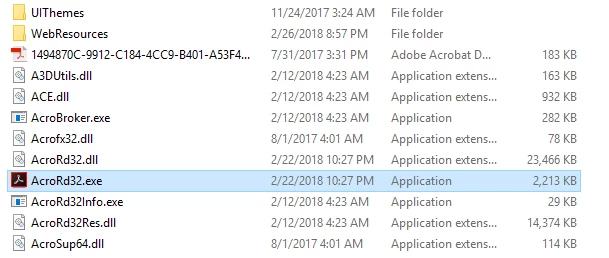
    Navigate to C:\Program Files(x86)\Adobe\Acrobat Reader DC\Reader, locate AcroRd32.exe

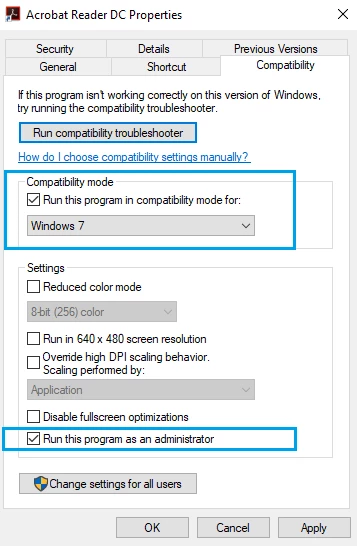
    Right-click AcroRd32.exe > Properties > Compatibility tab

    4 replies

    New Participant
    November 8, 2024

    I found that just leave it for a few minutes and it will respond.

    Inspiring
    July 19, 2022

    I have had a similar problem for a long time. When I would open any pdf doc (with rare, occasional exceptions) Acrobat Reader would be unresponsive for a minute or so, and then work perfectly. I tried re-installing, repair installation, duck-duck-go'ing for answers, but nothing helped. Lately it got much worse, so that even starting Reader by itself without an open file would lead to it being non-responsive, mostly, forever. So I tried steps 1, 2, and 3 of the suggestions here, and what helped, like a charm, was to uncheck "Protected Mode" (in the Security(Enhanced) preference page). But the advice is to turn Protected Mode back on once troubleshooting is complete. I looked here https://helpx.adobe.com/acrobat/kb/protected-mode-troubleshooting-reader.html and nothing seemed to apply. How do I do complete troubleshooting?

    [Computer generally works fine, tho it is older; OS Name Microsoft Windows 10 Pro Version 10.0.19044; Build 19044; Installed Acrobat: C:\Program Files\Adobe\Acrobat DC\Acrobat\Acrobat.exe; Version: 22.1.20169.0; Creation Date: 2022/07/05; Creation Time: 12:34:20 AM ]

    New Participant
    October 16, 2024

    The may be caused by too many documents in the history.  Start by clearing the history and then setting "Documents in recently used list" to something less than the default (100).  I have mine set to 20.

    rivermark
    New Participant
    April 14, 2020

    Hi there just did that and it froze again 'not responding'.

    I have since downloaded a free pdf reader and have started using that as it is more stable.

    I have left my subscription going to see if I need the paid version that much - otherwise will need to delete and find something that works.

    New Participant
    October 27, 2020

    Hi, I have the same problem when opening a specific pdf file. Then while trying another reader, it can solve.

    November 27, 2020

    I cannot check for updates because Adobe Reader is not responding. There is no access to the menu. 

    However, setting to compatibility mode for Windows 7 works though after several tries opening Adobe reader.

    Adorobat
    Community Manager
    Community Manager
    March 1, 2018

    Hi OhEmGeeLizC,

    Sorry for taking so long to respond.

    Are you still experiencing this issue? If yes, please try updating Reader to the latest patch available by clicking check for updates under Help menu. You may also visit this link - Adobe - Adobe Reader : For Windows to download updates manually. Once installed, reboot the machine and check.

    Also, have you tried launching Reader without opening any pdf, does that work?

    To do that, locate Reader's icon on the desktop > right-click > Open

    Keep us posted with the results.

    Shivam

    Participating Frequently
    March 1, 2018

    Yes—still experiencing the issue and yes I checked for updates—None were available.

    The issue didn’t occur when I opened adobe reader without a PDF.

    Any guesses as to what the problem could be and how to fix it?

    Sent from my iPhone. Please forgive any typos.

    Adorobat
    Community Manager
    Community Manager
    March 1, 2018

    It could be a file specific issue. Does Reader crash when you open a specific pdf file or with all the files?

    Try opening several pdf files in Reader and see if this behavior still continues.