
SidChak
Participant
November 6, 2020
Question

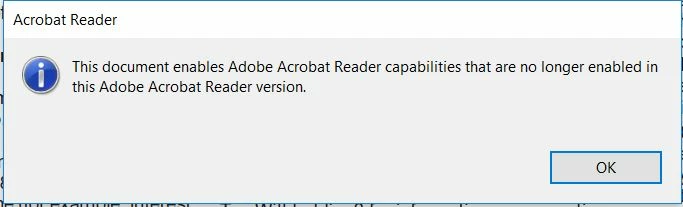
Form PDF throwing up error pop-up when Opened with Acrobat Reader DC
  • November 6, 2020
  • 5 replies
  • 2836 views

We are getting the Above Error when trying to Open a PDF Form with Acrobat Reader DC.

Can you help us in getting away with this error message. Or someway (setting change) so that the error pop-up does not comes up.

I have attached the File for your reference.

My Base Platform is Windows.

Note: The Error pop-up does not shows up with  Adobe Acrobat DC Pro. 

This topic has been closed for replies.

5 replies

JR Boulay
Community Expert
Community Expert
November 25, 2020

This form was made in 2004.

Reader's Extended Rights are now useless.

You can download it here: https://documentcloud.adobe.com/link/track?uri=urn:aaid:scds:US:93bab668-d161-45b0-ac4c-a53a902e1682

Acrobate du PDF, InDesigner et Photoshopographe
Legend
November 25, 2020

Adobe will be delighted to sell you an Acrobat subscription, I am sure. You can't use Reader to edit, there's no revenue there.

Participant
November 25, 2020

Print  the Form pdf with option as “ Microsoft Print to PDF" and Now save the file . Open the saved pdf file, the pop up will be not be displayed now. 


Note: After printing and saving the pdf , the form pdf will become non-editable but there is no content lost.

radzmar
Community Expert
Community Expert
November 6, 2020

The message means that at least one bit of the form got changed after there has been added a special signature that enables additional features in Adobe Reader for this specific PDF. As a result this signature got invalid so you lost the additional rights. This is often a result of a compression/decompression of that file during by an mail application. If you remember were you got the file from you may able to find an exemplar with is still intact.

SidChak
SidChakAuthor
Participant
November 10, 2020

Hi @radzmar ,

Thanks for the response. The thing is that we get PDF from various sources and need to Process them.

SO, to correct the format at the Source is difficult. Is there some way we can disable all the pop-up in PDF.

I mean I dont want to get any Error pop-up or even pop-up for Update .

Is there some configuration or Regisrty update wherein we can configure to disable all the pop-ups.

We are wusing Windows as base Platform.


radzmar
Community Expert
Community Expert
November 10, 2020

I'm not aware of any other method than saving the particular PDF as copy with Adobe Acrobat (File > Save As Copy). This will remove the applied Reader Extensions from the PDF. Then you can apply the Reader Extensions again. You'll have to heal the PDFs, not manipulate the application. 

Bernd Alheit
Community Expert
Community Expert
November 6, 2020

Open the file in Adobe Acrobat Pro and use the menu File > Save a Copy...

Then use the copy in Acrobat Reader.

SidChak
SidChakAuthor
Participant
November 6, 2020

Hi @Bernd Alheit ,

Thanks for the Solution. But the issue is we dont have access to the Adobe Acrobat DC Pro version.

We just got one time access to the Pro version for checking the behaviour.

We will have access to the Acrobat Reader DC Only.

So it there any other way to deal with it.

Bernd Alheit
Community Expert
Community Expert
November 6, 2020

Not possible with Acrobat Reader.