stephaniel.long1
Participant
February 22, 2018
Answered

Images showing on phone, not on desktop

  • February 22, 2018
  • 2 replies
  • 7592 views

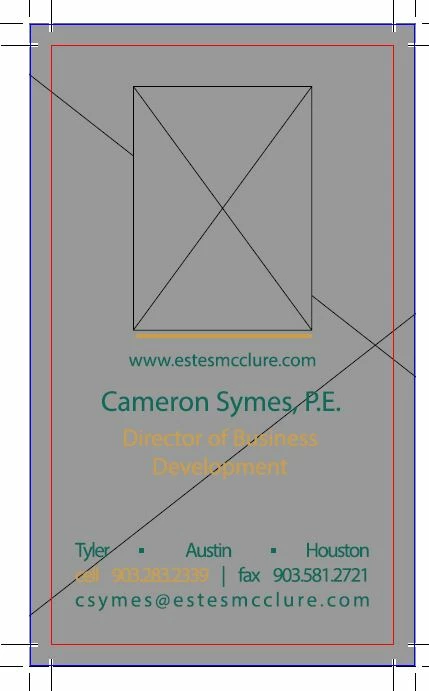
A client sent me a PDF. When I view it on the PDF viewer on my phone (Android) it shows up just fine. When I view it on my computer (Windows 10) the graphics are reduced to gray boxes. 
This topic has been closed for replies.
Correct answer ~graffiti

Not a flaw, no. More than likely it's a simple matter of not having "Show large images" checked in your preferences.

Edit>Preferences>Page display"Page content and information. Check the box that says "Show large images".

2 replies

Adorobat
Community Manager
Community Manager
February 28, 2018

Hi Stephaniel Long,

Would it be possible to share the pdf file with us to analyze the issue further? You may share the file using the steps given in this link: How to share a file using Adobe Document Cloud

Thank You,

Shivam

lw58584306g
Participant
April 18, 2018

I'm having the same issue.  All images and some scanned documents are completely greyed out.  These documents were viewable in the previous Reader version.  The update to DC rendered all of these documents un-viewable.  I've checked over 20 documents to confirm its not isolated to a specific document.  I've also saved all the files to folder and added the folder to the trusted sites and disabled all of the security features. 

I used another computer to view these same files using older Reader versions and they display without issue.  Seems there is a serious flaw in the Reader DC.

~graffiti
~graffitiCorrect answer
Legend
April 18, 2018

Not a flaw, no. More than likely it's a simple matter of not having "Show large images" checked in your preferences.

Edit>Preferences>Page display"Page content and information. Check the box that says "Show large images".

AkanchhaS8194121
Legend
February 22, 2018

Hi Stephaniel.long,

Could you please confirm what is the application you are using to view pdf on mobile device? Is it Adobe Reader or you are using any other pdf viewer?

And similar to that what is the application you are using on desktop, is it Adobe Acrobat Reader DC?

Are you downloading the file locally in system or opening via web-browser, because if you are opening via web browser then the web browsers like Chrome, Microsoft Edge then they uses there inbuilt pdf viewers not the Adobe Reader.

Please help us with more details.

Regards,

Akanchha

stephaniel.long1
Participant
February 22, 2018

Hi Akanchha,

On my Android, I am both previewing on web and downloading the PDF to my phone to open it successfully in all three of the following: PDF Viewer, Drive PDF Viewer, and Adobe Acrobat.  All the graphics show up.

On my computer, I am downloading the PDF and opening it in Adobe Acrobat Pro DC. This is where I see only gray boxes.

Another note, if it is helpful, the client exported from InDesign CC, High quality print.

Stephanie
