
lesb1961
Participant
June 26, 2017
Answered

Microsoft Visual C++ Runtime Library Error

  • June 26, 2017
  • 1 reply
  • 20059 views

When I try to preview a pdf in Windows 10 Explorer I get an error message pops up:
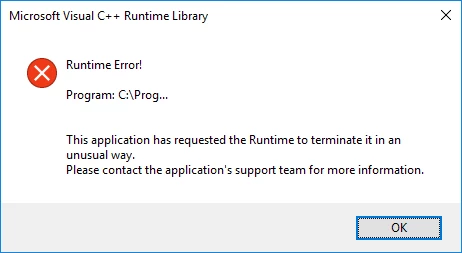
Once this has popped up I cannot Preview any other pdf until I click on the OK. I can open pdfs with no issue but as I cannot preview it means I have to open the pdf to confirm I have the correct document. Have uninstalled and run a new install of Adobe Reader but no luck in fixing the issue.

Any suggestions?

This topic has been closed for replies.
Correct answer Adorobat

Hi lesb1961,

Sorry for the delay in response.

As per the issue description, you are getting Microsoft visual runtime error when trying to view a pdf in Windows explorer, is that correct?

Please refer to the troubleshooting steps given in the following links:

Microsoft Visual C++ Runtime Library error message - Microsoft Community

Adobe Reader X Microsoft Visual C++ Runtime Error (Solved)

Thanks,

Shivam

1 reply

Adorobat
AdorobatCorrect answer
Participating Frequently
July 13, 2017

Hi lesb1961,

Sorry for the delay in response.

As per the issue description, you are getting Microsoft visual runtime error when trying to view a pdf in Windows explorer, is that correct?

Please refer to the troubleshooting steps given in the following links:

Microsoft Visual C++ Runtime Library error message - Microsoft Community

Adobe Reader X Microsoft Visual C++ Runtime Error (Solved)

Thanks,

Shivam

faithv34106242
Participant
April 20, 2018

If you’re getting Microsoft Visual C++ Runtime Error, you might be able to fix the problem simply by creating a new user account.

check for other methods here:

https://www.errorsolutions.tech/error/microsoft-visual-c-runtime-library-error/