

Answered
Reader active in Task manager, but not on screen
I've installed the latest version of Acrobat Reader, but after openening several documents its seems the reader starts a life of it's own...!
What happens:
- I click the Acrobat Readr icon onmy desktop (or Start menu);
- the cursor changes into the spinning blue circle;
- my screen does'nt change, Reader isn't shown.
When I open Task Manager I see two lines for Acrobat Reader and one for the update manager (@ background processes)
So the reader does start, but doesn't show itself.
This happened a few times. I tried a re-install of the reader twice, after re-install it works for a few times, and then all trouble starts again.
Any suggestions??
Rob.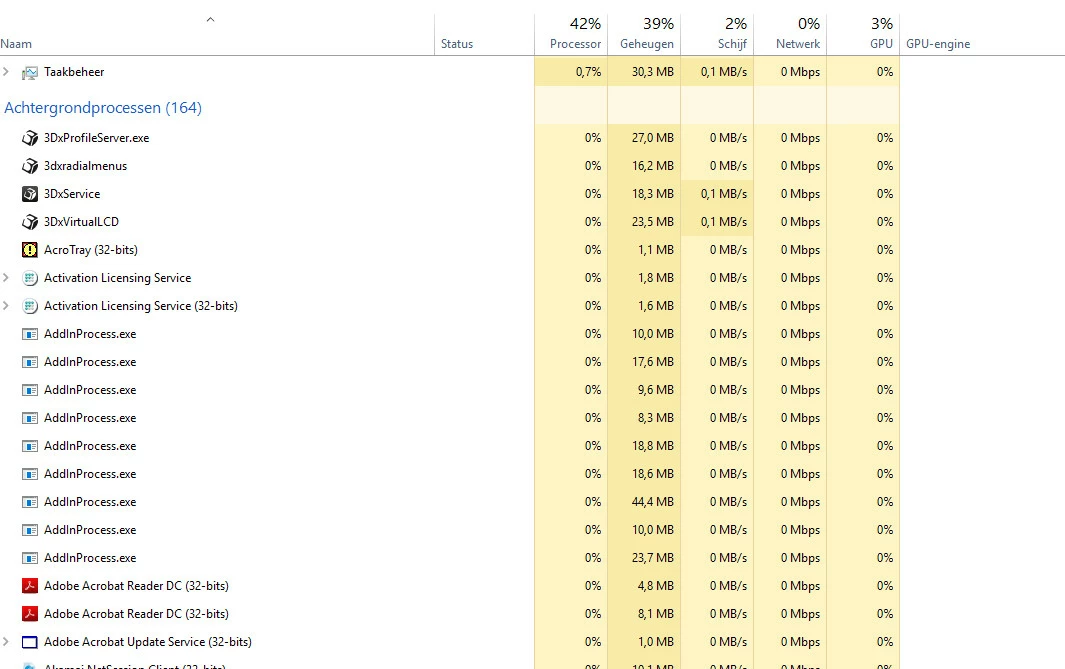
 AdChoices