Exit
  • Global community
    • Language:
      • Deutsch
      • English
      • Español
      • Français
      • Português
  • 日本語コミュニティ
  • 한국 커뮤니티
0

Adobe acrobat Form cannot capture "0" while using split() command

Engaged ,
Sep 16, 2020 Sep 16, 2020

Hi,

I am trying to split a number (with 2 decimalsplace ) and separate them in before decimal and after decimal.

Example:  

.  Text1 :  I have number say  25.68  ,  now i want it to split into two fields so,

Text2 :  it should show 25 

Text3 : it should show 68   ,

everything is working fine.. until when the number after decimal is 00   then it doesnot show correct value;


below is my script

for Text2 calculation script :

var mins = this.getField("Text1").valueAsString;

event.value = mins.split(".")[0]


for Text3

var mins = this.getField("Text1").valueAsString;

event.value = mins.split(".")[1]


is there any other method to split the number where when the number has 00 in its decimal capture the 0 in Text3 .


TOPICS
Acrobat SDK and JavaScript
2.9K
Translate
Report
Community guidelines
Be kind and respectful, give credit to the original source of content, and search for duplicates before posting. Learn more
community guidelines

correct answers 1 Correct answer

Engaged , Sep 17, 2020 Sep 17, 2020

ok.. thanks NesaNurani and try67   ...

script is working now... as required .. below is the script i used:


var mins = Number(this.getField("Text1").value);

var minsParts = mins.toString().split(".");

if (minsParts.length==2) {
minsParts[1];}
else {event.value =event.value = "00"  ;}

Translate
Community Expert ,
Sep 16, 2020 Sep 16, 2020

What format does you use for field "Text3" ?

Translate
Report
Community guidelines
Be kind and respectful, give credit to the original source of content, and search for duplicates before posting. Learn more
community guidelines
Engaged ,
Sep 16, 2020 Sep 16, 2020

no formatting for Text3

Translate
Report
Community guidelines
Be kind and respectful, give credit to the original source of content, and search for duplicates before posting. Learn more
community guidelines
Community Expert ,
Sep 16, 2020 Sep 16, 2020
Translate
Report
Community guidelines
Be kind and respectful, give credit to the original source of content, and search for duplicates before posting. Learn more
community guidelines
Engaged ,
Sep 16, 2020 Sep 16, 2020

Yes, it works for manually.. but doesnot work when the value is calculated  and then it has 00 in its decimal place

Translate
Report
Community guidelines
Be kind and respectful, give credit to the original source of content, and search for duplicates before posting. Learn more
community guidelines
Community Expert ,
Sep 16, 2020 Sep 16, 2020

What calculation does you use?

Translate
Report
Community guidelines
Be kind and respectful, give credit to the original source of content, and search for duplicates before posting. Learn more
community guidelines
Engaged ,
Sep 16, 2020 Sep 16, 2020

Any other way method to capture the 00 after decimal when the field is automatic calculated

Translate
Report
Community guidelines
Be kind and respectful, give credit to the original source of content, and search for duplicates before posting. Learn more
community guidelines
Community Expert ,
Sep 16, 2020 Sep 16, 2020

That's because the ".00" is added by the Number Format script. It's not an actual part of the field's value.

You should first check if the value contains a ".". If so, split by it and proceed like before. If not, treat the whole value as you do the mins in Text2.

Translate
Report
Community guidelines
Be kind and respectful, give credit to the original source of content, and search for duplicates before posting. Learn more
community guidelines
Engaged ,
Sep 16, 2020 Sep 16, 2020

there is no formatting done in Text1 .   06.00 is entered manually   Format tab is set to none

Translate
Report
Community guidelines
Be kind and respectful, give credit to the original source of content, and search for duplicates before posting. Learn more
community guidelines
Community Expert ,
Sep 16, 2020 Sep 16, 2020

Does you enter the value or does you use a calculation?

Translate
Report
Community guidelines
Be kind and respectful, give credit to the original source of content, and search for duplicates before posting. Learn more
community guidelines
Engaged ,
Sep 16, 2020 Sep 16, 2020

will be using both.. according to requirement.


Also plz see this post of mine :

https://community.adobe.com/t5/acrobat/adobe-acrobat-forms-add-a-specific-number-at-specific-interva...

Translate
Report
Community guidelines
Be kind and respectful, give credit to the original source of content, and search for duplicates before posting. Learn more
community guidelines
Community Expert ,
Sep 16, 2020 Sep 16, 2020

At Text 3 add  a message output:


var mins = this.getField("Text1").valueAsString;
console.show();
console.println(mins);
event.value = mins.split(".")[1];

Translate
Report
Community guidelines
Be kind and respectful, give credit to the original source of content, and search for duplicates before posting. Learn more
community guidelines
Engaged ,
Sep 16, 2020 Sep 16, 2020

Doesnot work 

console shows following error

InvalidSetError: Set not possible, invalid or unknown.
Event.value:4:Field Text3:Calculate
2

Translate
Report
Community guidelines
Be kind and respectful, give credit to the original source of content, and search for duplicates before posting. Learn more
community guidelines
Community Expert ,
Sep 16, 2020 Sep 16, 2020

What value have you in Text1?

Translate
Report
Community guidelines
Be kind and respectful, give credit to the original source of content, and search for duplicates before posting. Learn more
community guidelines
Engaged ,
Sep 16, 2020 Sep 16, 2020

Text1 is calculation field     . It' value has formulae   event.value = otherfield/60;

Translate
Report
Community guidelines
Be kind and respectful, give credit to the original source of content, and search for duplicates before posting. Learn more
community guidelines
Community Expert ,
Sep 16, 2020 Sep 16, 2020

What can you see in Text1?

Translate
Report
Community guidelines
Be kind and respectful, give credit to the original source of content, and search for duplicates before posting. Learn more
community guidelines
Engaged ,
Sep 16, 2020 Sep 16, 2020

the result of the formulae  for ex   4800/60 = 80.00;   or 90/60 = 1.50 

Translate
Report
Community guidelines
Be kind and respectful, give credit to the original source of content, and search for duplicates before posting. Learn more
community guidelines
Community Expert ,
Sep 16, 2020 Sep 16, 2020

You see 80.00 or 1.50 in the field?

Post a screenshot.

Translate
Report
Community guidelines
Be kind and respectful, give credit to the original source of content, and search for duplicates before posting. Learn more
community guidelines
Engaged ,
Sep 16, 2020 Sep 16, 2020
Translate
Report
Community guidelines
Be kind and respectful, give credit to the original source of content, and search for duplicates before posting. Learn more
community guidelines
Community Expert ,
Sep 16, 2020 Sep 16, 2020

You will get the error message when there is no point or no character after the point.

Translate
Report
Community guidelines
Be kind and respectful, give credit to the original source of content, and search for duplicates before posting. Learn more
community guidelines
Community Expert ,
Sep 16, 2020 Sep 16, 2020

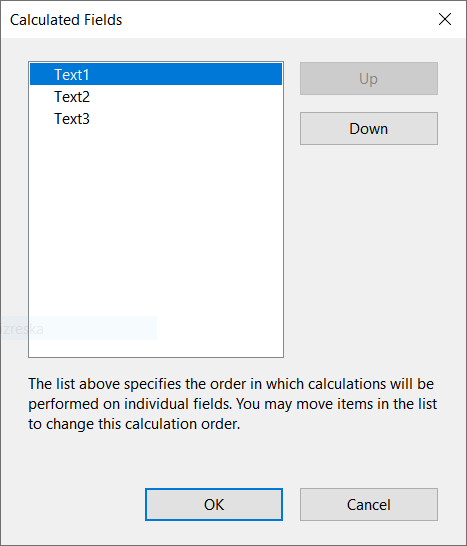
Just make sure field calculation order is like this:

Izrezak.PNG

and it should work fine.


Translate
Report
Community guidelines
Be kind and respectful, give credit to the original source of content, and search for duplicates before posting. Learn more
community guidelines
Community Expert ,
Sep 17, 2020 Sep 17, 2020

Sorry about my first post I thought you are just having troubles to make it work.

Anyway, you can try this workaround:

If result is whole number field "text3" will show 00 else it will split decimals normaly.

var mins = Number(this.getField("Text1").value);
var split = mins.toString().split(".")[1];
var int = Number.isInteger(mins);
if(int == true){
event.value = "00";}
else if(int == false){
event.value = split;}

It works for calculations so you don't need to enter value manually.

Hope that can help you 🙂

Translate
Report
Community guidelines
Be kind and respectful, give credit to the original source of content, and search for duplicates before posting. Learn more
community guidelines
Community Expert ,
Sep 17, 2020 Sep 17, 2020

I would recommend against using this kind of construction:

var split = mins.toString().split(".")[1];

You're making an assumption there that there is a period in the string. If there isn't, your script will error out.

It's better to do it like this:


var minsParts = mins.toString().split(".");
if (minsParts.length==2) {
// there's one period in the string, handle as usual
} else {
// there's more than one period in the string, or none at all, handle as needed
}

Translate
Report
Community guidelines
Be kind and respectful, give credit to the original source of content, and search for duplicates before posting. Learn more
community guidelines
Engaged ,
Sep 17, 2020 Sep 17, 2020
LATEST

ok.. thanks NesaNurani and try67   ...

script is working now... as required .. below is the script i used:


var mins = Number(this.getField("Text1").value);

var minsParts = mins.toString().split(".");

if (minsParts.length==2) {
minsParts[1];}
else {event.value =event.value = "00"  ;}

Translate
Report
Community guidelines
Be kind and respectful, give credit to the original source of content, and search for duplicates before posting. Learn more
community guidelines