


- Home
- Acrobat SDK
- Discussions
- How to debug plugin in Visual Studio 2013?
- How to debug plugin in Visual Studio 2013?

Copy link to clipboard
Copied
I followed all the necessary steps as descripted in the Plugin Apps Developer Guide document to debug a plugin into Visual C++:
● Specify the Acrobat plug-ins directory under the link | output tab in the Project settings dialog box.
● Specify the Acrobat or Adobe Reader executable under the executable for debug session in the Project settings dialog box.
● The first time you build a plug-in, do a Rebuild All.
● Set breakpoints in your source code by selecting the line and clicking the hand icon or pressing the F9 key.
● After setting breakpoints, press the F5 key to have Microsoft Visual Studio launch Acrobat or Adobe Reader.
However I received the following message when a press F5 key:

Of course I don't have PDB file of Acrobat's executable. So what do I have to do? Other question, the plugin have a lot of callbacks, can VS handle that?
Thanks,
Rodrigo Gonçalves.


 1 Correct answer

Stop trying to launch Reader. Lauch Acrobat. Build plugins to the Acrobat plug_ins folder not Reader.

 27
Replies
27
27
Replies
27


Copy link to clipboard
Copied
Just click on "Yes". You cannot debug Acrobat, but you can debug your own plug-in. The debugger has all the information it needs to allow you to debug your own code. Just set a breakpoint in e.g. the handshake functions and you should be able to see what's going on. If you don't get to the handshake functions, chances are that your plugin is not being loaded successfully. In that case, check that all libraries your plug-in depends on are available in directories where they can be found. And yes, all the callbacks should be handled correctly.
Copy link to clipboard
Copied
Ok I've tried press "Yes" but the breakpoint could not be hit. I set the breakpoint in PIHandshake function for test and it doesn't work. I tried also to open the Modules window to load the modules and the only module that does not load is the AcroRd32.exe. Because of this I think that was the problem.
I've googled and I tried a lot of combination of settings by changing the working directory, the command to load Acrobat Reader executable, the post-build event command to enable plugin into Adobe directory, etc. As well as attach to process. None of these attempts were successful.
In my case I want to debug the DocSign sample, therefore I presume that libraries is all available and can be found.
Copy link to clipboard
Copied
Unless you are creating your own plug-in and have RIKLA (Adobe Reader Integration Key License), you cannot load or debug a plug-in in Reader. You will need Adobe Acrobat to play around with the sample plug-ins.
Copy link to clipboard
Copied
Yes, I want to create my own plug-in and I have RIKLA. I am getting started with SDK developing.
Copy link to clipboard
Copied
You will have to develop and debug your plug-in in Acrobat. See here for more information about what the process of developing a Reader plug-in is:
This was written for Acrobat/Reader 9, but still applies to newer versions of Acrobat/Reader as well.
Copy link to clipboard
Copied
Like I said, I have RIKLA, the keypair file and I've done all the development and contractual tasks. My plug-in is loaded by Acrobat Reader DC normally.
Unless I'm missing some step, I don't know what else can be done to be enable the debug.
There is a sample project of Visual Studio for download that can debug?
Copy link to clipboard
Copied
Message at the breakpoint: "The breakpoint will not currently be hit. No symbols have been loaded for this document."
Copy link to clipboard
Copied
Are you seriously trying to do this without owning Acrobat?
Copy link to clipboard
Copied
What do you mean by owning Acrobat? How do I do this?
Copy link to clipboard
Copied
You can buy, or subscribe to, Acrobat Pro or Acrobat Standard. You should not expect to be able to make Reader plug-ins unless you have first tested and debugged them in Acrobat.
Copy link to clipboard
Copied
& of course you can only debug the Debug build, not the production build.
Copy link to clipboard
Copied
Sorry for the misunderstanding. I do own Acrobat, but VS doesn't launch Acrobat after press F5. Only appears that message that I showed earlier. Setting of my project bellow:
Configuration Properties > Debugging > Command => C:\Program Files (x86)\Adobe\Acrobat Reader DC\Reader\AcroRd32.exe
Configuration Properties > Debugging > Working Directory => C:\Program Files (x86)\Adobe\Acrobat Reader DC\Reader\
However, the Acrobat process appears in Windows Task Manager as background process.
Copy link to clipboard
Copied
Stop trying to launch Reader. Lauch Acrobat. Build plugins to the Acrobat plug_ins folder not Reader.
Copy link to clipboard
Copied
So Acrobat Reader DC is a Reader and not a Acrobat? I can only use the debugger owning and launching Acrobat? Indeed, I don't have Acrobat folder here, only Reader.
Copy link to clipboard
Copied
Yes Acrobat Reader is not Acrobat. Yes you need to buy it or subscribe to Acrobat. Haven't we been clear enough? Do you now follow the difference?
Copy link to clipboard
Copied
Thank you for your support.
More one question. Can you tell me why it is only possible to debug in Acrobat? The Reader should not work as well?
Copy link to clipboard
Copied
I don't know, I have never tried, I do not make Reader plugins, the strict license terms are too limiting . I do know the expected workflow is to create a plugin (with Reader options) and fully test and debug it in Acrobat before applying the Reader key And testing with Reader. All other developers have started with Acrobat, which is why I am surprised by your chosen path and why I doubt we can help you. Have you tried with Acrobat yet?
Copy link to clipboard
Copied
The Guide says:
● Specify the Acrobat or Adobe Reader executable under the executable for debug session in the Project settings dialog box.
So I had not seen problem using the Reader. Anyway, I downloaded the trial version of Acrobat today and nothing seems different.
Configuration Properties > General > Output Directory => C:\Program Files (x86)\Adobe\Acrobat DC\Acrobat\plug_ins
Configuration Properties > Debugging > Command => C:\Program Files (x86)\Adobe\Acrobat DC\Acrobat\AcroRd32.exe
Configuration Properties > Debugging > Working Directory => C:\Program Files (x86)\Adobe\Acrobat DC\Acrobat\
Copy link to clipboard
Copied
So using Acrobat you cannot debug? Correct? I am not interested in the Reader case.
Is this the debug build?
Did you copy the plugin after building?
Does the plugin load normally in Acrobat without debug?
Did you start with a sample project?
Copy link to clipboard
Copied
Hey...you are still running Acrord32.exe. Stop doing that!
Copy link to clipboard
Copied
My mistake! I change AcroRd32.exe to Acrobat.exe and now it works! Thanks 

Copy link to clipboard
Copied
How to do Debug the Acrobat Sdk dc Plugins in visual studio 2019.
I tried so many ways to debug the project, still no hint.
I kept attached path in command section also,not working
C:\Program Files (x86)\Adobe\Acrobat DC\Acrobat\Acrobat.exe
Please guide to me
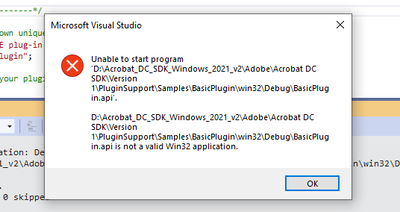
facing issue:
Copy link to clipboard
Copied
Your message seems clear. You are trying to "run" BasicPlugin.api. As the message says, this is not an application. The application you need to run is acrobat.exe.
Copy link to clipboard
Copied
Yes, My output need to come .api only. Based on api I'm pasting that in to plugins folder output will display.
I need to debug that plugin application, Please guide. If any need change setting please let me know.

-
- 1
- 2
 AdChoices