


- Home
- Acrobat SDK
- Discussions
- Re: How to open Acrobat Pro DC in Scan Mode from V...
- Re: How to open Acrobat Pro DC in Scan Mode from V...
How to open Acrobat Pro DC in Scan Mode from VB.NET

Copy link to clipboard
Copied
Our company has upgraded to Acrobat Pro DC from Adobe Pro X and the following line of code no longer functions to open Adobe in Scan mode:
AdobeAcro.MenuItemExecute("Scan")
Can someone direct me to help files for coding with Acrobat Pro DC with VB.NET?
Thank you,
Anthony


 16
Replies
16
16
Replies
16


Copy link to clipboard
Copied
Items removed from the menu have no replacement.
Copy link to clipboard
Copied
This line of code opens an instance of Acrobat in Scan mode. Is there a way to do that with DC?
Copy link to clipboard
Copied
Pretty sure no. It’s just sheer luck that there was once a menu item that entered scan mode.

Copy link to clipboard
Copied
With the Scan menu gone from Acrobat DC why is MenuItemIsEnabled("Scan") still returns a True?
A False return value would make more sense since there is no menu item with that name anymore.
Regards,
Peter


Copy link to clipboard
Copied
The menu item "Scan" exists in Javascript. It is the name for following entry:
File > Create > PDF from Scanner
Copy link to clipboard
Copied
Thats good to know. Thank you.
But when I call MenuItemExecute("Scan") from a C# app nothing happens except a true return value.
When I tried app.listMenuItems() in the JS console I'll get
oChildren:[[cName:NewDocFromFile] [cName:Scan] ..
so it looks like the scan name is part of NewDocFromFile which would make sense.
So the question would be if and how NewDocFromFile and Scan could be used as a single argument for MenuItemExecute().
Regards,
Peter
Copy link to clipboard
Copied
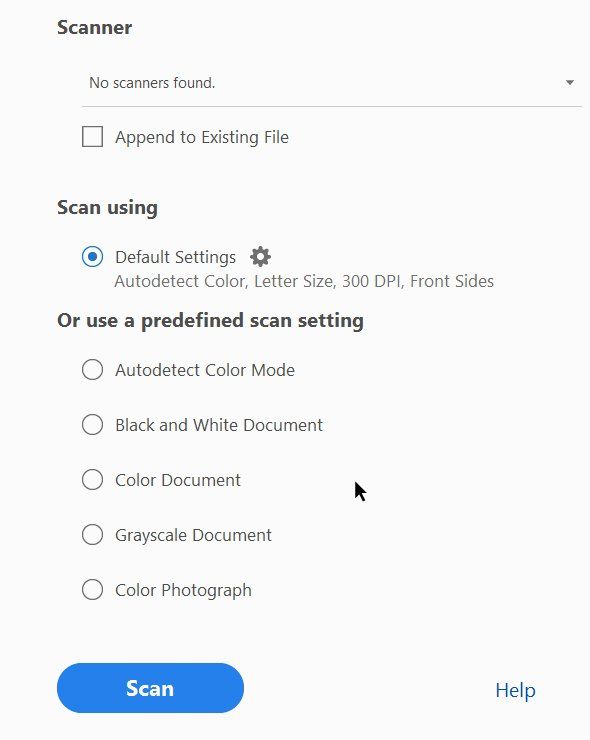
When you execute
app.execMenuItem("Scan");
in the Javascript console you will get this:
Copy link to clipboard
Copied
For some reasons this does not work from a language like C#. But I will give it another try. But thanks for trying this out (I was just about to try this myself;)
Regards,
Peter
Copy link to clipboard
Copied
So the company has moved to DC from X and our application with X opened Adobe ready to scan. Are you saying that this method was never intended to be included in X or that it was an accident?
Is there documentation on how to code for DC in .NET code? Would you send me more information so I can work on a solution?
Thank you,
Copy link to clipboard
Copied
The Acrobat SDK contains supported interfaces. There isn’t one to do this. Notice that you were executing a menu item - it was never a special function to enter scanning from your app. There just happened to be a Scan menu item, which you found useful. Now notice most menus are removed in DC. That’s why it no longer works.
Copy link to clipboard
Copied
I now have DC installed on my machine so I can actively work with it. I see that the menu items are gone and I understand that my code as it worked with X will not work with DC. I am trying now to open DC from my application so that it is connected to my application so when a file is scanned through the DC interface it will be stored in my system. Does this make sense?
This was my code:
Dim sPDFFileName As String = Path.GetTempFileName.ToLower.Replace(".tmp", ".pdf")
AdobeAcro.MenuItemExecute("Scan")
AVDoc = CType(AdobeAcro.GetActiveDoc, Acrobat.AcroAVDoc)
If AVDoc IsNot Nothing Then
If AVDoc.IsValid Then
'continue
PDDoc = CType(AVDoc.GetPDDoc, Acrobat.AcroPDDoc)
m_PDFPageNumbers = PDDoc.GetNumPages
PDDoc.Save(1, sPDFFileName)
PDDoc.Close()
End If
AVDoc.Close(CInt(True))
End If
AdobeAcro.CloseAllDocs()
AdobeAcro.Exit()
KillAdobe()
If File.Exists(sPDFFileName) Then
'open it for editing
Dim pInfo As New ProcessStartInfo
'Start the correct version of acrobat from the existing path
pInfo.FileName = StartUp.DetectAcrobat
pInfo.Arguments = "/A ""zoom=45&pagemode=thumbs"" """ & sPDFFileName & """"
launchProcess = New Process
launchProcess = Process.Start(pInfo)
launchProcess.WaitForExit()
' Other processing before returning sPDFFileName to the calling object.
End If
So, I wonder if I can open DC from my application in a similar fashion so whatever is scanned is returned to my application.
Thank you,
Copy link to clipboard
Copied
Is there a way to open an instance of Acrobat DC from a .NET application with the intention of scanning a document and saving said document to the .NET application? The idea is to keep the scanning within our application, but use Acrobat as the scan tool.
Thank you


Copy link to clipboard
Copied
No.
Copy link to clipboard
Copied
Does the SDK and all the tools come with the purchase of Acrobat DC Pro? I would like to investigate using Windows IAC to get the functionality that we are looking for. Is it possible to use that to run Adobe from within our VB.NET windows form application to scan, edit, view PDFs?
Thank you
Copy link to clipboard
Copied
You can find the SDK here:
Copy link to clipboard
Copied
the SDK is free to download. There are no tools that I can think of.

Find more inspiration, events, and resources on the new Adobe Community
Explore Now
 AdChoices