
Linearized PDF still waiting for entire document to load before showing PDF
Hello there!
I'm trying to integrate the PDF Embed API with one of our current applications to display PDF files. However, it takes very long to load the PDF's as they frequently have files sizes around 100mb.
I've had a go at using linearization but I'm not having any success so far. The viewer still waits for the entire PDF to load before showing anything. The only difference is that it just shows "Opening document" without a percentage showing how much is loaded.
I've used the code as provided in the "More samples/Linearization" from the Github repo, with the only change that I'm using an URL instead of the file upload. Here is the relevant code:
        /* Invoke the file preview API on Adobe DC View object */
        adobeDCView.previewFile({
            /* Alternatively you can specify a supported linearized PDF URL */
            content: {
                // Location of file where it is hosted
                location: {
                    url: "<?= $_ENV['PDF_URL'] ?>",
                },
            },
            /* Pass meta data of file */
            metaData: {
                /* file name */
                fileName: fileName
            }
        }, {
            enableLinearization: true
        });
I've tried it with multiple PDF's varying in size (including the one from the repo sample, but that one is really small so it might not function well). The PDF's I've tried should all be linearized. When I open them with a text editor I can see this on the 4th line: <</E 45010/H [ 867 9851 ]/L 90801018/Linearized 1/N 77/O 66777/T 90708161>>
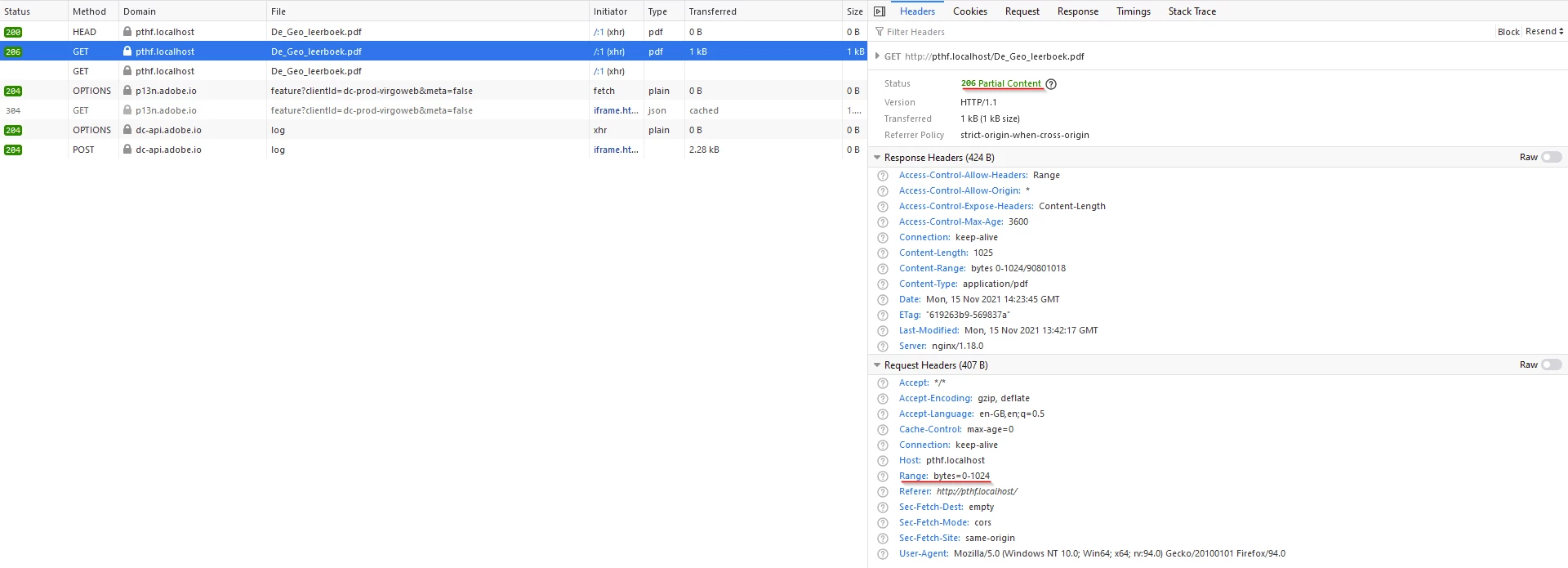
When looking at the network stack, I can see that the document is initially returning a 206 Partial Content with the first 1024 bytes but nothing is actually shown until the remainder of the document is transferred.
Hope someone can help me with this 🙂
 AdChoices