
Inspiring
February 21, 2018
Question

Acrobat doesn't recognize aliases as legitimate files

  • February 21, 2018
  • 1 reply
  • 405 views

When using Combine Files into a Single PDF, Acrobat doesn't recognize aliases as legitimate files. This happened when we upgraded to Yosemite. (Acrobat version 10.1.6). Is there a fix or setting that reverts it to the old behavior?
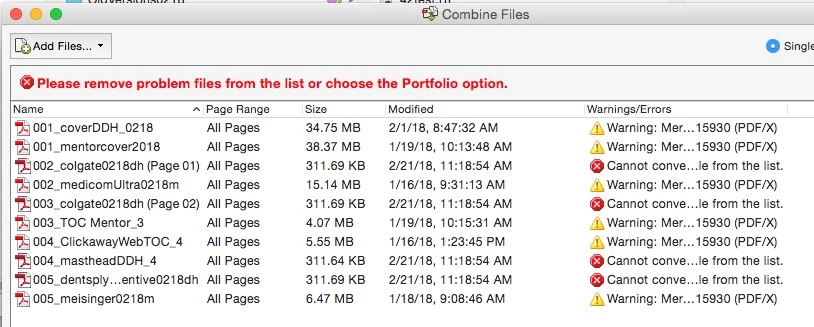
FYI, I have no control over the software/OS being used: I won't convince the company to spend tens of thousands of dollars to upgrade everyone to the latest versions of everything, so I'm hoping there's a fix that can work with our current versions.

This topic has been closed for replies.

1 reply

AnandSri
Community Manager
Community Manager
April 5, 2018

Hello Jfraze,

Sorry for the delayed response and inconvenience caused. Check for any pending updates of Acrobat 10 from help>check for updates, reboot the machine after installing the updates and see if this brings any difference.

Note: Acrobat 10 is already declared as End of Support product, End of Support means that Adobe no longer provides technical support or distributes runtimes. This policy affects product and security updates for all derivatives of a product or product version (localized versions, minor upgrades, operating systems, dot and double-dot releases, and connector products).

For detailed information refer to End of support for Acrobat X and Reader X

You may also refer to Adobe PDF conversion settings, Acrobat

Feel free to update this discussion for any further assistance.

Regards,

Anand Sri.