


Acrobat Icon Displayed Incorrectly
Hi all,
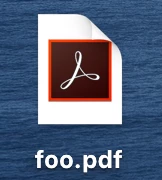
I recently brought a new mbp 16' Catalina 10.15.4. When I downloaded and installed Adobe acrobat, and set it as my .pdf default reader, the icon look like the attached (see below), which is clearly different from the "ACP_PDF.icns" file located at /Application/Adobe\ Acrobat\ DC/Adobe\ Acrobat.app/Contents/Resources/.
Even worse, I looked at the info.plist file and made sure CFBundleTypeExtentions uses the correct icon file for .pdf. It seems to me that it references the correct file, but it displayed incorrectly. Not sure if it's Apple's or Adobe's issue.
I wonder if anyone has similar problems before, if so, please share how to fix it.
BTW, this doesn't affect the usage of it, it just bothers me about the look of it since I'm used to the "correct" one for long.
Thanks.
 AdChoices