
Participant
August 30, 2018
Answered

Acrobat Pro 2017 "feature not included in license"

  • August 30, 2018
  • 2 replies
  • 3857 views

I previously had a subscription to CC, but I decided to go with a stand alone version of Acrobat Pro 2017 (Mac). The program has been activated, and is shown as active in my Acrobat Account. It was working for about 3 weeks, but now when I try to edit .pdf files it is telling me that "the feature is not included in my current Acrobat license." 

I spent about an hour doing on-line chat support tonight, and have uninstalled and reinstalled Acrobat Pro 2017 3 times. The support people wanted to have remote access to my computer which I can't do.  I've deleted everything I can find on the computer from Adobe and restarted, but it's still not working.

Help please!!
This topic has been closed for replies.
Correct answer Adorobat

Hi Rachelb,

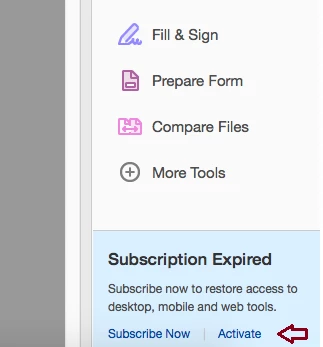
Could you check if you are getting message to activate the license in Acrobat (under the Tools pane) Below is the screenshot? If yes, try clicking on Activate and check if that works.

If that doesn't work, remove Acrobat using the steps given here:  Uninstall or remove Creative Cloud apps

Uninstall Creative Cloud app using the steps given here: Uninstall the Adobe Creative Cloud desktop application

Then, install Acrobat using this link: Download Acrobat 2017

You need your Acrobat 2017 serial number to complete the installation.

-Shivam

2 replies

Participant
August 30, 2018

The license is active--at least according to what I am seeing in my account. I am not seeing anything to activate the license. It seems like Creative Cloud on the computer is overriding everything else and it wants me to resubscribe to Creative Cloud and will not let me use Acrobat Pro 2017. I also cannot uninstall Creative Cloud from the machine.

Adorobat
AdorobatCorrect answer
Participating Frequently
September 3, 2018

Hi Rachelb,

Could you check if you are getting message to activate the license in Acrobat (under the Tools pane) Below is the screenshot? If yes, try clicking on Activate and check if that works.

If that doesn't work, remove Acrobat using the steps given here:  Uninstall or remove Creative Cloud apps

Uninstall Creative Cloud app using the steps given here: Uninstall the Adobe Creative Cloud desktop application

Then, install Acrobat using this link: Download Acrobat 2017

You need your Acrobat 2017 serial number to complete the installation.

-Shivam

Adorobat
Participating Frequently
August 30, 2018

Hi Rachelb,

As per the issue description mentioned above, you are facing issue with Acrobat's license on the machine, is that correct?

As we have checked the account details using the email address you are logged into the forums, you have a perpetual license for Acrobat Pro 2017. Could you let us know if you are getting a message to activate the license? If yes, try clicking on "Activate" and see if that brings any difference.

Let us know if you need any help.

Shivam