annaj32662383
Participant
August 2, 2017
解決済み

Acrobat Pro 9 Runtime Error

  • August 2, 2017
  • 返信数 1.
  • 5414 ビュー

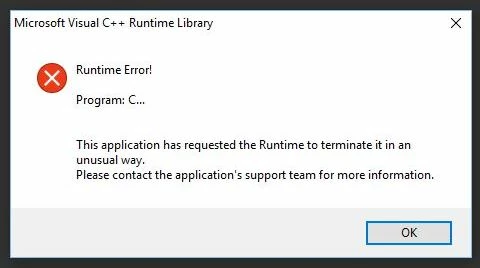
I'm having issues with 2 different installs of Adobe Acrobat 9. I get the following error about 2 seconds after launching the program:

One serial number is installed on a system running windows 7 and the other on Windows 10.

I've contacted support and they've directed me here.

thanks in advance!

このトピックへの返信は締め切られました。
解決に役立った回答 AnandSri

Hi Anna,

Sorry for the delay in response to your query.

As per the issue description, you are getting Microsoft Visual C++ Runtime error after launching Acrobat Pro 9.

For Windows 7, please follow the steps in the following link for troubleshooting: https://helpx.adobe.com/acrobat/kb/runtime-error-roaming-profile-workflows.html

Acrobat Pro 9 is not supported on Windows 10 OS.

You can try to repair the Microsoft Visual C++ files in Control Panel\All Control Panel Items\Programs and Features

Highlight the Microsoft Visual C++ files, Right Click > select Change and then Choose Repair.

You have to repair all the listed Microsoft Visual C++ files.

Once you have repaired the files, please reboot the machine and check.

Please keep us posted with the results.

Regards,

Anand Sri.

[Moving the thread into Acrobat General Troubleshooting]

返信数 1

AnandSri
Community Manager
AnandSriCommunity Manager解決!
Community Manager
August 8, 2017

Hi Anna,

Sorry for the delay in response to your query.

As per the issue description, you are getting Microsoft Visual C++ Runtime error after launching Acrobat Pro 9.

For Windows 7, please follow the steps in the following link for troubleshooting: https://helpx.adobe.com/acrobat/kb/runtime-error-roaming-profile-workflows.html

Acrobat Pro 9 is not supported on Windows 10 OS.

You can try to repair the Microsoft Visual C++ files in Control Panel\All Control Panel Items\Programs and Features

Highlight the Microsoft Visual C++ files, Right Click > select Change and then Choose Repair.

You have to repair all the listed Microsoft Visual C++ files.

Once you have repaired the files, please reboot the machine and check.

Please keep us posted with the results.

Regards,

Anand Sri.

[Moving the thread into Acrobat General Troubleshooting]