
Participant
January 17, 2017
Answered

Acrobat Standard DC always scans both sides

  • January 17, 2017
  • 1 reply
  • 2986 views

I have an Epson 3620 printer dedicated to our receptionist and two Epson 3640 printers that are used by several people.  All have Acrobat Standard DC. When they scan documents the printer always scans both sides, no matter what the setting is in Acrobat.  It doesn't happen when I use the Epson Scan app, so Epson says it's not their problem.

??
This topic has been closed for replies.
Correct answer Lovekesh Garg

You must be doing things correctly. But just for confirmation and find out the root cause, can you please do me a favor.

As per the steps and screen, you shared there seems a mismatch.

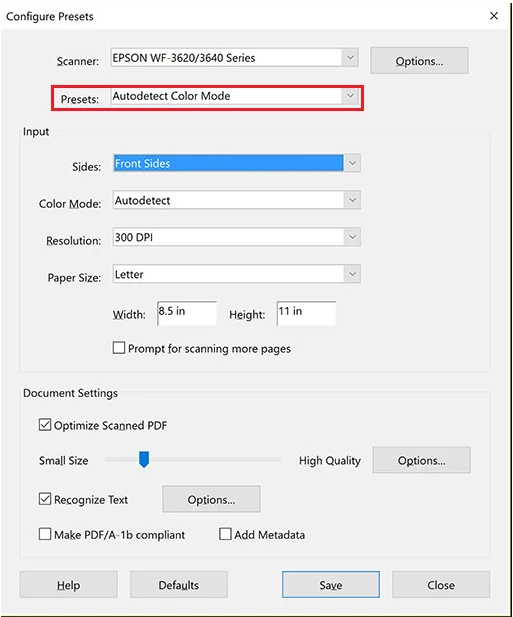
On 'configure preset' dialog you changed settings for 'Autodetect color mode' but while scanning you used Grayscale preset.

All of these presets are independent. Changing any value in once won't effect other. So if you want to scan with Grayscale Document' preset, you need to select 'Front side' for Grayscale preset.

Go to 'Configure preset' and on the dialog change preset which you want to scan with(say Grayscale document). Change settings now and save. Scan now with same preset for which you made changes and it will reflect in your scanning.

1 reply

Lovekesh Garg
Adobe Employee
Adobe Employee
January 18, 2017

In Acrobat we have an option to scan front side or both side. So can you please confirm at what settings you are scanning. Please share the screens of settings you are scanning with.

If you are scanning from any preset like (Autodetect color mode, Greyscale Document etc), all of these have different settings. You will need to change the setting of that preset on clicking (*) in front of that preset.

Thanks.

Participant
January 18, 2017

Don't believe me, hum?  <grin>

I clicked Save | Close | Create | PDF from Scanner | Grayscale.

It scanned both sides.

Lovekesh Garg
Adobe Employee
Lovekesh GargCorrect answer
Adobe Employee
January 19, 2017

You must be doing things correctly. But just for confirmation and find out the root cause, can you please do me a favor.

As per the steps and screen, you shared there seems a mismatch.

On 'configure preset' dialog you changed settings for 'Autodetect color mode' but while scanning you used Grayscale preset.

All of these presets are independent. Changing any value in once won't effect other. So if you want to scan with Grayscale Document' preset, you need to select 'Front side' for Grayscale preset.

Go to 'Configure preset' and on the dialog change preset which you want to scan with(say Grayscale document). Change settings now and save. Scan now with same preset for which you made changes and it will reflect in your scanning.