

Acrobat X Pro vs. Acrobat DC - Cut/copy/paste of text boxes
So I'm running into a fundamental change between the two products. TO BE CLEAR - NEITHER PRODUCT IS READER - These are full versions.
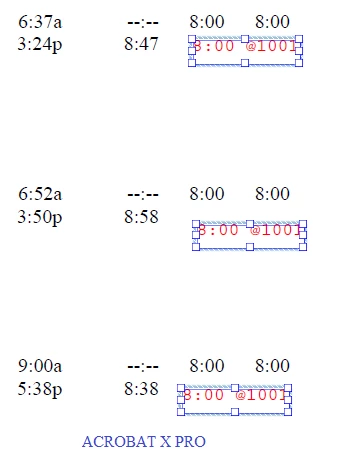
In Acrobat X Pro, I was able to select several text boxes at a time. I would enter the five text boxes onto the page, select them, copy them and paste them onto a new document.
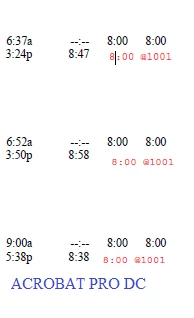
In Acrobat DC, If I select a text box, the cursor immediately shifts to and I bar for highlighting the individual text, not allowing me to select the text box itself.
As the images below show, the DC Pro on the left only places the I cursor in the text box (second row, the red 8:00).
The second image to the right allows for the 3 text boxes to be selected, copied and pasted into a new document.
how do I select the text boxes in Acrobat DC pro?
 AdChoices