
Participating Frequently
November 20, 2010
Answered

Acrobat X Std - Crop margin options grayed out

  • November 20, 2010
  • 6 replies
  • 35686 views

My scanner creates 8.5x14" scans which in Acrobat 9 I just cropped to 8.5x11" by selecting "Constrain Proportions" and setting "Bottom:" to 3".

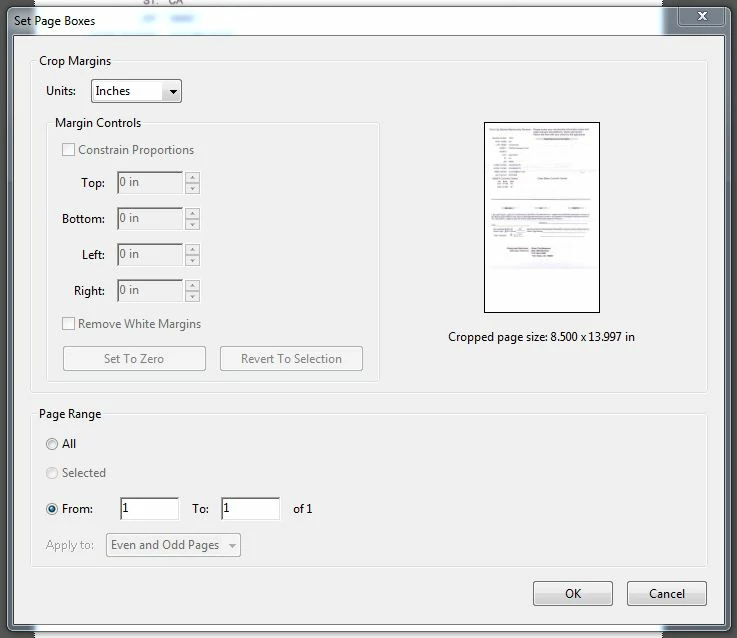
When I try the same thing with Acrobat X, the entire Crop page is grayed out. I've looked and can't find a configuration problem. What am I missing?
    This topic has been closed for replies.
    Correct answer Hitender_Prakash

    Hi ,

    Please update your Acrobat X Std. to 10.1.0 either by clicking Help > Check for Updates (from within the application) or download and install the patch from http://www.adobe.com/support/downloads/thankyou.jsp?ftpID=5135&fileID=4771

    The issue is resolved in Acrobat 10.1.0

    Hopefully this should resolve the issue.

    6 replies

    Participating Frequently
    August 7, 2011

    Hello, woodp et al.      

         I am having the same problem with the same program.  It happens whenever I try to crop, regardless of--

              (a)     Whether I am cropping a newly created PDF, a PDF created some time ago with Acrobat X Std, or a PDF created with Acrobat 5.0 (as shown in the screen shot); and

              (b)     Whether I get to "Set Page Boxes" by double-clicking on the image directly after clicking the crop tool button (as shown in the screen shot) or by first doing the click-and-drag dance to crop the image to approximately the size I want. 


    This is a big productivity issue: 

    • I scan and save a lot of documents, very few of which are larger than 8.5 x 11 inches.
    • I am yet to find a way to configure the paper-size preset, which toggles between "Automatic" (i.e., 8.5 x 14 inches) and Nothing (both with the Width and Height greyed out).
    • To crop the bottom of a single page by 2.88 inches to get it to 11 inches with click-and-drag cropping (to include displaying the ruler, which must be done each and every time I start Acrobat) takes dozens of seconds, while using the crop margin feature (judging from my experience in Acrobat 5.0, where the key sequence is Shift/Ctrl/t ==> Alt/b ==> 2.88 ==> [Enter] ==> [Enter]) would take just seconds.  

         As I understand the history, since you first reported this problem 14 posts and nearly ten months ago, other users have reported the same problem, and Adobe has issued several updates--yet the bug remains.  Does no one from Adobe monitor this forum?

         Adobe premeditates its products' obsolescence by making backward compatibility an unattainable daydream, thus conscripting buyers of its newer products to proliferate no-longer-fully portable documents produced with the newer versions, which by their growing predominance force its original customers to continually buy ever-more expensive, memory-intensive, and clunky products (Do any other dinosaurs survive out there who might remember, for instance, how quickly one could insert form fields on the fly in 5.0?).  The least Adobe could do is make even a head fake toward caring whether its marketing strategy also robs customers of productivity--because time really is the one asset one can never recoup.  Because it apparently will not, I remain

    RFTorqued. 

    woodpAuthor
    Participating Frequently
    August 7, 2011

    RFTorqued,

    Your description sounds exactly like mine, except that ... about a month ago the scan cropping ability suddenly started working! I only use the functionality every 2-3 weeks so I don't know exactly when it happened or what caused it. I can only guess - There were Windows 7 updates, I know I reinstalled the Acrobat software *and* the printer driver because of a driver conflict with Quickbooks' PDF driver. Did I fix it or did an Adobe update fix it? I have no idea. Sorry.

    I wish I had a better answer for you. Do you have Quickbooks installed?

    Hitender_PrakashCorrect answer
    Adobe Employee
    August 8, 2011

    Hi ,

    Please update your Acrobat X Std. to 10.1.0 either by clicking Help > Check for Updates (from within the application) or download and install the patch from http://www.adobe.com/support/downloads/thankyou.jsp?ftpID=5135&fileID=4771

    The issue is resolved in Acrobat 10.1.0

    Hopefully this should resolve the issue.

    Participant
    May 26, 2011

    Acrobat 10 works a bit differently.  First you have to add the CROP icon to your toolbar.  Click on the Gear looking icon "Custom Quick Tools".  Select TOOLS - PAGES - CROP.  Add it to the left by either double clicking on it or selecting the left arrow.   Now open the pdf document you want to crop.  Click on the CROP icon on the toolbar.  Click on the image at the upper left part you want to crop. Drag the blue screen over the image you want to keep. When you let go of the mouse, you can make any minor adjustments.  Then double click on the image. (You can not make changes here-as in previous Acrobat versions)  Click OK.  Save the image that is now cropped.   (I then save the image as a png).

    woodpAuthor
    Participating Frequently
    May 26, 2011

    Nope, that doesn't make a difference. There's no argument that the cropping tool works - You can select it and drag the blue box over the target document and crop your selection.

    What we're asking about is why the Margin Controls in the subsequent Set Page Boxes window are grayed out. Specifically I want to trim my scanned page to 8.5x11 inches. In Acrobat 9, you could use the Margin Control boxes - In Acrobat X they're grayed out.

    Participant
    January 21, 2011

    I'm having the same problem. This was not an issue on the Acrobat X Pro version that I trialed, but it is on the Standard version. Does anyone know if Adobe has limited this feature to the Pro? (If so, it's another outrageous example of functionality removed between Acrobat 9 and X Standard).

    Participant
    January 21, 2011

    Just saw this discussion of the same problem on another forum, which indicates this is an unintentional bug in Acrobat X Standard:

    http://printplanet.com/forums/adobe/24515-crop-tool-problem-acrobat-x-standard

    woodpAuthor
    Participating Frequently
    January 21, 2011

    So the good news is that it's a known issue and will be fixed? The bad news is that it's been 60 days and *no* patch has been delivered ...

    The comment from Leonardr at printplanet.com is confusing. He claims there are two crop tools, "Crop Pages" and "Set Page Boxes," but at least on my installation, I see a "Crop Pages" link which takes me to "Set Page Boxes"... and it's exactly the "Set Page Boxes" that has the grayed out. I have a feeling he is trying to be helpful but doesn't have a copy of X STD himself ...

    woodpAuthor
    Participating Frequently
    December 11, 2010

    Bump. This one is still frustrating me.

    MichaelKazlow
    Legend
    December 11, 2010

    Do you have Acrobat X and 9 installed on the same machine?

    woodpAuthor
    Participating Frequently
    December 11, 2010

    Do you have Acrobat X and 9 installed on the same machine?

    No, as a matter of fact, Acrobat X was installed on a fresh Win7 installation.

    Inspiring
    November 22, 2010

    Did the file some how get converted to a PDF/A. If so, you need to get out of that mode to edit the document in any way. I suspect that OCR is also greyed out.

    woodpAuthor
    Participating Frequently
    November 22, 2010

    If the file was somehow converted to PDF/A, I'm not certain how. Here's my scanner's "Configure Presets" page:

    And going through the preferences settings didn't yield much to go on either - The only PDF/A setting I found was on this page and it seems appropriate. I did try toggling it, but it made no difference.

    Any help is appreciated!

    Participating Frequently
    December 12, 2010

    I see that the option to set the height and width in "Configure Preset" window is also greyed out. Click on the Options button next to your scanner name. This will give an option to show the Scanner Interface. Change the document size from 8.5x14 to 8.5x11in the scanner interface. Then scan the document.

    AbhigyanModi
    Community Manager
    Community Manager
    November 22, 2010

    Does it happen on all documents, or just the documents from that scanner. If later, can you post a sample document for us to see.

    woodpAuthor
    Participating Frequently
    November 22, 2010

    No, it happens with all my documents - I went back and found documents I created with acrobat 8 and 9, both scanned and Office-generated acrobat files. In each case, the "Set Page Boxes" opens with almost every option grayed out.