
Participating Frequently
April 2, 2017
Answered

Action: all colored text to grayscale

  • April 2, 2017
  • 2 replies
  • 2211 views

From what I can read online, transforming all the colored text (and not the figures) within a pdf to pure black text (with Acrobat 11 or Acrobat DC) is not possible at this time. This is sad but this is ok. In order to go from colored text to grayscale text, I use the Tools -> Convert Colors toolbox and click on what's indicated in the below figure. It looks like this cannot be automated with a customized action. Is this true? If yes, could this be replaced by a Javascript script (available as a tool to be added in the Action Widzard) that would do the same? Thanks
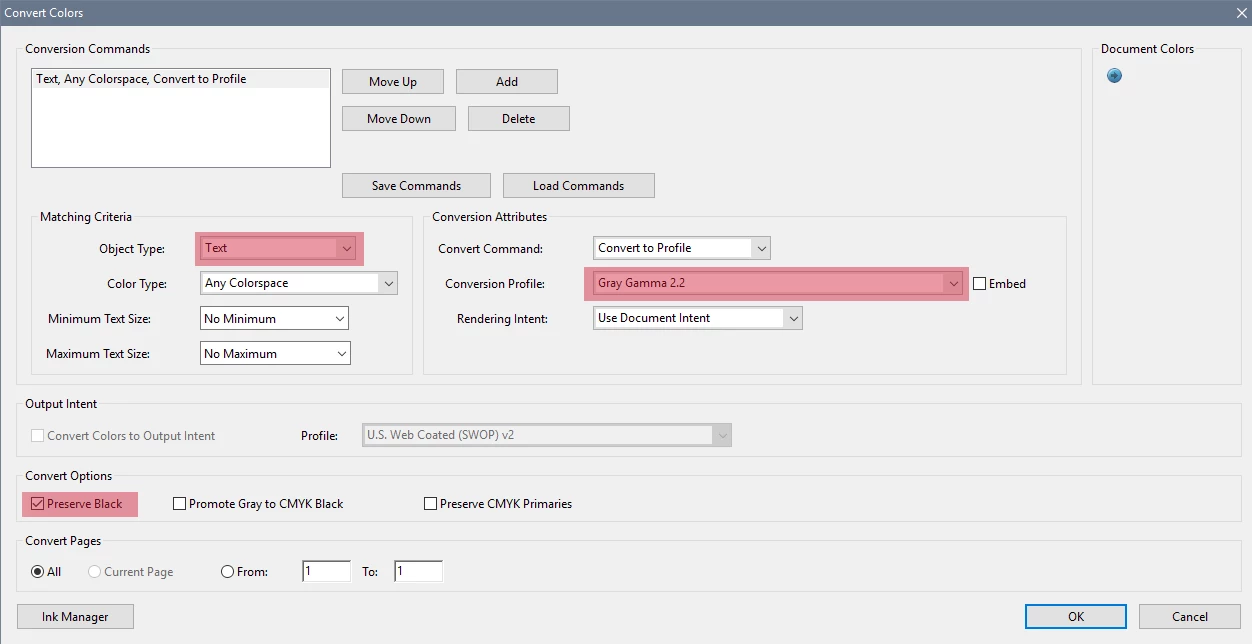
This topic has been closed for replies.
Correct answer Karl Heinz Kremer

Take a look here for instructions about how to do this in an Action: Convert Documents to Grayscale in an Acrobat Action - KHKonsulting LLC

Because you only want to convert text, you need to combine this with the method I describe here to selectively apply a change only to a subset of elements: Remove Content from PDF Files Using Acrobat's Preflight - KHKonsulting LLC

2 replies

Karl Heinz  Kremer
Community Expert
Karl Heinz KremerCommunity ExpertCorrect answer
Community Expert
April 2, 2017

Take a look here for instructions about how to do this in an Action: Convert Documents to Grayscale in an Acrobat Action - KHKonsulting LLC

Because you only want to convert text, you need to combine this with the method I describe here to selectively apply a change only to a subset of elements: Remove Content from PDF Files Using Acrobat's Preflight - KHKonsulting LLC

Participating Frequently
April 2, 2017

ok, so I could create a custom Preflight fixup and a Preflight profile to be inserted in an Action. This works well and all the colored text is now converted into gray scale as expected. Do you think text conversion to pure black using a similar approach (some high level customized fixup) would be possible as well?

Karl Heinz  Kremer
Community Expert
Community Expert
April 3, 2017

You may be able to create a custom ICC profile that maps all colors to black, but that's rather complicated, and I am not aware of any existing profile you could use.

try67
Community Expert
Community Expert
April 2, 2017

I think the easiest way of doing that is to create a Preflight Profile that converts the file to grayscale using the desired preferences and then executing it using the preflight method of the Document object.