


- Home
- Acrobat
- Discussions
- Re: Adobe 10.1.7 will not close in task manager af...
- Re: Adobe 10.1.7 will not close in task manager af...

Copy link to clipboard
Copied
Hello,
Updated to 10.1.7 and noticed that when you close the program an instance of acrobat stays open in task manager with high 50%+ cpu usage. Will not close at all unless you end task. if you open adobe again a new instance opens again consuming more cpu and cripples the machine with high cpu. This is on win 8 64bit machine. Had the previous release 10.1.6 working for some time on the same machine with no issues.
Thank you in advance




Copy link to clipboard
Copied
Rollback procedure for me
1/
Uninstall Acrobat X
2/
Used my initial installationfile of AcrobatX 10.0.0
3/
Downloaded update for 10.1.5 from ftp://ftp.adobe.com/pub/adobe/acrobat/win/10.x/
List of compatible updates are found here; http://helpx.adobe.com/acrobat/release-note/release-notes-acrobat-reader.html
 99
Replies
99
99
Replies
99



Copy link to clipboard
Copied
Can I see a screenshot of the Registry key on the computer with the problem:
HKEY_CURRENT_USER\Software\Microsoft\Windows NT\CurrentVersion\AppCompatFlags\Layers
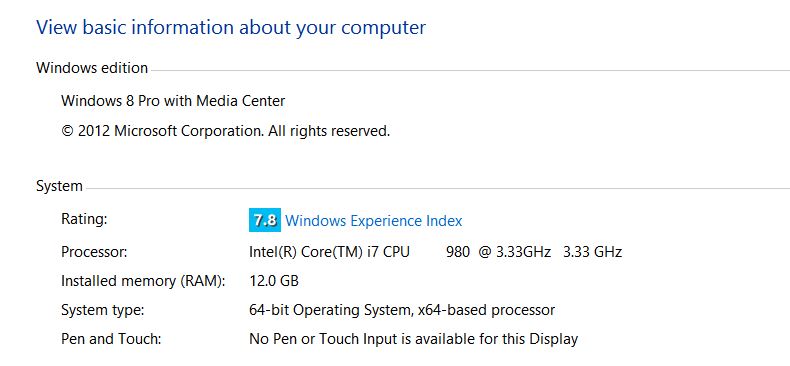
What operating system are you using?

Copy link to clipboard
Copied
OK Here is a copy of the Registry
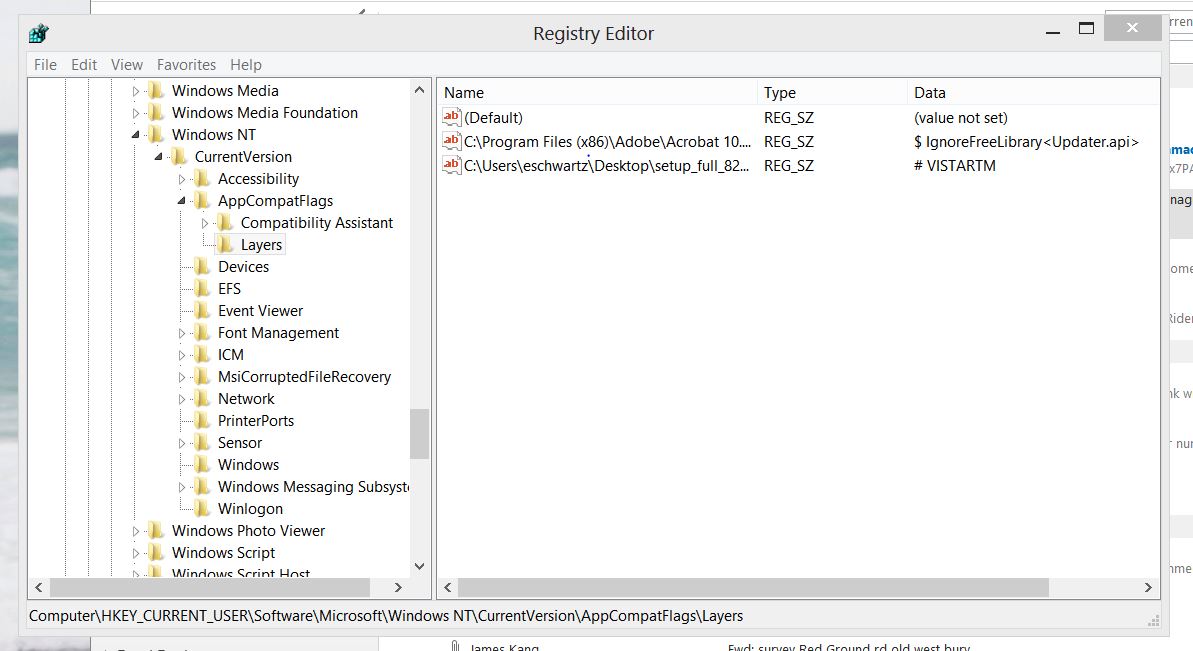
Now please understand that I deleted the registry entry a few days ago and obviously Acrobat recreated it again.
Here is a copy of the registry just now when I deleted the entry once again.

As you can see I properly deleted it, as I did the first time.
Please help with a final resolution to this.
Thanks.
Copy link to clipboard
Copied
Something Adobe recreated this entry, I Certainly did not add the entry on my own!

Copy link to clipboard
Copied
Strange...
I would re-install the app fresh and delete the key thereagain.
Copy link to clipboard
Copied
Windows 8
Copy link to clipboard
Copied
You may need to disable your Application Compatability Engine. Not quite so good would be to set "Program Compatibility Assistant Service" to Manual.
It's unlikely that Adobe recreated the Registry Key unless you reinstalled the program.

Copy link to clipboard
Copied
Thank goodness for the internet!
I'm an admin assistant/spontaneous tech help for a team, and one coworker has been having this exact problem-- I was amazed to find so many others having the same issue AND a solution that so far seems to be working.
I will note, I also had trouble finding the location in regedit-- It wasn't showing "layers", but I found it under "store." So if anyone is missing it, look for that instead.
I'll be following this thread in case any new updates comes up, cause this has been such a ridiculous problem! Thank you everyone for all the work you've been putting in, it makes a huge difference.

Copy link to clipboard
Copied
When you run Acrobat XI Pro as administrator this will reduce the redundant processes.
Example: Opening 10 PDF files and then closing them. At my machine (WIN8) either all processes close or only one acrobat process stays open.
Go to
C:\Program Files (x86)\Adobe\Acrobat 11.0\Acrobat
right mouse click on Acrobat.exe
select PROPERTIES
Select tab COMPATIBILITY and set
PRIVILEGE LEVEL to Run as administrator mode.
Hope this helps.
Copy link to clipboard
Copied
I recieved an email from the same end user that I fixed previously. It's back!
The first thing I did was look for the registry entry, lo and behold there it was, back in the same location.
I asked him if he had done any updates and he said no.
I deleted the regitry entry and problem solved... for now.

Copy link to clipboard
Copied
After installing the newest update of the Acrobat Reader (11.0.4) I encouter the same problems. Starting a Reader process and closing the program results in an Adobe ghost process, consuming one CPU almost completely.

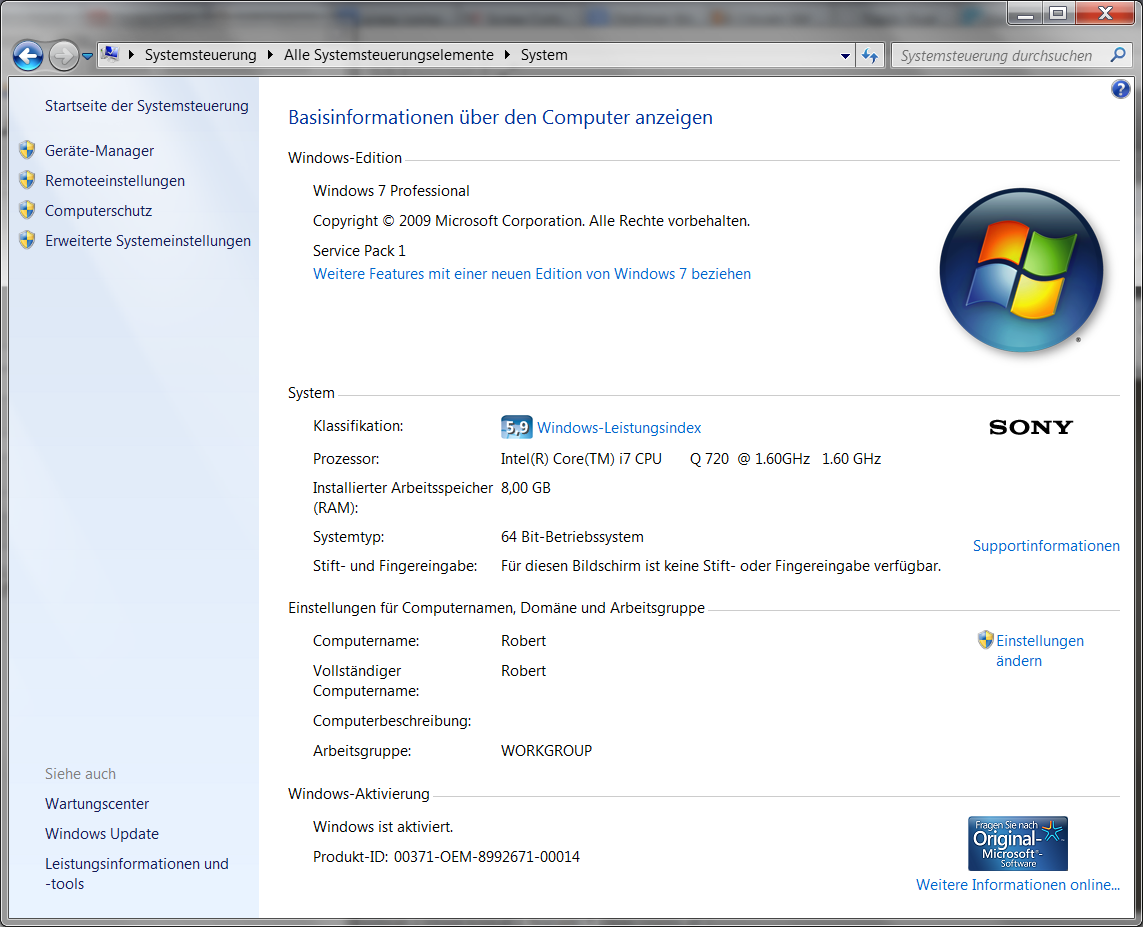

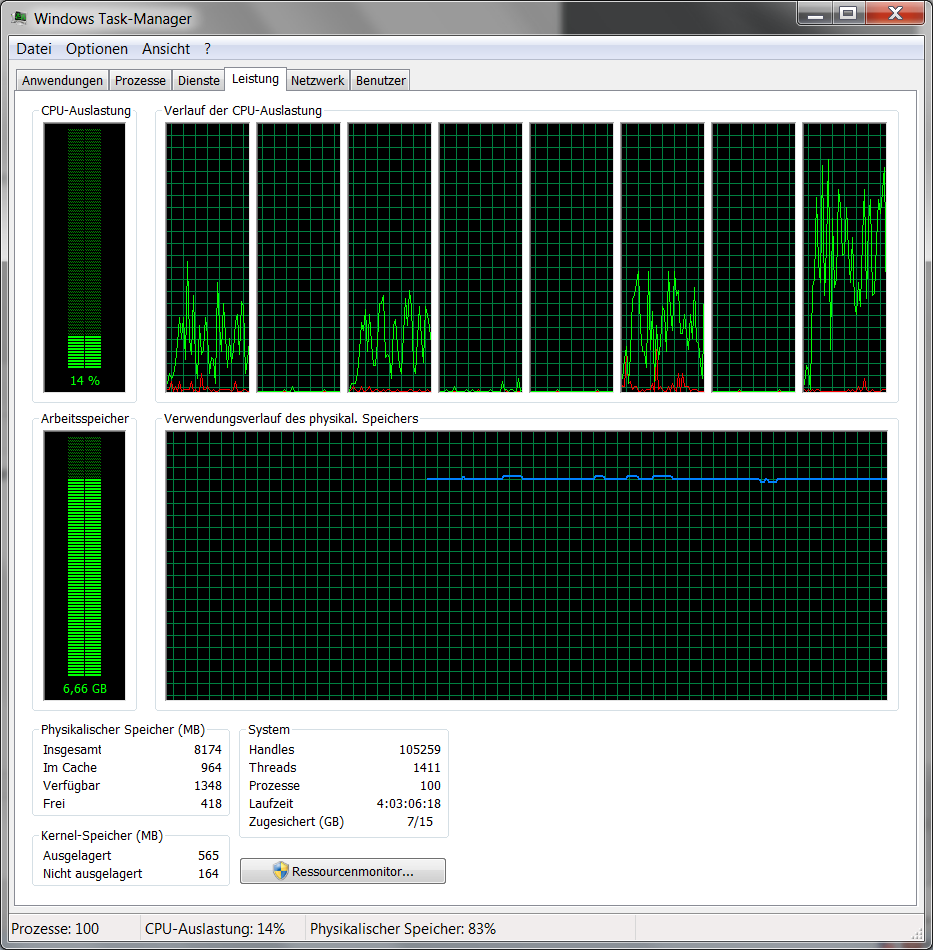
Playing arounf with this for a while, Adobe Reader strated to create two processes when started, leaving them both active after program termination, while one of the two consumes the CPU:
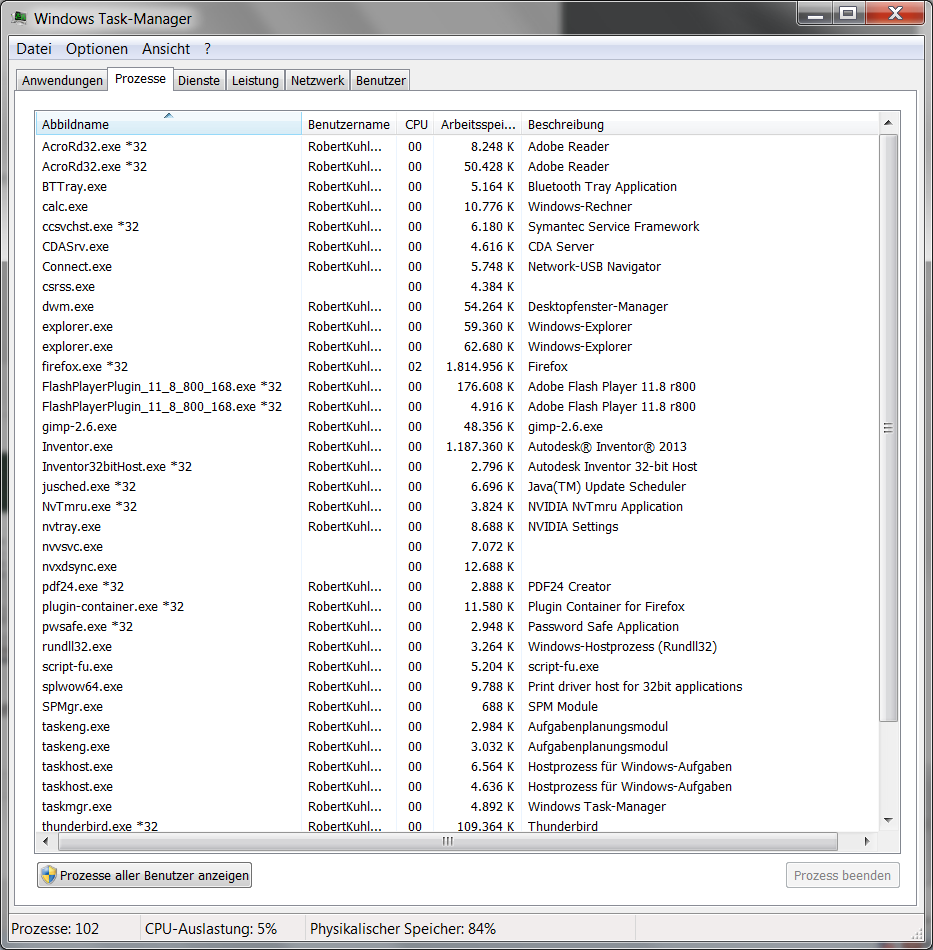

Stopping one of the two Adobe-processes stops them both.
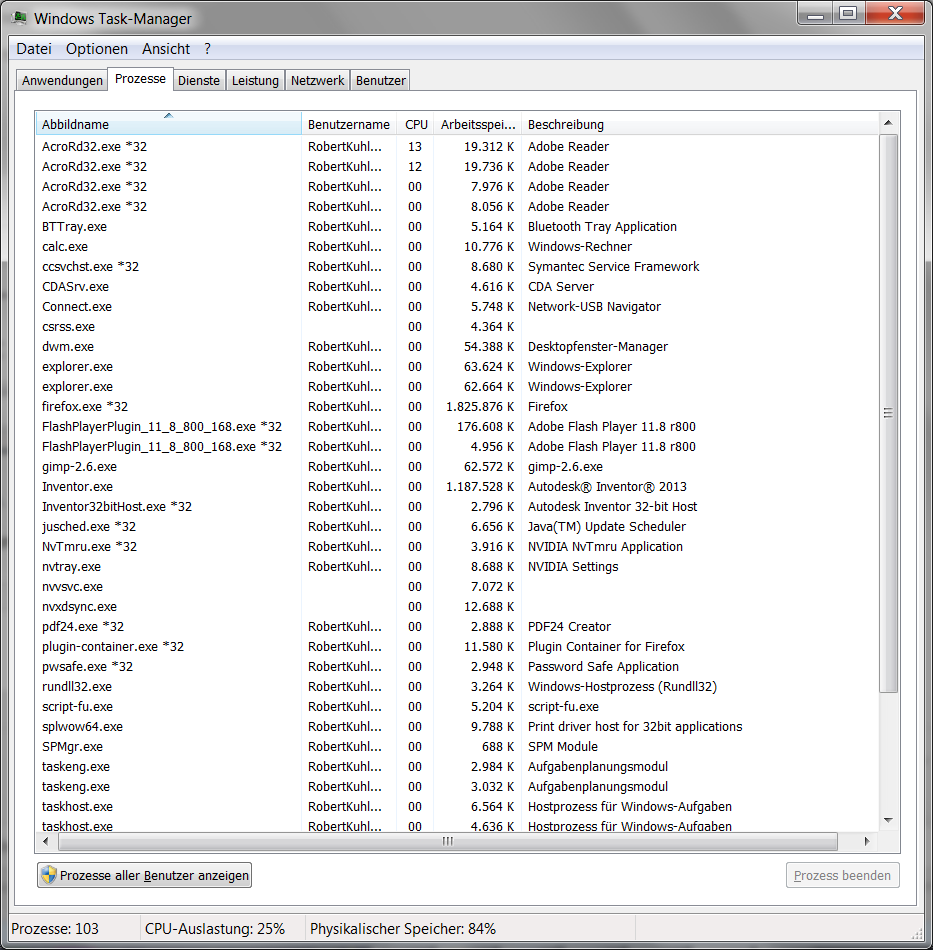
Starting the REader and stopping it within the first few seconds doesn't leave the ghost processes active and anything looks normal.
Several starts, each having a minimum of 10 seconds activity before beeing closed, give several CPU and memory consuming ghost processes:
And here's the section of my registry, that was mentioned in this thread. I can't see any Adobe netry in there:
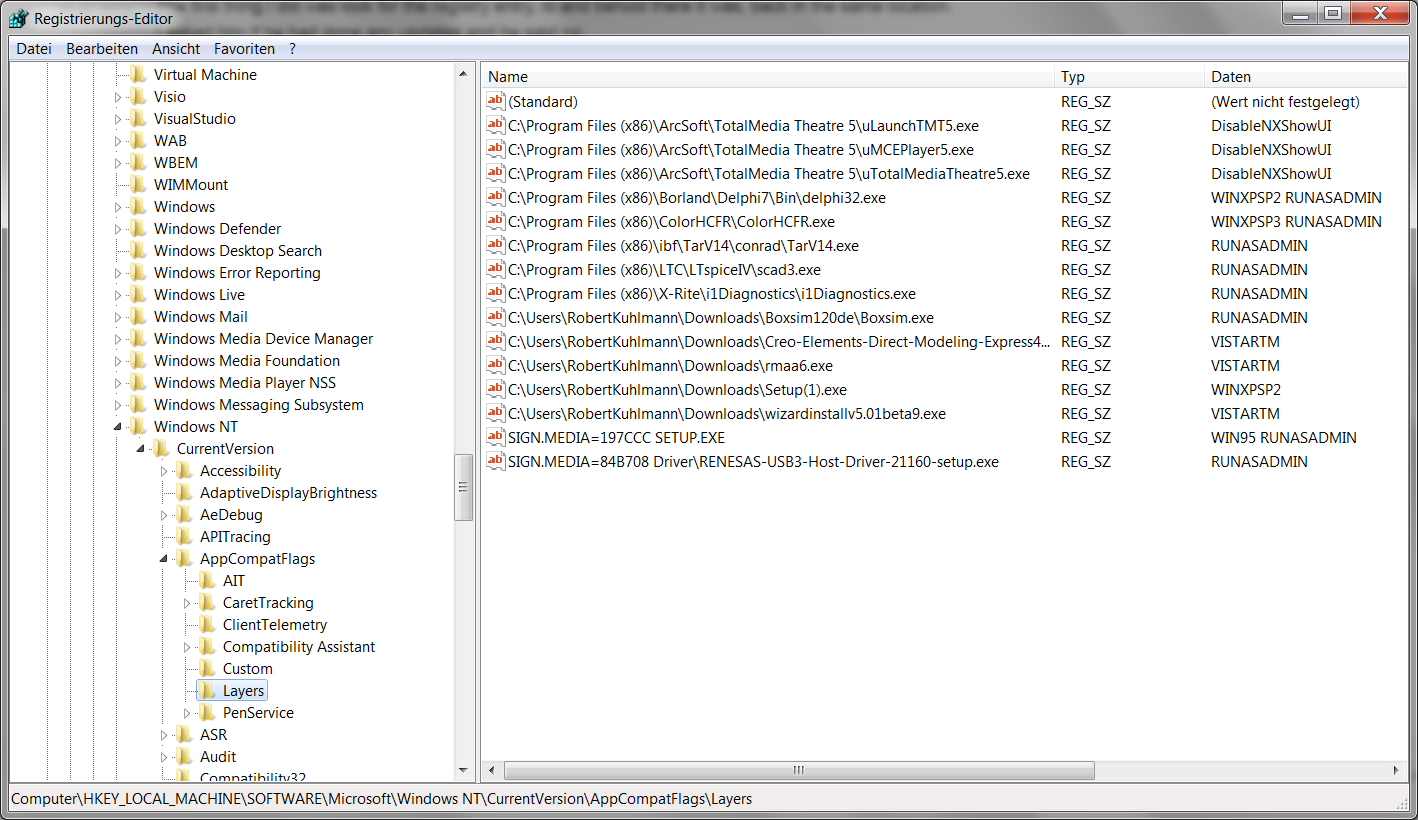
I can't find the entry, that should be deleted and can't solve the problme this way, obviously.
By the way: Did you notice that there are two Flash Player instances in my memory too? That without using any Flash Player actually?
I think you at Adobe have some real big problems with your products and have to fix them as soon as possible. And don't tell me it's my system setup or hardware.
Regards
Robert Kuhlmann
Copy link to clipboard
Copied
It came back again (a month later). So I created a startup script that deletes that registry entry.
Put this registry key in shell:startup
The only annoying part is if UAC is turned on, each time the user logs in they are prompted to allow/disallow the system change.
Windows Registry Editor Version 5.00
[HKEY_CURRENT_USER\Software\Microsoft\Windows NT\CurrentVersion\AppCompatFlags\Layers]
"C:\\Program Files (x86)\\Adobe\\Acrobat 10.0\\Acrobat\\Acrobat.exe"=-
Copy link to clipboard
Copied
jmccracken112112 wrote:
It came back again (a month later). So I created a startup script that deletes that registry entry.
...
Because the entry doesn't exist on my machine, its elimination isn't possible and setting its default to "-" doesn't solve my problem.
What really makes me nervous arethe two instances of the Reader after just one program start. And the additional Flash player processes as well.
Maybe these are the NSA-Listener-Ports, Adobe has to install on any german computer? 
Just kidding. But seriously: Adobe! Solve this problem! Soon!
Copy link to clipboard
Copied
I also have this problem, but I have traced it to the installation of a 3rd party plugin, PDF Snake. If I remove the plugin from the plugin folder, Acrobat closes without the extra files running in the background. I now only move PDF Snake plugin into the folder when I need to use it and move it out when I'm not using it. I have contacted the company that makes PDF Snake about the issue, however, I suspect from the volume of complaints on this thread, that there may be other plugins or addons or even additional software on various computers that is triggering the same behavior that I am getting when PDF Snake is installed. I'd love to know what exactly is causing the issue because it's a real inconvenience to have to keep moving that plugin around. I have it because I need it frequently.
I am also running Windows 8 64 bit with the latest patch of Acrobat Pro.
Copy link to clipboard
Copied
It seems, that my identical problem ("forgotten" Readers in Taskmanager) is not related to Plugins.
But see:
Consuming CPU-time after closing Adobe Reader
May be that solution fits for some one too.

Copy link to clipboard
Copied
Yes. This Registry fix works for me (windows 8, acrobat XI).
Copy link to clipboard
Copied
This seems to have worked for me adobe 10.1.7 in a windows 8.1 pro preview

Copy link to clipboard
Copied
How do launch Regedit? I am not a computer wiz but should be able to perform this fix
Thanks,
Shawn
Date: Fri, 5 Jul 2013 01:35:54 -0700
From: forums_noreply@adobe.com
To: smcdougall6@hotmail.com
Subject: Adobe 10.1.7 will not close in task manager after you exit the program. High cpu
Re: Adobe 10.1.7 will not close in task manager after you exit the program. High cpu
created by slselwyn in Acrobat Installation & Update Issues - View the full discussion
A possible solution. I have been given this to try by Adobe tec support after providing them with some information and it has worked for the last few days. I have no idea what it is meant to do but it seems to have solved the problem.
If you have Acrobat 11.0.3 or 10.1.7 installed, and are seeing the issue, can you please following the steps:
Launch Regedit. OK on the UAC dialog if asked. Navigate to the key Under this key, find a value that matches the Acrobat.exe installation location on your machine. For example, it could be ""C:\Program Files (x86)\Adobe\Acrobat 11.0\Acrobat\Acrobat.exe"". Delete just this value (for Acrobat.exe) by right-clicking on the value, and select delete. Bakup either the registry or that key before carrying this out depending on your level of confidence working with the registry and please feedback if it works for you.
Please note that the Adobe Forums do not accept email attachments. If you want to embed a screen image in your message please visit the thread in the forum to embed the image at http://forums.adobe.com/message/5478517#5478517
Replies to this message go to everyone subscribed to this thread, not directly to the person who posted the message. To post a reply, either reply to this email or visit the message page:
To unsubscribe from this thread, please visit the message page at . In the Actions box on the right, click the Stop Email Notifications link.
Start a new discussion in Acrobat Installation & Update Issues by email or at Adobe Community
For more information about maintaining your forum email notifications please go to http://forums.adobe.com/message/2936746#2936746.

Copy link to clipboard
Copied
Hi wa2pyq2,
I apologize for all the trouble. I have not seen this issue before. We did perform some tests in-house, but were unable to replicate the issue. Likely someone needs to work with your IT person individually. Please have jmccracken112112 open a case with Adobe Support contact info provided when you purchased Acrobat XI Pro.
Regards, Stacy

Copy link to clipboard
Copied
Stacy,
It is frustrating that Adobe will not even acknowledge this is an issue. As you can see from this discussion thread dating back to May 17, 2013, wa2pyq2 is not the only one experiencing this problem. Obviously, there are many others, including myself and my co-workers. It shouldn't be that difficult for Adobe to replicate the problem in-house.
I have tried the work-around solutions that other users have suggested, without success.
If Adobe is not going to even attempt to fix this bug, then I will look for alternative software for my PDF needs.
Windows 8 Pro, 64bit, with Adobe Acrobat 10.1.7 installed here.
Copy link to clipboard
Copied
I agree at 100% with KCRCPA.
Windows 8 Pro, 64 bit, with Adobe Acrobat 11.0.03 installed here.
P.S. I just opened Adobe Acrobat without opening any PDF document just to check my current version and guess what? Closing Adobe Acrobat my CPU usage goes to 60% on Adobe Acrobat process.
Copy link to clipboard
Copied
Hi KCRCPA,
Thank you for your feedback. Everyone's feedback! Please do not think I as a representative of Adobe am denying there is an issue. I am simply doing what I can to find a fix. Once wa2pyq2's IT department works with our folks - we can find the solution. Then I can come back here and let everyone know what it is.
Regards, Stacy

Copy link to clipboard
Copied
I am having the exact same problem. I'm using Windows 8 Pro 32bit on a Dell Insprion. How do I fix this issue? or go back to the previous version?
Copy link to clipboard
Copied
I am having a similar performance slowdown since the upgrade to 10.1.7, but I am using Win 7 64-bit. I process a lot of imagery and this is terrible... It is taking 10-20x longer to optimize pdfs.
SSD
i7-3770
16GB mem
Hope they fix this soon!
Doug

Copy link to clipboard
Copied
This post http://forums.adobe.com/message/4512061#4512061 (32) had an interesting solution for a similar problem with Adobe Reader 10; perhaps this could be adapted for Acrobat 10?
I cannot test this, as I do not experience that problem (using Acrobat 11 on Windows 7).
Copy link to clipboard
Copied
I have tried this "trick" as mentioned above without success.


Get ready! An upgraded Adobe Community experience is coming in January.
Learn more
 AdChoices