
Exit
  • Global community
    • Language:
      • Deutsch
      • English
      • Español
      • Français
      • Português
  • 日本語コミュニティ
  • 한국 커뮤니티
0

Adobe Acrobat Pro DC - can't edit text box

New Here ,
Jun 23, 2019 Jun 23, 2019

Hi All,

I'm currently trying to create an editable pdf wedding invitation. After creating the form, filling the text boxes, formatting, and saving I tried to edit the text boxes properties form "Edit PDF" option on the but look like my text boxes are not recognized, only clip art. When I try to select one of the text boxes, it selects the whole doc.

Do I miss something?

Thanks.

Best Regards
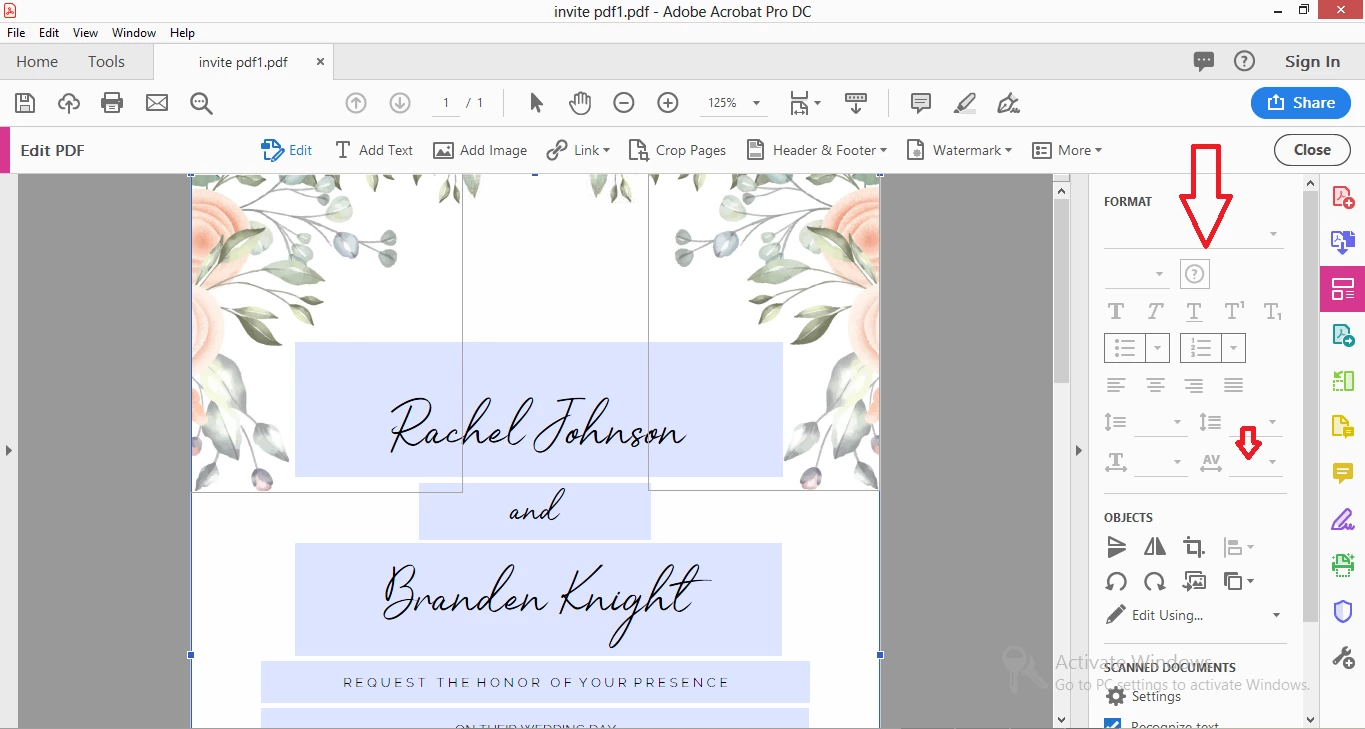
Capture.PNG

TOPICS
Create PDFs
6.5K
Translate
Report
Community guidelines
Be kind and respectful, give credit to the original source of content, and search for duplicates before posting. Learn more
community guidelines
LEGEND ,
Jun 24, 2019 Jun 24, 2019

Are these fillable form fields? If so you cannot use Edit PDF., which isn’t for form design or form filling. Just type to fill them.

Translate
Report
Community guidelines
Be kind and respectful, give credit to the original source of content, and search for duplicates before posting. Learn more
community guidelines
New Here ,
Jun 24, 2019 Jun 24, 2019

Thank you for your reply. yes, they are fillable form fields. The thing is I want to extend the spacing between the characters inside the text box using the AV option.  Any way to get around this?

Translate
Report
Community guidelines
Be kind and respectful, give credit to the original source of content, and search for duplicates before posting. Learn more
community guidelines
Community Expert ,
Jun 24, 2019 Jun 24, 2019
LATEST

You can try the rich text format in the text fields.

Translate
Report
Community guidelines
Be kind and respectful, give credit to the original source of content, and search for duplicates before posting. Learn more
community guidelines
Community Expert ,
Jun 24, 2019 Jun 24, 2019

For changing the form fields use Tools > Prepare Form

Translate
Report
Community guidelines
Be kind and respectful, give credit to the original source of content, and search for duplicates before posting. Learn more
community guidelines