jasons27876808
Participant
March 17, 2017
Answered

Adobe Acrobat Pro with the USPTO for patents

  • March 17, 2017
  • 7 replies
  • 15435 views

How do I use Adobe Acrobat for USPTO standard documents that I can then upload with the USPTO EFS-web?  I'm using the latest version of Adobe Acrobat Pro for Mac.  The USPTO is picky about the pdf docs that are uploaded.

PDF Requirements

https://www.uspto.gov/sites/default/files/ebc/portal/efs/pdf-creation.pdf 

Many Thanks!

Jason

This topic has been closed for replies.
Correct answer Dov Isaacs

… Continuing!

Attached file joboptions.pdf (attached) describes in detail use of the uspto.joboptions file (also attached).

Unfortunately, the joboptions.pdf and the uppto.joboptions files both date back to 2006, over eleven years ago. Much of what is described has changed since then including options in Acrobat.

Issues with the uspto.joboptions:

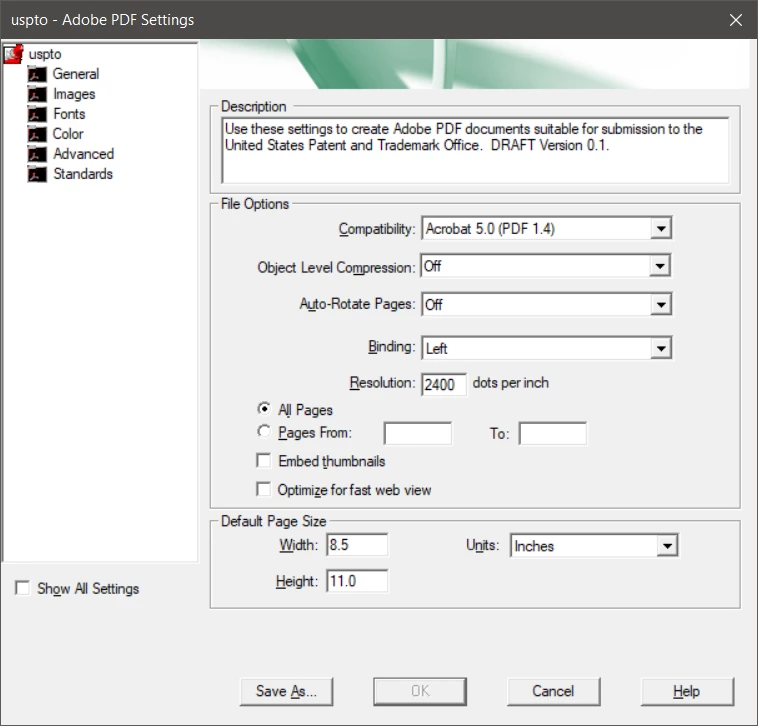
The compatibility is specified as Acrobat 5.0 (PDF 1.4) when in fact USPTO allows for PDF 1.6. Furthermore, unless you have at least PDF 1.5, you end up with a bloated PDF file since Object level compression cannot be set to maximum – changing this doesn't violate any USPTO specifications:
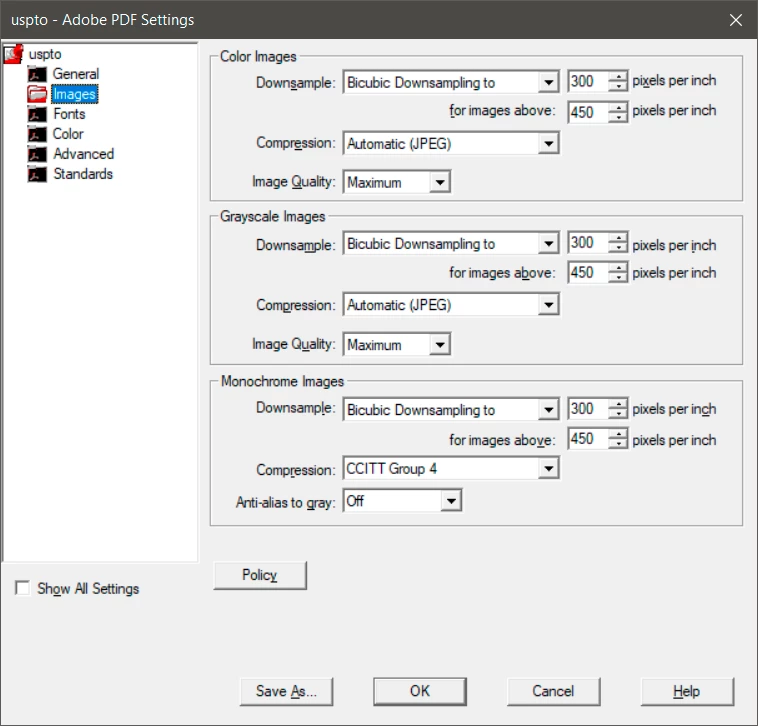
The images settings also make no sense. If you have totally monochrome drawings (no gray, simple bi-level), 300dpi is generally inadequate for viewing or printing. 600dpi or 1200dpi. Again, changing this does not violate any USPTO specifications:
The color settings are also screwy! The Color Management Policy of Convert All Colors to sRGB is wrong, wrong, wrong! For what the USPTO is using PDF for, you are best off to set this to Leave Color Unchanged. This would leave any color coming in unchanged from what you specify in the original layout program. (On Windows, grayscale and black should never be converted to sRGB!)

All other settings are relatively benign!

Note that these setting are only relevant if creating PDF via Acrobat's PDFMaker for Office on Windows, exporting PDF from InDesign or FrameMaker, saving PDF from Illustrator, or producing PDF by distilling PostScript, a method which increasing difficult to do on MacOS and generally inferior to direct PDF production otherwise.

It is really unfortunate that the USPTO has let their website and documents stagnate for over a decade. The content generation and PDF production tools have advanced tremendously since 2006.

          - Dov

PS:     Let the questions and comments commence …  

7 replies

Participant
October 30, 2023

I have recently downloaded and bought Adobe Pro.  But the USPTO online filing website will not display fillable forms that I request.   It says I do not have the right version of Adobe.  What is the problem.  I tried calling the USPTO office 800-786-9199 but ofcouse they are having an emergency and I was told to call back later.

Participant
October 30, 2023

I have recently downloaded and bought Adobe Pro.  But the USPTO online filing website will not display fillable forms that I request.   I say I do not have the right version of Adobe.  What is the problem.  I tried calling the USPTO office 800-786-9199 but ofcouse they are having an emergency and I was told to call back later.

Dov Isaacs
Legend
August 31, 2017

This thread has been open for a while with various pieces of information and speculation going back and forth!

I decided it was time to get the facts on the table.

In attached document efsweb applying-online.pdf, the basic requirements for PDF submission are specified. There is nothing particularly unusual here.

Paper size is either A4 or US Letter – nothing unusual here!

Fonts embedded – again, nothing unusual. Specs allow for subsetting or not. No further restrictions exist although their tool may be improperly rejecting fonts with CID-H encoding.

Color Text – requests black text (and strongly advises for same) but doesn't reject colored text. Nothing unusual here (although ironically, use of the USPTO joboptions converts everything to sRGB – see my next posting.

Images – nothing you wouldn't expect. Very few applications allow specification of “alternates” or “multiple layers” in images (whatever that means - output of layered PSD files to PDF in Photoshop doesn't result in layers - maybe they are referring to complex images with masks?)

Layers – no good reason to use these anyway. The few applications that allow for PDF creation with layers (an option you would need to specifically enable) are unlikely to be the source of patent applications.

Non-PDF native Objects – 3d, attachments, multimedia, executables – very easy to avoid.

Security – Obviously if you lock the document, USPTO will reject since they can't process. Viruses, etc. highly unlikely if you are generating the PDF with current, licensed software.

Attached document efsweb-pdf.pdf is a PDF version of a cheesy PowerPoint presentation that visually shows the rules and issues.

Attached document pdf-creation.pdf is yet another document from the USPTO site rehashing the same requirements.

Continues in next message ...

          - Dov

- Dov Isaacs, former Adobe Principal Scientist (April 30, 1990 - May 30, 2021)
Dov Isaacs
Dov IsaacsCorrect answer
Legend
August 31, 2017

… Continuing!

Attached file joboptions.pdf (attached) describes in detail use of the uspto.joboptions file (also attached).

Unfortunately, the joboptions.pdf and the uppto.joboptions files both date back to 2006, over eleven years ago. Much of what is described has changed since then including options in Acrobat.

Issues with the uspto.joboptions:

The compatibility is specified as Acrobat 5.0 (PDF 1.4) when in fact USPTO allows for PDF 1.6. Furthermore, unless you have at least PDF 1.5, you end up with a bloated PDF file since Object level compression cannot be set to maximum – changing this doesn't violate any USPTO specifications:

The images settings also make no sense. If you have totally monochrome drawings (no gray, simple bi-level), 300dpi is generally inadequate for viewing or printing. 600dpi or 1200dpi. Again, changing this does not violate any USPTO specifications:

The color settings are also screwy! The Color Management Policy of Convert All Colors to sRGB is wrong, wrong, wrong! For what the USPTO is using PDF for, you are best off to set this to Leave Color Unchanged. This would leave any color coming in unchanged from what you specify in the original layout program. (On Windows, grayscale and black should never be converted to sRGB!)

All other settings are relatively benign!

Note that these setting are only relevant if creating PDF via Acrobat's PDFMaker for Office on Windows, exporting PDF from InDesign or FrameMaker, saving PDF from Illustrator, or producing PDF by distilling PostScript, a method which increasing difficult to do on MacOS and generally inferior to direct PDF production otherwise.

It is really unfortunate that the USPTO has let their website and documents stagnate for over a decade. The content generation and PDF production tools have advanced tremendously since 2006.

          - Dov

PS:     Let the questions and comments commence …  

- Dov Isaacs, former Adobe Principal Scientist (April 30, 1990 - May 30, 2021)
Participant
January 24, 2024

I'd love an update here now that we have to file everything in PatentCenter (sigh) -- I routinely have the embedded font errors - despite trying every tip and trick I've found. If one uses Adobe Acrobat Pro and Windows, what is the best way to save a .pdf (especially with Asian characters, like say, a JP patent) so it uploads correctly to PatentCenter the first time rather than the fifteenth? Thanks in advance!

Participant
August 25, 2017

Does anyone know what happened to the Adobe pdf setting that is specific to USPTO?  I do not see it anywhere.

Dov Isaacs
Legend
August 25, 2017

No such settings are distributed with Acrobat itself.

          - Dov

- Dov Isaacs, former Adobe Principal Scientist (April 30, 1990 - May 30, 2021)
Participant
March 22, 2017

I have called Adobe twice for this issue for my Mac.  No one could help me. I save my file on a USB, put it in my old Windows laptop, and use the free program CutePDF. It works every time. When I use Adobe Pro DC, I get the wrong page size error from the patent office consistently with all the formats that Adobe Pro DC has. I also sometimes get the embedded fonts error.

Inspiring
March 17, 2017

You might want to look at the AcroLaw blog with regards to patents

PDF Creation and Font Embedding for USPTO Submissions is a very specific post about the patent application in the PDF format.

Rick Borstein is an attorney who has posted for years about how the legal profession can best use PDFs in their profession. He also has provided various tools that can be added to Acrobat to help in processing PDFs for the legal profession.

Dov Isaacs
Legend
March 17, 2017

This should be fairly simple using Adobe Acrobat.

I've read the USPTO PDF requirements and there is really nothing unusual there. They aren't very picky at all

Obviously, they don't want viruses in the PDF file. Acrobat doesn't put viruses in PDF files that it creates or opens.

You need to embed fonts. That is best practices for virtually any PDF file you create.

Don't embed any multimedia.

The paragraph with regards to what type of images may be used within a PDF file is nonsense since by the time the image gets into the PDF file, all traces of its original file type are gone.

And don't create a file with explicit layers (something possible from InDesign, Illustrator, etc.). Everyone must be in the base document.

The only part of their requirements which could be problematic is the requirement for the file not exceeding 5MB. For text and vector, this isn't an issue. If you have raster images, this could be problematic and you might need to downsample or change compression mode(s) to get the file size down.

I would recommend starting off with Acrobat's High Quality Print settings and possibly modifying it to use PDF 1.6 (Acrobat 6) compatibility.

          - Dov

- Dov Isaacs, former Adobe Principal Scientist (April 30, 1990 - May 30, 2021)
Participant
August 31, 2017

I'm using Adobe Pro DC on Mac. I, too, have found it extremely difficult to submit drawings to the USPTO.

Here's an example of the errors from the PTO as drawings are uploaded:

warningThe page size in the PDF is too large. The pages should be 8.5 x 11 or A4. If this PDF is submitted, the pages will be resized upon entry into the Image File Wrapper and may affect subsequent processing

errorThe attached PDF file references a non-embedded font: *Helvetica-2509-Identity-H. Please remove file, embed the font and reattach.

errorThe attached PDF file references a non-embedded font: *Times#20New#20Roman-2506-Identity-H. Please remove file, embed the font and reattach.

errorThe attached PDF file references a non-embedded font: *Geneva-Bold-2507-Identity-H. Please remove file, embed the font and reattach.

errorThe attached PDF file references a non-embedded font: *Helvetica-Identity-H. Please remove file, embed the font and reattach.

errorThe attached PDF file references a non-embedded font: *Times#20New#20Roman-Bold-2505-Identity-H. Please remove file, embed the font and reattach.

errorThe attached PDF file references a non-embedded font: *Courier-2508-Identity-H. Please remove file, embed the font and reattach.

We could really use some help in making this process easier. Thank you.

Legend
August 31, 2017

I hope we can help. Exactly how did you make this file, step by step? It does not look like it was made by Acrobat. What is the page size in PDF (you can check this by hovering the mouse in the bottom left of the page)?