
Adobe DC Order Form "Visible but Doesn't Print" Doesn't work on Phone
Hi Everyone,
My interactive order form I have been working on now for months through Acrobat DC is almost ready to give to my boss, but I am still having a few small issues that I can't seem to resolve.
One issue is that text fields or buttons I put as "visable but don't print", will actually show if I print the form to a PDF on my phone. (the feature works on a desk top, but doesn't work on the phone). What I expect with the form right now is for the sales representative to prepare the orders or quotes with drop downs, then print it to PDF on their phone and then send it to their customer as a PDF without the interactive form and drop down choices. And I need for certain buttons and mainly check boxes next to the products not to show when printing. So I selected the "visible but don't print" thinking this would work on the phone like it does on the desk top, but it doesn't work it still shows the check boxes.
If there is no solution for printing to PDF on my phone and getting the feature to work, then maybe someone has another solution to make these check boxes visable for the sales reps but not visable before or after it is printed as a PDF.
See below screen shot of what I am referring to.
See to the left, the check boxes, the reason for the boxes is if the box is checked, the pricing will populate to the right with the Export value which is the price, when unchecked then the rep can use their own price. Thank you and hope someone can help!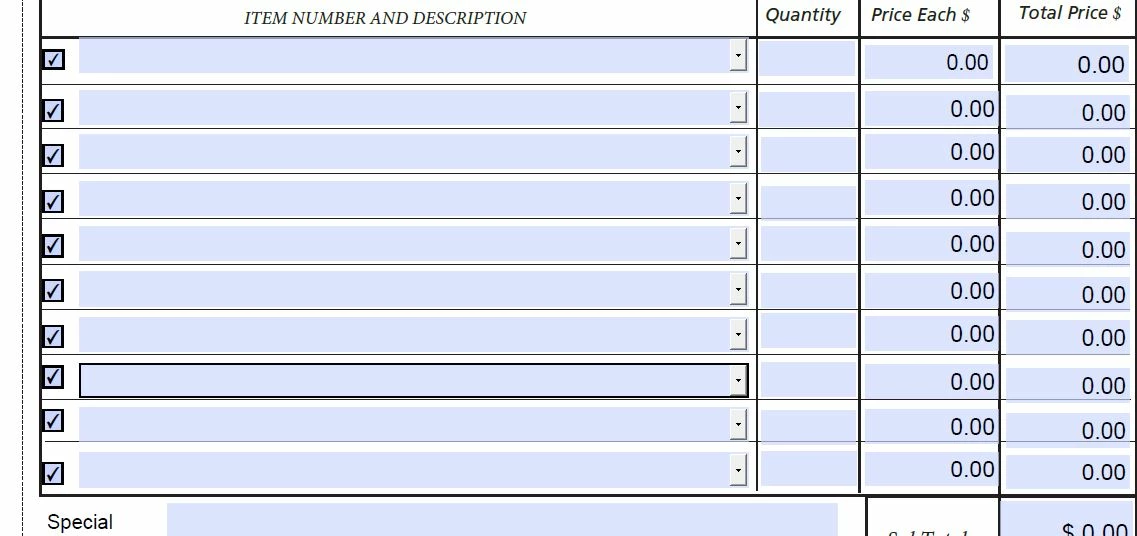


 AdChoices