
imaliasad
Participating Frequently
March 8, 2018
Question

Adobe PDF Printer Doesn't Creating the PDF Files

  • March 8, 2018
  • 8 replies
  • 6607 views

I'm creating an add-in in Revit 2017. The addin will export drawing sheets to PDF files. So, whenever I try to export the sheet a dialog box appears to choose the location to save. I tried to turn off the Prompting programmatically by adding a key to the Windows registry (as described in Adobe documentation page 15-16).

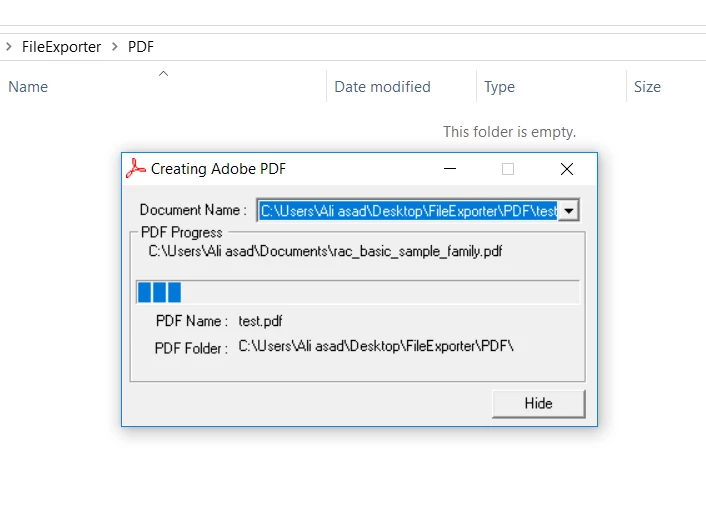
Now, the prompting got turned off and now I'm facing an issue. The issue is the Adobe Printer got stuck while creating the pdf file. See the below image: The PDF creating progress bar seems frozen, I waited for more than 10 mins and it didn't create the pdf file.

Can anybody provide any fix? Appreciate any suggestion.
This topic has been closed for replies.

8 replies

AnandSri
Community Manager
Community Manager
April 11, 2018

Hello Imaliasad,

Sorry for the delayed response and inconvenience caused. Please check for any pending updates of Acrobat from help>check for updates, reboot the machine after installing the updates and see if this brings any difference.

If the issue persists with the latest update/patch, please share the following details:

If you wish to file a bug, you can use the following URL Feature Request/Bug Report Form

Let us know how it goes and share your findings.

Regards,

Anand Sri.

Legend
March 8, 2018

Of course, it is open to debate which software has the bug. You might find this post interesting, even though it is not quite on target: PDF output takes a long time or fails; progress bar stops advancing (Adobe PDF printer) | Revit Products | Autodesk Know…

Legend
March 8, 2018

Did you report it?

imaliasad
imaliasadAuthor
Participating Frequently
March 8, 2018

No, I don't know how to report it. Is there any link where I can report the issue?

Edit:

I'm going to send a bug report

lotharb73480773
Participant
June 19, 2018

Hey imaliasad​,

we are facing the same issue under Windows 7 Professional Service Pack 1 and Adobe Acrobat Pro DC (2015) v. 15.006.30418.

We are also using Revit Version 2018, but we were already able to reproduce the problem, when printing a PDF within Excel.

Do you got any respond to your bug report?

Thanks in advance.

imaliasad
imaliasadAuthor
Participating Frequently
March 8, 2018

Thank you for looking at the issue. Hope it will soon be resolved.

Legend
March 8, 2018

No, I have no other solutions to share. I can comment that some other Office apps have been reported to do this, for some users.

Legend
March 8, 2018

Oh, maybe that is the problem. You MUST NOT use "print to file" when trying to use the Adobe PDF printer if you want to make a PDF. You have to print normally, and rely on the second API to choose a destination.

imaliasad
imaliasadAuthor
Participating Frequently
March 8, 2018

Thank you but it didn't work either. I'm not sure why this is happening. I'm in a great stress now, tried almost everything that I could but nothing help. Can you share any other solution?

Legend
March 8, 2018

I mean to select Print to File. I don't know if you can. In Word, for example, you can say

Document.Printout ... PrintToFile=true OutputFileName=...

This would NOT make a PDF, that's not the intent; the intent is to see which part of your process is hanging: the printing preparation or the PDF conversion.

imaliasad
imaliasadAuthor
Participating Frequently
March 8, 2018

Yes, the PrintToFile property is already has set to true. Below is the code snippet, I hope that may give some idea where the problem is.

        public static bool ExportSheetToPDF(Document doc, string path)

        {

            using (Transaction tx = new Transaction(doc)

            {

                tx.Start("Exportint to PDF");


                PrintManager pm = doc.PrintManager;

                pm.SelectNewPrintDriver("Adobe PDF");

                pm.Apply();

                pm.PrintRange = PrintRange.Current;

                pm.Apply();

                pm.CombinedFile = true;

                pm.Apply();

                pm.PrintToFile = true;

                pm.Apply();

                pm.PrintToFileName = path + @"\PDF\" + "abc.pdf";

                pm.Apply();

                SuppressAdobeDialogAndSaveFilePath(path + @"\PDF\" + "abc.pdf");

                pm.SubmitPrint();

                pm.Apply();

                tx.Commit();

            }

            return true;

        }

        // Add Registry Key to suppress the dialog box

        public static void SuppressAdobeDialogAndSaveFilePath(string value)

        {

            var valueName = @"C:\Program Files\Autodesk\Revit 2017\Revit.exe";

            var reg = currentUser.OpenSubKey(key, true);

            var tempReg = reg.OpenSubKey(valueName);

            if (tempReg == null)

            {

                reg = reg.CreateSubKey(valueName);

            }

            reg.SetValue(valueName, value);

            reg.Close();

        }

Legend
March 8, 2018

A test for you. Does the Revit API allow you to print to a named file (not PDF)? If so, see if you can print the same Revit document to a file, using the Adobe PDF document. It won't make a PDF! But does it finish?

imaliasad
imaliasadAuthor
Participating Frequently
March 8, 2018

Thank you for your reply. The Revit API does allow us to export drawings in PDF if the save dialog box isn't suppressed. When the dialog box is suppressed by modifying the registry key, the process of exporting the PDF file doesn't get complete.