
Exit
  • Global community
    • Language:
      • Deutsch
      • English
      • Español
      • Français
      • Português
  • 日本語コミュニティ
  • 한국 커뮤니티
0

Bates stamping and Name Document with bates range.

Community Beginner ,
Jan 17, 2018 Jan 17, 2018

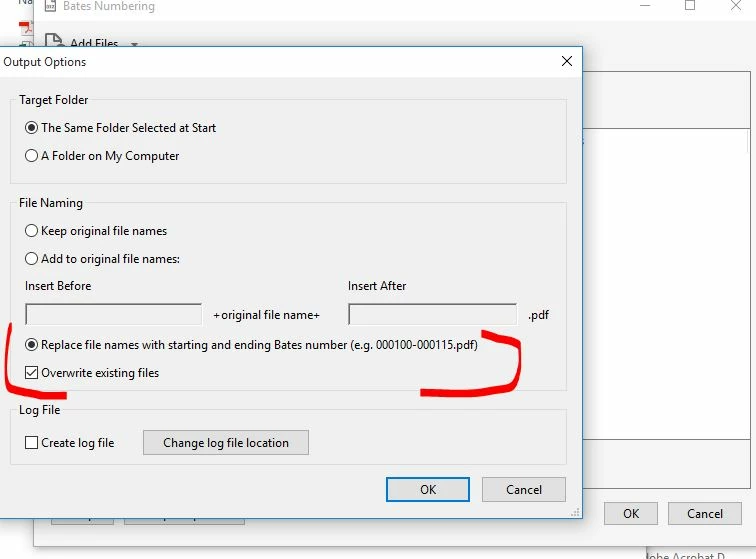
I am using Adobe Acrobat Pro DC.  I am bates stamping groups of documents.  What I am trying to do is rename each document with the bate range number, however, it creates a new document with the bates range and the separate original document is still there.  In Output Option I select "Replace File names with beginning and ending bates number" and I also select "Overwrite existing file", but it still creates a new document with the bate range and and the original document is still there.  Any input would be greatly appreciated.

Here's a pic of the selection that I made.  Bates Cant rename with numbers..JPG
TOPICS
General troubleshooting
6.5K
Translate
Report
Community guidelines
Be kind and respectful, give credit to the original source of content, and search for duplicates before posting. Learn more
community guidelines
1 ACCEPTED SOLUTION
Community Expert ,
Jan 17, 2018 Jan 17, 2018

This option doesn't mean the original file will be deleted. It means that if there's already a file with that name it will be overwritten by the new file. As a rule-of-thumb, Acrobat doesn't delete files.

View solution in original post

Translate
Report
Community guidelines
Be kind and respectful, give credit to the original source of content, and search for duplicates before posting. Learn more
community guidelines
Community Expert ,
Jan 17, 2018 Jan 17, 2018

This option doesn't mean the original file will be deleted. It means that if there's already a file with that name it will be overwritten by the new file. As a rule-of-thumb, Acrobat doesn't delete files.

Translate
Report
Community guidelines
Be kind and respectful, give credit to the original source of content, and search for duplicates before posting. Learn more
community guidelines
Community Beginner ,
Jan 18, 2018 Jan 18, 2018

Now that you explained it, it makes sense. Thank you for your prompt reply!.

Translate
Report
Community guidelines
Be kind and respectful, give credit to the original source of content, and search for duplicates before posting. Learn more
community guidelines
Community Beginner ,
Jan 18, 2018 Jan 18, 2018
LATEST

I have a question along the same subject. I am Bates stamping hundreds of documents. I don’t just want to replace the file name with the Bates numbers only. I also don’t just want to keep the original file name. I currently perform Bates stamping and then have to go back manually to each and every file in order to ADD the Bates numbers in front of the original file name.

I’d like to know if there’s a way to configure either an action/command so that the files will be renamed with BOTH the Bates numbers AND the original file name. For example, “Bates001-250_Bank Notebook “.  Is this a possibility?  Thank you in advance.

Translate
Report
Community guidelines
Be kind and respectful, give credit to the original source of content, and search for duplicates before posting. Learn more
community guidelines