
lloydh99587804
Participant
May 14, 2021
Answered

Calculating reverse sales tax

  • May 14, 2021
  • 1 reply
  • 977 views

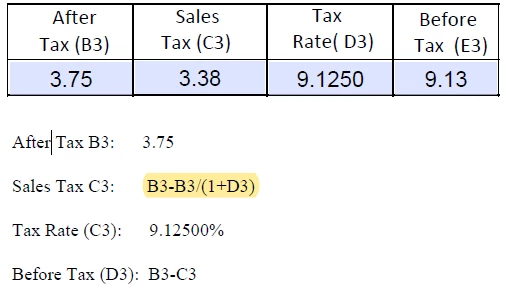
I have a simple form with 4 fields “After Tax”, Sales Tax”, “Tax Rate”, and Before Tax. I would like to enter the after tax amount and the tax rate and have it populate the sales tax and the amount before tax. I think my problem is in the Sales Tax calculation Custom Calc Script
 

Thank You

This topic has been closed for replies.
Correct answer lloydh99587804

Solved, Once I got the % to work as a percentage field rather than a numeric field everything calc correctly

1 reply

try67
Community Expert
Community Expert
May 14, 2021

You can enter this formula as the Simplified Field Notation option under the Calculate tab of C3.

lloydh99587804
Participant
May 14, 2021

Thanks you for your quick response, I checked and made sure that the Calc was in the Simp Field. Below is the what the calc results are showing. if the calc is working it should be total prince $3.75, Tax Rate 9.12500 (this is a Numeric field) cannot get the Percentage right if the field is set as a % field, Taxes $0.33 and the before tax $3.44


lloydh99587804
lloydh99587804AuthorCorrect answer
Participant
May 14, 2021

Solved, Once I got the % to work as a percentage field rather than a numeric field everything calc correctly