
sharneed90187960
New Participant
June 15, 2016
Answered

Can not PDF A3 doc to A3 PDF

  • June 15, 2016
  • 1 reply
  • 17604 views

Hi All,

I have a A3 Word doc, when PDFed with Adobe Acrobat Pro DC it changes to A4.

I've followed the 'create' wizard, PDF from explorer view , save as PDF from word and PDF print from word.

Any tips on how to PDF an A3 document to a A3 PDF?

I am using Windows, and Word 2010.

Thank you

S
This topic has been closed for replies.
Correct answer Adorobat

Hello ,

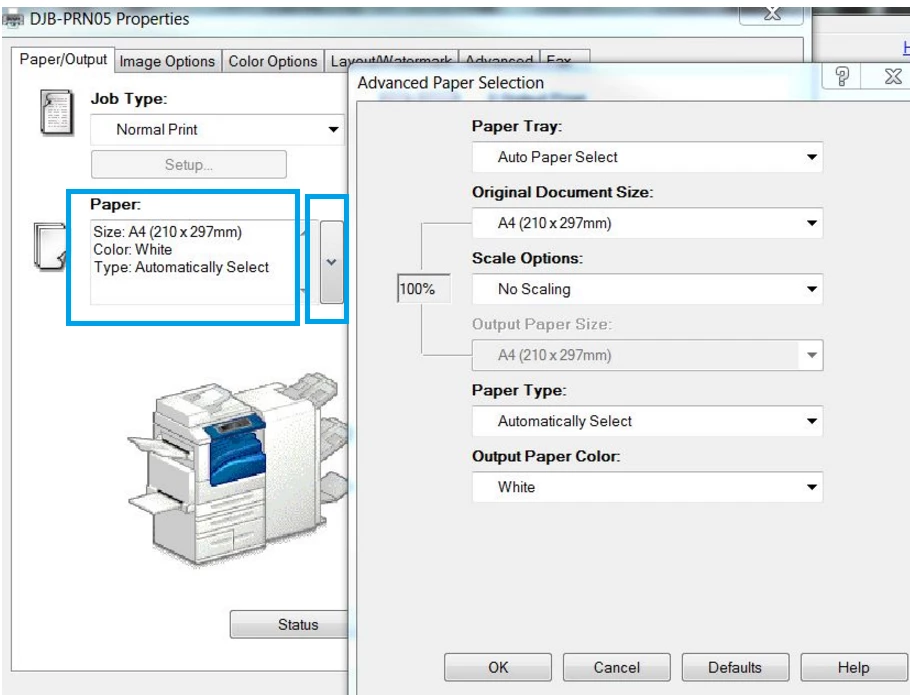
Would you please click on drop down menu under "Paper" ,there should be an option A3 in the list.If  A3 is there, select it and hit OK.

Let us know about the results.

Thank You!

1 reply

Adorobat
Community Manager
Community Manager
June 16, 2016

Hi sharneed90187960 ,

With word file open , click on Print>(you might get two options here>Print/Quick Print,select Print>Printer Properties>Under Adobe PDF Page size>select A3 in the dropdown>OK>Print.

Make sure that  A3 is set in word.

Below are the screenshot:

Let us know about the results.

Thank you!

Shivam

sharneed90187960
New Participant
June 16, 2016

Thank you Shivam,

I have followed the process above.

From the PDF Adobe Acrobat Pro DC document, I have clicked print, however the document prints as A4.

The screenshot below is the  Adobe Acrobat Print Settings

Adorobat
Community Manager
AdorobatCommunity ManagerCorrect answer
Community Manager
June 17, 2016

Hello ,

Would you please click on drop down menu under "Paper" ,there should be an option A3 in the list.If  A3 is there, select it and hit OK.

Let us know about the results.

Thank You!