
Exit
  • Global community
    • Language:
      • Deutsch
      • English
      • Español
      • Français
      • Português
  • 日本語コミュニティ
  • 한국 커뮤니티
0

can't highlight text

Guest
Feb 21, 2019 Feb 21, 2019

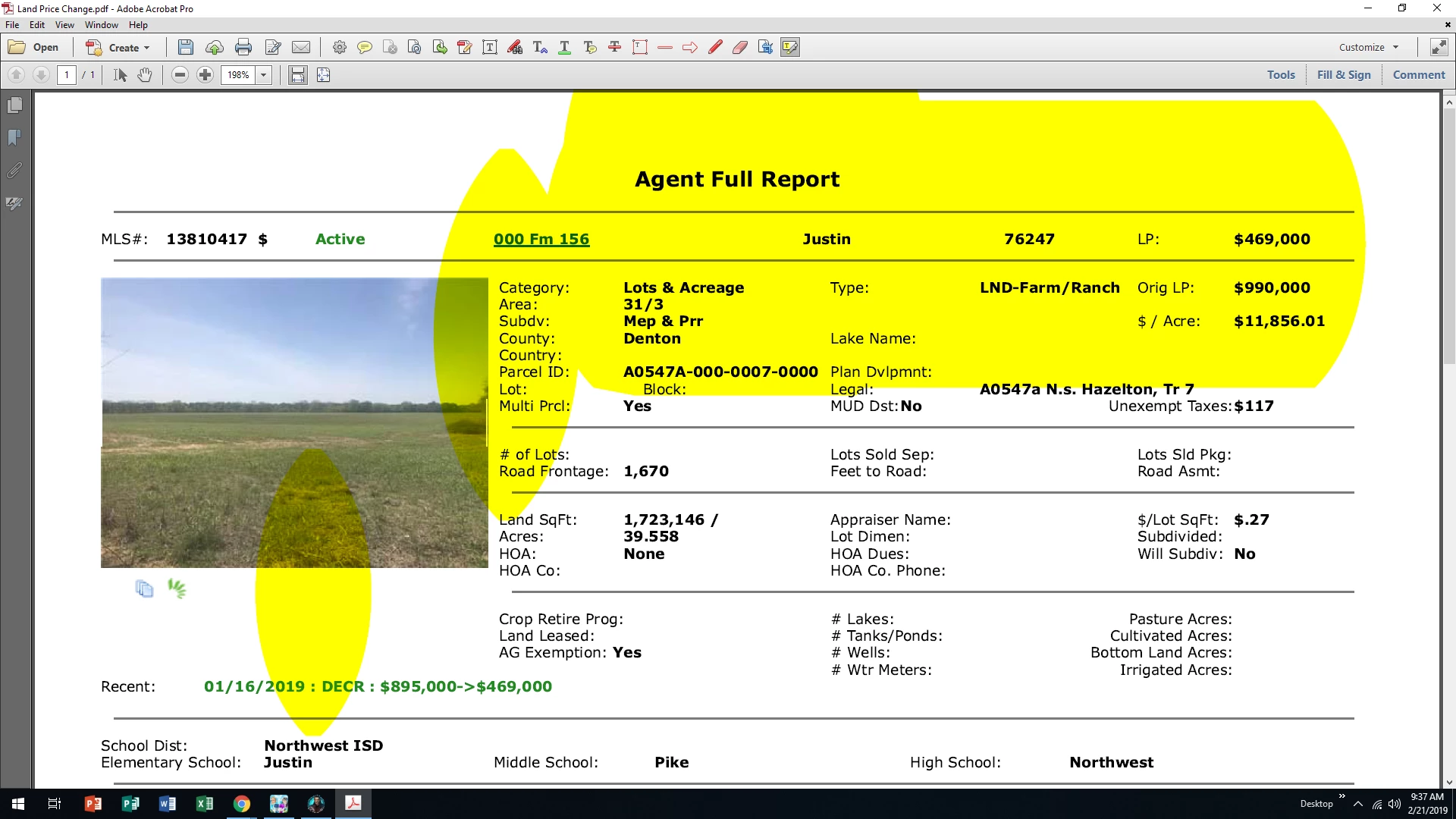
I know this has been asked before, but I still can't highlight text in .pdf.  I have worked on this for months and am about ready to try BlueBeam.

If I try to highlight any pdf document, it is always in a huge shape. I can't just select text. I run text recognition but it always comes back "this page contains renderable text. PLEASE help!! PS- I have used Adobe Acrobat for over a decade and am fairly proficient.
TOPICS
PDF forms
952
Translate
Report
Community guidelines
Be kind and respectful, give credit to the original source of content, and search for duplicates before posting. Learn more
community guidelines
Community Expert ,
Feb 21, 2019 Feb 21, 2019

There is something very wrong with this document. Have you tried highlighting in other PDF files? 

What happens when you just select text. Does the selection do the same thing?

Thom Parker - Software Developer at PDFScripting
Use the Acrobat JavaScript Reference early and often

Translate
Report
Community guidelines
Be kind and respectful, give credit to the original source of content, and search for duplicates before posting. Learn more
community guidelines
Guest
Feb 21, 2019 Feb 21, 2019

It happens on every single document. Imported file, pdf file created, word doc converted to .pdf, doesn't matter.

Translate
Report
Community guidelines
Be kind and respectful, give credit to the original source of content, and search for duplicates before posting. Learn more
community guidelines
Community Expert ,
Feb 21, 2019 Feb 21, 2019

So what happens when you use the Text selection tool?

Thom Parker - Software Developer at PDFScripting
Use the Acrobat JavaScript Reference early and often

Translate
Report
Community guidelines
Be kind and respectful, give credit to the original source of content, and search for duplicates before posting. Learn more
community guidelines
Guest
Feb 21, 2019 Feb 21, 2019

The above graphic is what happens.

Translate
Report
Community guidelines
Be kind and respectful, give credit to the original source of content, and search for duplicates before posting. Learn more
community guidelines
Community Expert ,
Feb 21, 2019 Feb 21, 2019

I meant regular text selection, not with the commenting tools. Can you copy and paste text from the PDF.

Thom Parker - Software Developer at PDFScripting
Use the Acrobat JavaScript Reference early and often

Translate
Report
Community guidelines
Be kind and respectful, give credit to the original source of content, and search for duplicates before posting. Learn more
community guidelines
Guest
Feb 22, 2019 Feb 22, 2019

Will not let me select text.

Translate
Report
Community guidelines
Be kind and respectful, give credit to the original source of content, and search for duplicates before posting. Learn more
community guidelines
Community Expert ,
Feb 22, 2019 Feb 22, 2019
LATEST

I was hoping it was the document, but it sounds like you have an issue with the Acrobat install. Have there been any Updates or changes to Acrobat before this behavior started?

I would suggest two things.

1) Post this issue to the "General Debugging" forum and maybe the "Intall" forum as well. Maybe this is a known issue. I've never heard of it, but maybe someone else has.

2) Complain to Adobe Support. It's definitely an issue with Acrobat.

Thom Parker - Software Developer at PDFScripting
Use the Acrobat JavaScript Reference early and often

Translate
Report
Community guidelines
Be kind and respectful, give credit to the original source of content, and search for duplicates before posting. Learn more
community guidelines