ginnyb71168091
Participant
October 4, 2017
Answered

can't print pdf to fit the page

  • October 4, 2017
  • 3 replies
  • 23956 views

pdf in email shows 147%. when I change to "fit to page" or to 100% it still prints 147%.  now what?  HP support indicates it is the Adobe Reader problem not theirs.

This topic has been closed for replies.
Correct answer Abambo

Print options in Acrobat:

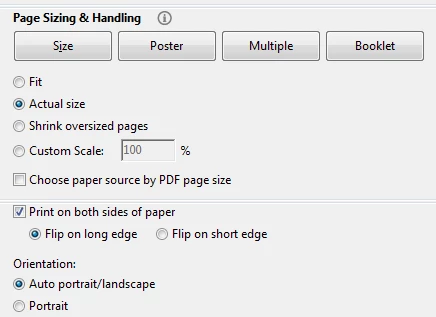
FIT: Fits what ever you want to print to the page size you selected to the useful print size (if your printer prints with a border, it fits to this border)

ACTUAL SIZE: Prints your design at design size (100%) regardless of the page size.

SHRINK: Assures printing the whole document on the print size, shrinking only if the document is to big.

CUSTOM SCALE: Your choice of a print size.

If, however, your printer applies additional scaling that is not communicated to Acrobat by the printer driver, then those scaling factors are applied too!

3 replies

Abambo
Community Expert
AbamboCommunity ExpertCorrect answer
Community Expert
October 17, 2017

Print options in Acrobat:

FIT: Fits what ever you want to print to the page size you selected to the useful print size (if your printer prints with a border, it fits to this border)

ACTUAL SIZE: Prints your design at design size (100%) regardless of the page size.

SHRINK: Assures printing the whole document on the print size, shrinking only if the document is to big.

CUSTOM SCALE: Your choice of a print size.

If, however, your printer applies additional scaling that is not communicated to Acrobat by the printer driver, then those scaling factors are applied too!

ABAMBO | Hard- and Software Engineer | Photographer
Legend
October 17, 2017

The size you choose on screen is not relevant to printing. Choose print options as needed.

AnandSri
Community Manager
Community Manager
October 4, 2017

Hi Ginnyb,

As per the description above, you are not able to print the PDF file to 100%, Is that correct?

Please refer to the following KN doc for the troubleshooting steps: Scale or resize printed pages in Acrobat and Reader  Link: https://helpx.adobe.com/acrobat/kb/scale-or-resize-printed-pages.html

You may also check for any pending updates of Reader from Help>Check for updates.

Hope this works, and keep us posted  with the results.

Regards,

Anand Sri.