
Delay before stroke begins - drawing with Wacom tablet
In Adobe Acrobat, when I am using the Draw tool with my Wacom tablet, there is a distinct delay before the beginning of the stroke is registered. I first noticed this issue a few years ago, and haven't been able to find a good solution in all that time. Here are the conditions under which I have and have not seen this problem:
Delay: using Wacom tablet to draw in Acrobat
- On my home computer (Windows 10 with a GTX 1060 6GB graphics card)
- On my former work computer (Windows 8, then Windows 10)
- Note: Unlike on my home computer, where this behavior is always present, on my work computer the first stroke after opening Acrobat was always perfectly normal, with no lag
- With a Wacom Intuos Pro Pen and Touch Medium (PTH651)
- With a Wacom Intuos Pen and Touch Medium (CTH680)
- Over the past few years (i.e., through various Windows, Wacom driver, and Creative Cloud updates)
- Note: I think there might have been a period of time when the problem went away for a few months on my work computer, but it could be that I'm misremembering or that I just wasn't annotating PDFs in Acrobat during that time.
- With up-to-date software
- With various combinations of Windows Ink settings (I've changed them around a few times to get rid of those annoying circles around your cursor when using a tablet)
No delay
- Using a mouse
- In programs other than Acrobat (e.g., Photoshop, Illustrator, Paint 3D, Kami PDF and Document Markup)
When I was recording the videos below, I discovered that the problem manifests itself in screen recordings as well: during the delay at the beginning of the stroke, my cursor is not shown to move in the video either. This is true in all of the (free) recording programs I tried (TinyTake, Screencast-O-Matic, and Free Cam).
In recorders that indicate when the mouse is held and when it's released (as in the clips below), during the lag period there is no indicator, as if the cursor were in some kind of limbo between click and release.
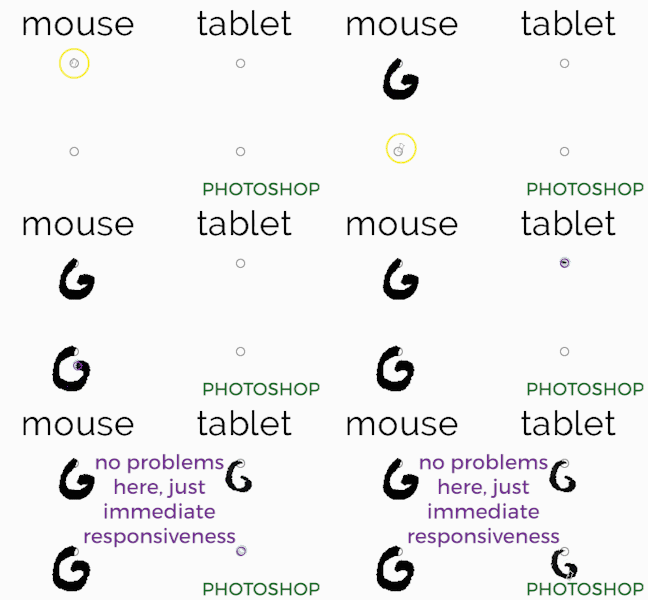
These two gifs show the problem in Acrobat and one example of everything working correctly in a different program (in this case, Photoshop):

 AdChoices