
Participant
August 2, 2021
Question

Editing a catalogue Index

  • August 2, 2021
  • 2 replies
  • 517 views

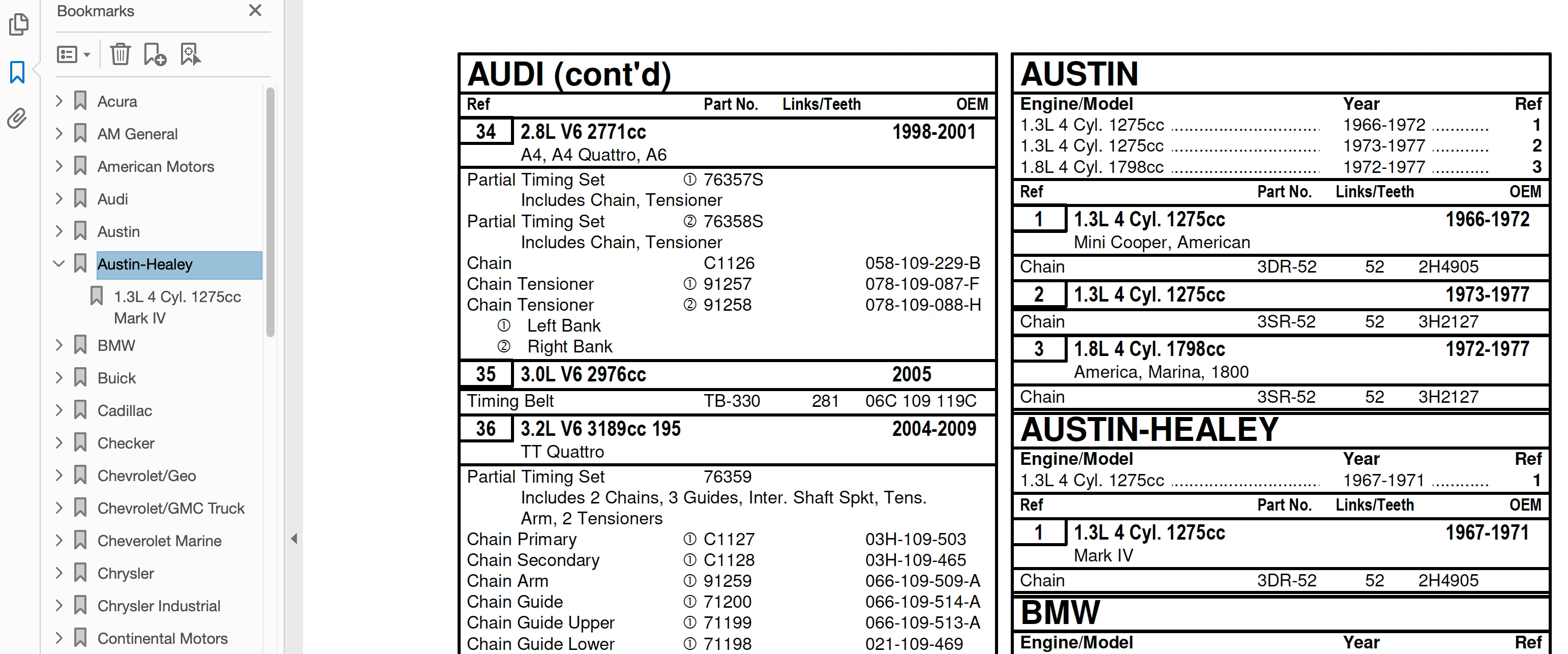
Image capture enclosed:

I recently added a basic index to a client's parts catalogue.  The catalogue is generated by a specialty company that produces catalogues and can save a pdf version for digital use.  The index I created has the "Brand Name - Austin-Healey" as the main folder index.  Within those brand folders are the products that correspond to a page (page number 9, sequence number for the product ie, 1, then the engine/make "1.3L r Cyl. 1275cc Mark IV kits with all of their parts for the products).  They recently updated some parts to those kits.  This changed the page and product number for the Brand/Make/Model.  How can I edit or change a few pages without having to "relink" the entire catalogue.


When someone opens the pdf, they can easily scroll to the Brand > open > scroll to the make/model.  We want to maintain that but allow pages to be updated.  Thanks!
    This topic has been closed for replies.

    2 replies

    Thom Parker
    Community Expert
    Community Expert
    August 4, 2021

    There is also a way to fully automate this process with a combination of scripting and a plugin, both of which would need to be custom built. 

    Thom Parker - Software Developer at PDFScriptingUse the Acrobat JavaScript Reference early and often
    Participant
    August 4, 2021
    I was wondering about that. Any YouTube links that you recommend that I
    could look at for your suggestions?

    The difficulty, at least on my end, is that the client has some type of
    unique/niche PDF catalogue generator they use for producing their
    catalogues. Recently, they wanted the bookmark feature added to their
    online versions. Their generator could not do anything like that so I went
    through each make and engine, creating the bookmark.

    They now have a few updates that throw the pages off, thus messing up the
    links. With the solutions you mentioned, can I set the mark to the engine?

    My thought is that this way if the page order changes, by clicking on the
    mark, it should still go to the engine.

    Thanks, you've been a help!

    --
    Dave Micksch - Graphic Designer
    DJM Designs, Inc.
    dave@djmdesigns.net
    630-510-1558
    www.djmdesigns.net
    Thom Parker
    Community Expert
    Community Expert
    August 6, 2021

    Here's the manaual technique for resetting the bookmarks.


    To know if the complete process for creating and updating the bookmarks can be automated I'd have to know more about how the  process. But from your description I'm prettty sure that at least a bookmark update could be automated.  This is not a simple script.  PM me through this forum if you are interested in a custom made tool. 


    Thom Parker - Software Developer at PDFScriptingUse the Acrobat JavaScript Reference early and often
    Thom Parker
    Community Expert
    Community Expert
    August 4, 2021

    By index do you mean bookmark? or a link on a page in the PDF, i.e., like a traditional index in a book?


    If its a bookmark then just right click on the bookmark and select a new destination.  Its a similar process if it's a link on a page, but in this case you'll need to put Acrobt into "Prepare Form" mode to see and select the links.


    Thom Parker - Software Developer at PDFScriptingUse the Acrobat JavaScript Reference early and often
    Participant
    August 4, 2021
    Yes, it is a bookmark. I should've clarified.
    Thanks, I'll look into it.

    --
    Dave Micksch - Graphic Designer
    DJM Designs, Inc.
    dave@djmdesigns.net
    630-510-1558
    www.djmdesigns.net