
New Participant
December 17, 2018
Answered

FullTrustNotifier.exe

  • December 17, 2018
  • 5 replies
  • 143741 views

I keep getting the attached error every day, I have search for a resolution and can not find one.  I have uninstalled, reinstalled.  Did the full uninstall and reinstall, it even popup after that before I reinstalled.  Just want to fix/stop it.

Adobe Acrobat Pro DC

2019.010.20064
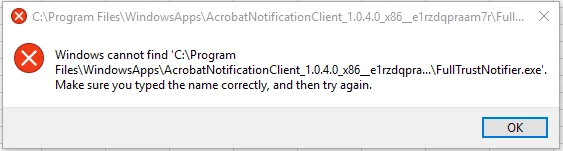
Any help would be great.

Correct answer Rohit_Anand

Thank you for the quick response.

Based on the details shared by you, please follow the steps below:

Step 1:  Uninstall "Notification Manager for Adobe Acrobat"

     Click on start menu -> Search for above app -> Right click-> Uninstall.

Step 2:  Delete the following registry key

     HKEY_CURRENT_USER\Software\Adobe\Adobe Acrobat\DC\Installer\NotificationAppx

This should resolve the issue.

Regards,

Rohit

5 replies

notNelo
New Participant
November 11, 2023
  1. Go to start/search menu;
  2. Search for "Notification Manager for Adobe Acrobat";
  3. Right click and uninstall "Notification Manager for Adobe Acrobat";
  4. Press the Windows key + R on your keyboard to open the Run dialog box;
  5. Type regedit in the Open field and click OK;
  6. In the Registry Editor window, navigate to the following location:


HKEY_CURRENT_USER\Software\Adobe\Adobe Acrobat\DC\Installer\NotificationAppx​


  • Right-click on the NotificationAppx key and select Delete;
  • Confirm the deletion by clicking Yes.


Please take note that changing the Registry Editor window can be risky, and should be done with caution when working on it.

If you don't have any type of help or guidance, or you don't know what you are doing, it is recommended doing a backup and ask for help on your subject.

If you do ask for help on someone you don't know, please be aware of scammers and false negleted people.

If you find anything that they are requesting is weird, just cancel the process with that person, and try a different method with someone/something else.


If the steps above still didn't fix your issue, you can try the following:

  1. Go to start/search menu;
  2. Search for "Add or remove programs";
  3. Seach for "Adobe Acrobat" on the search bar;
  4. Click on Modify;
  5. Click Next on the first page;
  6. Select Repair on the second page and click Next;
  7. Click Update on the third and final page, and let it update.


If all of this was done, you most likely won't encounter this issue anymore.


The best,

notNelo


quote

I keep getting the attached error every day, I have search for a resolution and can not find one.  I have uninstalled, reinstalled.  Did the full uninstall and reinstall, it even popup after that before I reinstalled.  Just want to fix/stop it.


Adobe Acrobat Pro DC

2019.010.20064


Any help would be great.


By @Doug_Allison


New Participant
October 23, 2023

I just want to say what I have done to get it fixed:

We had several users who had the same error and found that if nothing of these options helped, a re-installation of the PC is necessary (win 11)  and running all update for that too AND then we had to install Adobe first and then install MS 365 after.
That was our solution to fix it.

New Participant
June 5, 2022

Apparently Adobe suggests modifying the registry to fix this annoying problem.  If this is the kind of expertise needed to fix an Adobe product, Adobe is  obviously not for the average user.

Adobe Employee
December 18, 2018

Hi doug.allison

Can you please share the following details to help us resolve this issue:

1. What is the OS version running on your machine. (See link to get exact version)

2. Open Command prompt (Cmd) and run the command mentioned below.

          powershell.exe Get-AppxPackage -Name *AcrobatNotificationClient*

    Look for "Version” entry in the command output and share the version number with us.

3. What is the frequency of this error message

4. Since when did the error start popping up

Regards,

Rohit

New Participant
December 18, 2018

Editons Windows 10 Pro

Version 1803

OS Build 17134.471

Adobe Version  1.0.4.0

Its seems to happen every day just after boot up.  But today it did not.

Happen since I first install adobe.

Rohit_AnandCorrect answer
Adobe Employee
December 20, 2018

Thank you for the quick response.

Based on the details shared by you, please follow the steps below:

Step 1:  Uninstall "Notification Manager for Adobe Acrobat"

     Click on start menu -> Search for above app -> Right click-> Uninstall.

Step 2:  Delete the following registry key

     HKEY_CURRENT_USER\Software\Adobe\Adobe Acrobat\DC\Installer\NotificationAppx

This should resolve the issue.

Regards,

Rohit

Adorobat
Community Manager
Community Manager
December 17, 2018

Hi doug.allison,

As per the issue description mentioned above, you are getting above mentioned error on your windows machine, is that correct?

Could you check if an update is available for Acrobat using "Check for updates" option under "Help" menu,  You may also download updates from here:  Adobe software and product updates

Reboot the machine after installing update and check.

Also, check if full trust notifier.exe exists under C/program files/windows apps/acrobat notification client,....

Thanks,

Shivam

New Participant
December 17, 2018

There are no updates available.

yes the FullTrustNotifier.exe exists in that location.

New Participant
December 17, 2018

I was contacted via https://forums.adobe.com/collaboration/XXXXXX?et=notification.direct.message (seem legit) and asked for my Skype or Hangout ID ( a bit shaky) .  I gave them the Hangout id, and then wanted want my Adobe Username and password, this seem very strange and out of the norm, is this the way Adobe operates?  I ended the conversation.

I still this original issue resolved.