
ruthellen15
Inspiring
October 16, 2017
Answered

How do i keep line tool open to draw multiple underlines?

  • October 16, 2017
  • 2 replies
  • 4549 views

In ACROBAT DC Creative Cloud.

It doesnt' stay open.  I need to reclick it every time to use.  Ridiculous - I have hundreds of underlines to do.

What do I need to do to KEEP the draw tool/Line tool open to use over and over?  Thanks.
This topic has been closed for replies.
Correct answer Karl Heinz Kremer

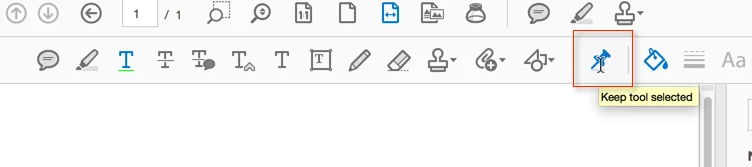
In Acrobat DC, it's the push pin you need to select:

2 replies

try67
Community Expert
Community Expert
October 16, 2017

Click the padlock icon at the top toolbar.

On Mon, Oct 16, 2017 at 8:37 PM, ruthellen15 <forums_noreply@adobe.com>

ruthellen15
Inspiring
October 26, 2017

This wasn't the correct answer above - I was able to set it so a tool stays selected, which was exactly what was needed.  I can't find exactly where I did that right now, but when I do I'll come back and post it.  Thanks for all  your help everyone.

Karl Heinz  Kremer
Community Expert
Karl Heinz KremerCommunity ExpertCorrect answer
Community Expert
October 26, 2017

In Acrobat DC, it's the push pin you need to select:

kglad
Community Expert
Community Expert
October 16, 2017