

Participating Frequently
August 1, 2017
Answered

How to disable "Lock Document After Signing" so that signers can't lock PDF

  • August 1, 2017
  • 3 replies
  • 70281 views

Hello. How can I disable the "Lock Document After Signing" option so that signers can't lock a PDF when signing?
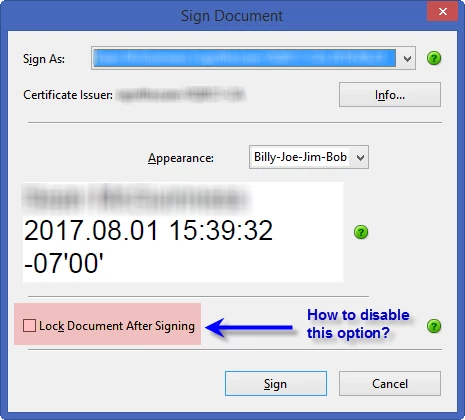
Thank you.

This topic has been closed for replies.
Correct answer try67

Not possible. The user has a right to lock the document after they sign it, to make sure its not edited in a way they didn't agree to.

3 replies

Participant
November 22, 2021

What I did was to save the pdf as MS Word, then back to pdf. The fields that still needed to be signed were active again. The next thing to remember is to never use this product again.  

Inspiring
August 2, 2017

Seed value: /LockDocument false

but I don't remember in which version of Acrobat this first appeared.

try67
Community Expert
try67Community ExpertCorrect answer
Community Expert
August 1, 2017

Not possible. The user has a right to lock the document after they sign it, to make sure its not edited in a way they didn't agree to.

seanmcguAuthor
Participating Frequently
August 1, 2017

That's too bad, as we have many documents where multiple people need to sign and there's always one person who thinks they're helping by checking that box and then stop the signing process dead in it's tracks. (We have a high turnover rate in the field and training each one - who may only last a couple of weeks - has been very problematic. Nothing should get locked until it comes back to me, where I then lock and post it on our intranet.)

Thank you.

try67
Community Expert
Community Expert
August 1, 2017

In that case create Digital Signature fields and set them up not to lock

the other fields in the file. I don't believe the user can override that...