


l337godd3ss
Known Participant
May 18, 2017
Answered

How to toggle a button border on and off?

  • May 18, 2017
  • 1 reply
  • 6574 views

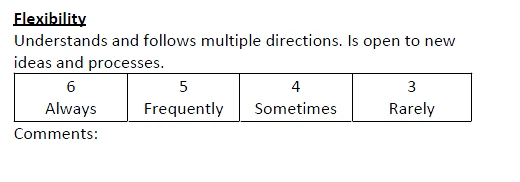
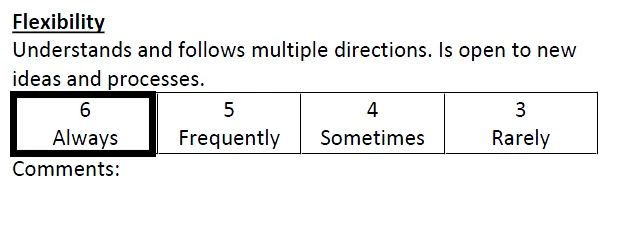
I am trying to create a pdf where the user can select a box (see below). When the user clicks on the box, a thick black border will appear around the selection.

I know this can be done using a transparent button and javascript but I don't know what script to use. I've tried to find another example on the forums but can only find script for buttons that create a solid fill when clicked, not a border.

The button also needs to toggle, so the border can be added and removed if the user changed their mind.

I know this has to be a fairly simple code (I'm guessing that's why I can't find a forum question on it), but I don't know javascript so I can't write it up. I know how to make the button and where the script goes.....is someone able to help me out?
This topic has been closed for replies.
Correct answer George_Johnson

Here's a Mouse Up script you can use with a button that toggles the border color between black and transparent:

// Mouse Up script for button

// Toggle this button's border color between transparent and black

event.target.strokeColor = color.equal(event.target.strokeColor, color.transparent) ? color.black : color.transparent;

1 reply

try67
Community Expert
Community Expert
May 21, 2017

Should the buttons be mutually exclusive? In other words, should clicking on "6 Always" cause the other buttons in the group to "un-click"?

l337godd3ss
Known Participant
May 22, 2017

No, each button would be independent of the others. So if someone really wanted to, they could "click" every single one. I want it set this way because if someone wanted to give a 5.5, they could do that and select both 6 and 5. (We use this form in a paper version now, and I have folks who do that).

George_JohnsonCorrect answer
Inspiring
May 22, 2017

Here's a Mouse Up script you can use with a button that toggles the border color between black and transparent:

// Mouse Up script for button

// Toggle this button's border color between transparent and black

event.target.strokeColor = color.equal(event.target.strokeColor, color.transparent) ? color.black : color.transparent;