charlotten86139972
Inspiring
April 10, 2018
Answered

Image masks can't be downsampled when compressing PDF

  • April 10, 2018
  • 1 reply
  • 8605 views

Hi all,

I have a pdf document of about 30 pages of jpeg images. I have reduced it down to 17mb. It is too big to attach to an email, and I need to send it out asap.

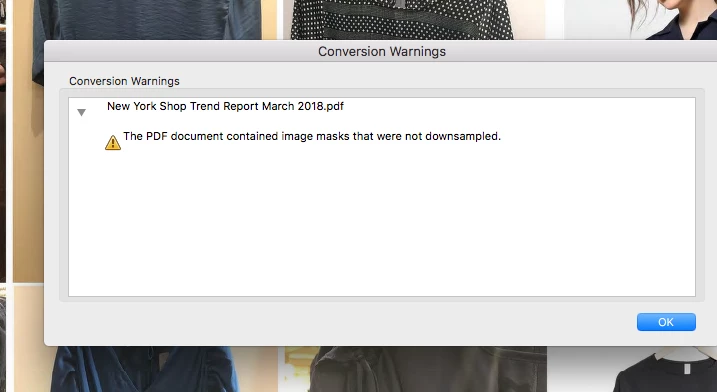
When I try to save as reduced file pdf, this error message comes up:
Unfortunately I am at work and have to solve this riddle in a short amount of time. I want this file to reduce to at least 6mb so I can attach it to email.

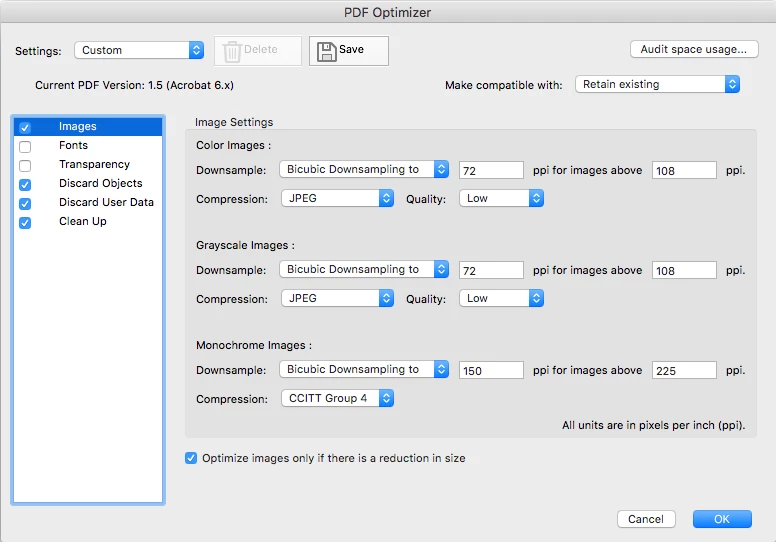
I have optimised the PDF file, and looked at the options on that panel, but I don't know what Im doing haha.

Please tell me how to get around this image mask problem and compress my pdf?

Thanks

*Please don't send me links for some heavy reading, I just want someone to explain it plain and simple thanks

This topic has been closed for replies.
Correct answer Luke Jennings

You are on the right track, don't worry about the image mask message. Go to File> Save as other> Optimized PDF> Go to Discard Objects, Discard User Data and Clean Up, open each section and check everything on. If your PDF is still too big, you can increase downsampling until you get the desired final size.

Instead of sending one low res file, you can consider sending several higher res files, or uploading to a site like DropBox or WeTransfer, or from InDesign, Publish on-line.

1 reply

Luke Jennings
Luke JenningsCorrect answer
Inspiring
April 11, 2018

You are on the right track, don't worry about the image mask message. Go to File> Save as other> Optimized PDF> Go to Discard Objects, Discard User Data and Clean Up, open each section and check everything on. If your PDF is still too big, you can increase downsampling until you get the desired final size.

Instead of sending one low res file, you can consider sending several higher res files, or uploading to a site like DropBox or WeTransfer, or from InDesign, Publish on-line.

Participant
January 6, 2023

Thank you! Had this issue and did the steps you posted and worked for me.