December 22, 2016
Answered

isn't there a proper fdf standard?

  • December 22, 2016
  • 3 replies
  • 2117 views

I wonder, since different pdf readers do handle text entered in very different ways.

Almost all pdf tools I checked do show text while entered different than text after editing. Is that on purpose?

Such differences are not uniform:

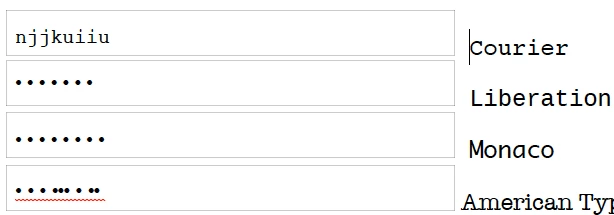
* size: sometimes active text is taller

* font: sometimes the text while editing is what was defined, but not after

* font: sometimes the text while editing is not what was defined, but after it is

* line height: sometimes text has proper line height while editing, but is shifted upwards after

PDF was all about proper display, regardless of platform and OS.

I wonder why FDF is not.
This topic has been closed for replies.
Correct answer George_Johnson

Here's a link

https://www.docdroid.net/GwCMSZm/mono.pdf.html

On the top right should be the download button.


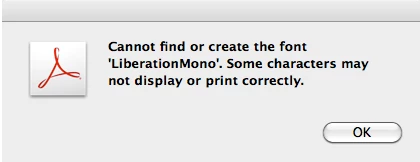
The Courier field works for me with Acrobat 9.5.5 (Mac). When I try to enter text in the Liberation Mono field, I get the following error:

The give the same error and display incorrectly:

There's likely a problem with the way the fonts are embedded. Note that the entire font needs to be embedded when used with a form field, unless it is one of the base-14, and this is apart from any other use of the font, as with text in the regular page contents, for example.

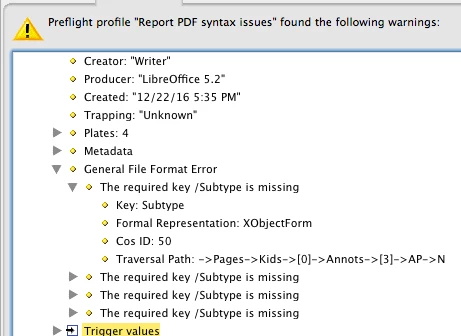
Here are some of the syntax errors reported in Preflight:

Which indicates the Normal appearance string for the field is missing.

So I'd say the problem is the PDF simply isn't constructed correctly by LibreOffice.

3 replies

Legend
December 22, 2016

The fonts are not embedded in at least some annotation Widgets (form fields)   They need to be because the standard of PDF is very clear that it need not go looking at other page content to find them. Some PDF viewers might search anyway. So, faulty file. Report to makers of software creating it.

Standards are good, sadly your software doesn't follow them. This is pretty much the story with form fields. If you aren't prepared to get Adobe software to make them AND insist you end users use only Adobe software (and support them in this in all platforms) PDF forms are a non starter. I see them as a doomed technology though others disagree.

Inspiring
December 22, 2016

FDF really has nothing to do with what you're asking about. Part of the problem is much of the behavior you're describing is not part of the spec (e.g., leading, interactive behavior while a field has the focus), so the behavior can vary between implementations. There are slight variations between different versions of Acrobat/Reader, and you could make the case that some software gets it wrong.

December 22, 2016

In fact I suppose, FDF is more about the data entered, while PDF itself should define how to handle text form fields.

Nevertheless, I guess that text field forms are not standardized properly. Please prove me wrong.

Legend
December 22, 2016

FDF is part of the PDF standard, ISO 32000-1, a 1000 page book available online. You are right that FDF does not define form field format, only text content for import and export.

Many, many tools do not implement PDF forms correctly or at all . Some break existing forms. Tools can leave PDF with a form field appearance that is wrong, and may change if another app goes to fill them. The tool makers (including, notoriously, Apple for all their products) have shown little interest in fixing it or documenting their limitations. It's sad but if you want consistent PDF form handling you need to stick to Adobe products or do very thorough testing. But if you see consistent errors across multiple unrelated products you may have a different issue. 

Do Adobe products show this effect?

December 22, 2016

The Courier field works for me with Acrobat 9.5.5 (Mac). When I try to enter text in the Liberation Mono field, I get the following error:

The give the same error and display incorrectly:

There's likely a problem with the way the fonts are embedded. Note that the entire font needs to be embedded when used with a form field, unless it is one of the base-14, and this is apart from any other use of the font, as with text in the regular page contents, for example.

Here are some of the syntax errors reported in Preflight:

Which indicates the Normal appearance string for the field is missing.

So I'd say the problem is the PDF simply isn't constructed correctly by LibreOffice.


Thanks, that's interesting.

I used another PDF checker which did not show any problems. I'll have another look for Preflight now.

Maybe someone could create a proper sample here, to prove, that this will cause proper display.

I wonder why you see the dots only - so there's not even an assumption for a suitable replacement font.