
Participant
April 10, 2018
Answered

Multiple pages scanned to one page PDF. How to split up again?

  • April 10, 2018
  • 1 reply
  • 4950 views

First of all. The solution here is not using the extract option. That option only splits a PDF to separate documents, when the PDF already has multiple pages.

The issue that a colleague of mine had printed 6 page document, and he put some notes to it. Scanned it. And sent it to me.

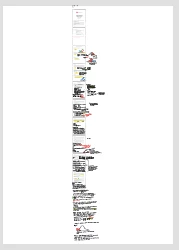
The scanner/program he used, compressed the 6 or 7 pages into one page PDF document. So, when I try to print out, I get a one sheet with 6 pages compressed on the middle.

Can anyone tell me if possible to split it somehow?

See the image attached.
This topic has been closed for replies.
Correct answer Karl Heinz Kremer

You can try the crop tool to remove everything but the contents of one page. Do that six times after duplicating the page five times, and you should have a document that shows the six original pages. How good they look depends on the resolution that you have in your combined document. Once you blow up these thumbnails to e.g. letter size, the content may not look that great anymore.

To duplicate the page, you can use the mechanism described here: Duplicate a Page in Adobe Acrobat - KHKonsulting LLC

The crop tool can be found by e.g. right-clicking on a page in the page thumbnail pane and selecting "Crop Pages". You can now set the "Apply To" selection to "CropBox". Now adjust the Top/Bottom/Left/Right margins so that you get only one page in the preview on the right side. Once you are done, apply these settings to the page by clicking the "OK" button and move on to the next page.

1 reply

Karl Heinz  Kremer
Community Expert
Karl Heinz KremerCommunity ExpertCorrect answer
Community Expert
April 10, 2018

You can try the crop tool to remove everything but the contents of one page. Do that six times after duplicating the page five times, and you should have a document that shows the six original pages. How good they look depends on the resolution that you have in your combined document. Once you blow up these thumbnails to e.g. letter size, the content may not look that great anymore.

To duplicate the page, you can use the mechanism described here: Duplicate a Page in Adobe Acrobat - KHKonsulting LLC

The crop tool can be found by e.g. right-clicking on a page in the page thumbnail pane and selecting "Crop Pages". You can now set the "Apply To" selection to "CropBox". Now adjust the Top/Bottom/Left/Right margins so that you get only one page in the preview on the right side. Once you are done, apply these settings to the page by clicking the "OK" button and move on to the next page.

Jonas15RUAuthor
Participant
April 10, 2018

So, split to 6 different PDF documents, and then merge?