mikew32981381
Participant
September 20, 2018
Answered

Need help with getting Chinese languages to show up in Acrobat

  • September 20, 2018
  • 2 replies
  • 2107 views

My company has some employees over in China and all of their Acrobats are in English and they'd like it to be in Chinese.   I've gone into the preferences in Acrobat and only English appears as an option.  I've also gone into the add/remove programs menu and hit modify on Acrobat and tried to install new languages that way and only English appears on that list as well.  I've done some research and the option for Asian languages should have been installed with Acrobat.  Any help would be appreciated. 
This topic has been closed for replies.
Correct answer Adorobat

Hi mikew,

Sorry for the delayed response. 

As mentioned in the description above, you want to install Acrobat in Chinese language, could you try removing Acrobat in the machine using cleaner tool:Download Adobe Reader and Acrobat Cleaner Tool - Adobe Labs

2- Reboot the machine

3- Download and install Acrobat MUI installer from here: Download Acrobat DC installer for Enterprise term or VIP license

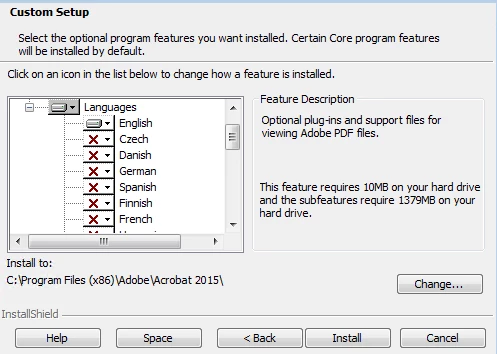
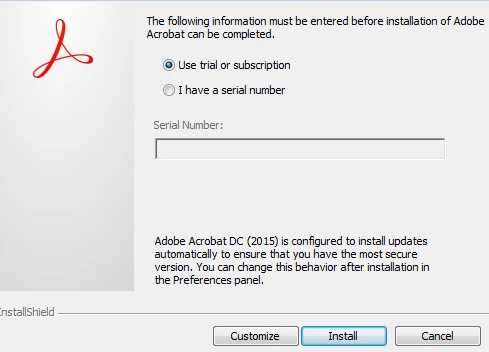
4- While installing, click customize and select the language you want to install.

Below are the screenshots:

You may refer to the following help document for more info:

Language Support and Configuration — Enterprise Administration Guide

Let us know if you need any help.

Shivam

2 replies

Adorobat
Community Manager
AdorobatCommunity ManagerCorrect answer
Community Manager
November 23, 2018

Hi mikew,

Sorry for the delayed response. 

As mentioned in the description above, you want to install Acrobat in Chinese language, could you try removing Acrobat in the machine using cleaner tool:Download Adobe Reader and Acrobat Cleaner Tool - Adobe Labs

2- Reboot the machine

3- Download and install Acrobat MUI installer from here: Download Acrobat DC installer for Enterprise term or VIP license

4- While installing, click customize and select the language you want to install.

Below are the screenshots:

You may refer to the following help document for more info:

Language Support and Configuration — Enterprise Administration Guide

Let us know if you need any help.

Shivam

try67
Community Expert
Community Expert
September 21, 2018

Have them go to Edit - Preferences - Language and change the Application Language setting to either "Choose at application startup" or "Same as the operating system"...

mikew32981381
Participant
September 28, 2018

I've tried that both of those options and it doesn't help.  The choose at application start up doesn't prompt for a language and the same as operating system doesn't change the language to Chinese.

Legend
September 29, 2018

I think you may have to buy the Chinese software, in China.